Miro hacks, fancy use cases, inspiring discussions, creativity, networking, and more 😍
Recently active
Hi All,I feel that the miro wish list as it is today is almost useless - At least from a user point of view. Also I am sure it is of little use for developers also. The issues with the current wish list areOnce you create a wish it is visible for a few days. Then it goes down in the list as the list is sorted with the newest first. This results in people requesting duplicate wishes or not able to vote for a good wish. Having a better search will surely eliminate duplicates. Also it may be good to categorize the wishes to enable easy identification of wishes. May be we can have attributes to wishes like “enterprise feature” or “import and export” etc. That will go a long way in solving this issue. A person would be interested in his / her wish. Today once the wish is recorded - if you visit again after a week it becomes very difficult to find your wish. Also if you have multiple wishes and have forgotten your wishes - you cant even search for the same. The solution is to have a menu sec
Much like Expedia, the End Date of a task should automatically match the start date, or start date +1 depending on what you guys think, so that we don’t have to click through 1-12 months of date pages when planning things. That’s hundreds of button clicks just for one day of planning. Also, starting a Calendar on Tuesday is psychotic haha, please start on Monday on the left most column. Not Tuesday.
Last week, my colleague Niro mentioned how we created Salesforce for Miro app and the Sales Account Planning with Salesforce template after working to solve one sales team’s problems.After working with the sales team, we learned that account planning is vital for sales teams. It helps them understand their accounts, align resources, and create clear strategies to grow and retain key relationships. As a key player in the EPD (Engineering, Product, and Development) area, we realized that this sales account planning process could benefit from the Agile methodology that we’re familiar with.Here’s a quick rundown on Agile sprints, which originated from software development: They are organized, time-boxed work periods designed to help teams make steady progress, stay flexible, work together, and keep improving. Sales team can mirror the iterative nature of sprints by breaking down sales goals into manageable tasks such as weekly targets or pipeline reviews.Just as Agile emphasizes flexibilit
🎄✨ In the heart of Wonderland, we look back and cheer,on the stats that shaped our amazing year!From threads to templates, we’ve reached new heights,let’s celebrate together in these community delights! ✨🎄 It’s day four of our Innovation Wonderland week, and today we’re sharing the 2024 Miro Heroes Community wrap-up! 🎉If you’re subscribed to Miro emails, you will receive your Year in Miro Community Wrapped. As an essential member of our community, we’re excited to give you early access to this personalized data. Your full Miro usage stats will be available soon! The top 100 Miroverse and Forum contributors also received a special profile icon or banner celebrating this milestone.Now let’s keep the party going!Share your stats and reflections of the year on LinkedIn and tag @miroHQ. Add a link to your post in the thread below for a chance to win an exclusive discount at the Miro Shop!And there’s even more to celebrate in 2024:90k+ Miro Community members. Big enough to be our own city
🎄✨ In Innovation Wonderland, where ideas flow,the gift of giving is the star of the show!On day three, let’s share and connect,a little kindness is the gift we’ll collect! ✨🎄 It’s day three of our Innovation Wonderland week, and we’re kicking off the season of giving with a gift exchange! 🎁Generosity is at the heart of the Miro Heroes community — it’s how we grow, collaborate, and support each other. So today, we invite you to join in the giving!How to participate:Comment with a link to a digital resource you’d like to gift — it’s that simple! It can be anything that benefits the community! 🙌Unsure of what to share? Here’s some inspiration: A link to schedule a quick coffee chat with you ☕ A free e-book you authored 📚 A secret, exclusive template not yet shared on Miroverse 🌟 Or anything else you think other Miro Heroes would enjoy! Browse what others are sharing and feel free to claim what you like! 💫What's in it for you?We’ll randomly select 50 community members who share
Remember last week when we were talking about Miro in different departments? Well, we’re still super curious to hear from you all.The scoopWe asked if departments other than EDP(Engineering, Development, and Product) use Miro.So, we teamed up with a sales team struggling with account planning and needed a way to visualize their processes. Here’s the scoop: Customer info was everywhere in different tools, making it tough to get a clear picture. Manually updating Salesforce data in Miro was a pain; time-consuming and error-prone. Without automatic data sync, they often had outdated info, which slowed down decision-making. The big differenceThese issues didn’t just slow them down, they also made it harder to strategize and close deals. To fix this, in addition to Salesforce for Miro app, we also created the Sales Account Planning with Salesforce Miro template, and it made a big difference. Here’s how:Account overview: The template helped the sales team map out key info about their cus
Get ready to step into the Innovation Wonderland – join us for a festive, week-long celebration of the achievements, creativity, and community spirit that made the Miro Heroes community shine in 2024.The celebration begins with a kick-off party on Monday, where we’ll ring in a week of fun, unwrap the first presents, and enjoy festivities together. Kickoff Party: Dec 95 PM CET / 8 AM PST🔗 RSVP here to join 🎁 What’s in store 🎁🎄 Surprise of the dayEvery day of the Innovation Wonderland advent will reveal a new surprise for our community! The first gift will be delivered to your door after the kick-off, so don’t miss out – save your seat now!💡 Celebrating 2024's greatest milestonesRaise a toast to the innovative ideas and creativity that have fueled our community’s growth and success all year long! Let’s reflect on the moments that made 2024 special.📚 Program showcaseGet a holistic look at our community programs, from Enterprise Advocates to Miroverse Creators, and learn how you can
I want to create individual topics for year end thanks giving for a development team
how to upload pdf file?
Hi everyone,I’ve just published a video on YouTube, that I thought you might like here in the forum! It’s covering 100 handy Miro tips, hidden features and shortcuts that I’ve collected over the last 4 years working with Miro and exploring probably all use cases.Link to the video → https://www.youtube.com/watch?v=5Bv8zaZRNB4Some tips you might be familiar with, but some I’m sure are knew for you since I also learned a lot things by trying to stretch myself to collect 100 tips, that are helpful and not-obvious.Making this video took us over 30 hours, plus another 25 hours for editing. So we hope you enjoy it! Let me know if you find it helpful/valuable and if you have any questions.P.S: And if you feel for it, leave a like or comment on the video to give our tiny YouTube channel some support 🙂
Начало проекта
Japan trip timeline
I am writing this post as there has been an uptick in users thinking they were missing apps or controls were disappearing. Here’s an example: This behaviour should be expected when your Miro board is being displayed in a way that there is just not enough space for all of the controls - some examples of this include:a small physical display + low resolution, e.g., 13-inch laptop with a resolution set to 1024×576 a larger physical display, but still set to a very low resolution your browser/Miro desktop app window is not full maximized. For example, here is what happens if I have Miro opened in a browser on my 14-inch monitor at 1920 x 1080 resolution AND I don’t have the browser windows fully maximized to fill the screen: Embedded BoardsThis may also happen with embedded board – viewing boards through MS Teams, Confluence pages, Google Meet, etc. Browser Zoom greater than 100%Another thing to check is your browser zoom level is at 100%:
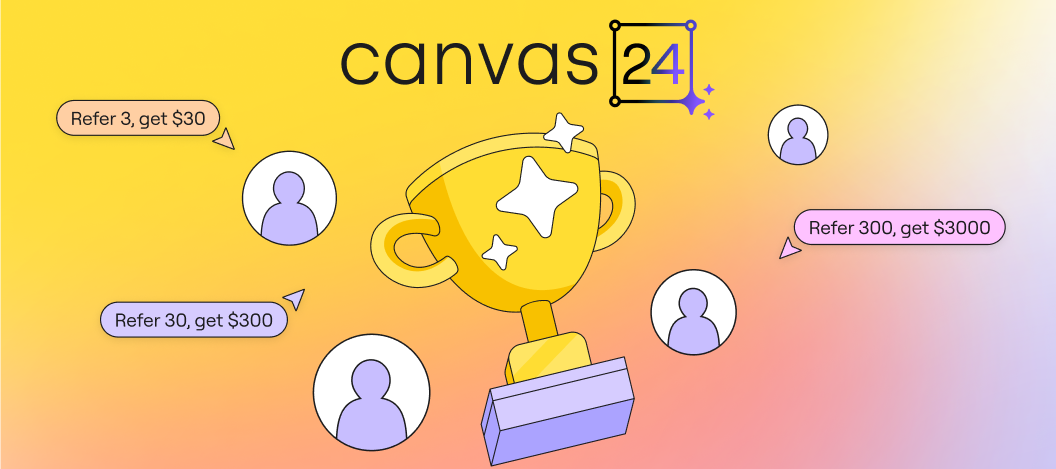
Miro Community–– We’ve never done a community challenge like this before! Now that the agenda is live, we’re excited to announce the Canvas ‘24 Referral Challenge! This is your chance for you, a friend, and/or a team to win up to $3,000 in rewards! Take a look at how to participate and win! How to participate:Register for the Canvas '24 online event here. Get your unique link on the referral program page here. Create your customizable Attendee Badge here and use it to share about Canvas ‘24 in a message, email or social media post. Encourage your team, friends or professional contacts to sign up with your unique link and a work email. Remind your referrals to actually attend on October 8 for it to count. That’s it! How you could get up to $3,000There are three tiers of rewards for bringing friends or teammates. Your reward will come as a gift card of your choice. Our top reward is a $1,500 gift card for you, and $1,500 donation to a charity of your choice.Refer 3, Get $30 Refer 30, G
Miro Community! We're excited to reveal this year’s nominees for the Miro Hall of Fame – a community choice award that celebrates the individuals and teams driving creativity and innovation, shaping new ways of working. ✨ Congratulations to all the nominees! We’re grateful for your incredible contributions to the Miro Community. 🗳️ Cast your votes for your fellow community members and discover the nominees and their amazing contributions! Voting ends on September 20, and the winners will be revealed at Canvas '24 – don’t miss it!
Currently if you goup some components in a “panel” and then add another component and create a group again, Miro doesn’t look at this as a multi layer grouping, but as a single group containing all components. If you create templates where for example you have a panel, where you want to have all the common elements - box, header, label grouped, and then the main content separately grouped with the rest.I would like the functionality to ungroup the panel, so that I can easily edit the content, without messing up the man box, header and label, and then done, I would regroup the content witht the main panel again when done.This also has a unexpected “feature” when you lock a section. Lockin creates a group, and when you unlock the area, the entire area is grouped, and when you then ungroup, all the underlying groupings are gone.Especially, if you like me generate a lot of template components, that I can copy from my template board over to my working board, having the template component lo
One game-changing tip I've discovered while using Miro is utilising the infinite canvas to create dynamic, strategic sales plans. By mapping out entire customer journeys, identifying touchpoints, and overlaying data analytics directly on the board, I’ve been able to visualise complex sales processes in a way that’s easy for both my team and clients to understand. The ability to integrate real-time feedback and collaborate across time zones has turned Miro into our virtual war room, enabling us to stay agile and close deals faster. Remember, the key is not just to plan but to visualise and iterate constantly. Big shoutout to @Manouska J and the Miro community for continuously pushing the boundaries of what’s possible in digital collaboration!
I am nearly done editing my basic math lessons.Here are 77 lessons with sound pedagogy and interactive kinesthetics to help math students in grade school or a GED program.(I teach GED math in Oregon, USA.)If you are being asked to teach math in a HyFlex environment where some students are with you in-person and other students attend class remotely (such as using Zoom) then all the students can interact together!If you are (fortunately) not forced to use HyFlex pedagogy, there is lots of lots of stuff to steal for your own math lessons.Might this be the biggest Miro board ever? It currently has 4,964 objects when I use “select all”.
Love the new(er) voting function, but have some ideas for enhancements First of all, one should be able to add multiple dots as opposed to just add a counter. From a visual perspective, it is much easier to see the “heat map”, if everyone will add a separate dot on an item. Secondly, it would also be great if the system would support straw poll voting, where the one vote has the users Initial on it automatically.
Do you know any life hacks for adding tracks on the board?@Manouska
Creating a mind map in Miro is an excellent way to organize your thoughts, brainstorm ideas, and prepare for meetings effectively. In this guide, we'll walk you through each step to build a collaborative and visually appealing mind map. Let's dive in and make your next meeting prep a breeze! 🧠✨Access Mind Map Tool 🛠️ Click on "More tools" in the left-hand toolbar. Select "Mind Map" and place it on the board. Name the Central Topic 🏷️ Click on the central node and name it "Meeting Prep." Create the First Branch 🌿 Hit "Tab" to create a new node. Name this node "Team." Add Sub-nodes ➕ Click on the "Team" node, press "Tab," and type a name. Press "Enter" to create sibling nodes. Repeat the process to add more names under the "Team" node. Collaborate with Team Members 🤝 Invite team members to join the board. They can create new branches or nodes as needed. Expand the Mind Map 🌐 Add additional branches for other main topics (e.g., "Agenda," "Materials Needed"). Follow the sa
Hey Miro community, I’m Becky Juda, Senior Agile Delivery Manager at CleanChoice Energy, a renewable energy company committed to sustainability. I’m excited to share how our teams use Miro for PI planning.I really appreciate how Miro enables seamless collaboration among our dispersed teams—product managers, engineers, and designers—across different locations. It helps us quickly tackle challenges, converge on feature designs, and ensure everyone is aligned to deliver results promptly. Here are some highlights from our approach:Having a structured quarterly planning template to stay consistent and organized Utilizing a cross-team tracker in Miro to visualize dependencies clearly Saving time with on clustering sticky notes with Miro AI Watch this video and head over to Miroverse for her free custom board with a Talktrack walkthrough just for you.If you have any questions, drop them below and tag me. Becky
For multiple day workshops, I have many work areas, where I need to assign names to each area based on my participants. Would be great if I could use variables/parameters to identify the different names, and then once I copy a standard exercise into my workshop board, I just have to define the participant names ones, and every work area automatically gets named accordingly.This could be done with just general variables, or even better, with a dedicated participant list, and I could then in my exercise templates reference either: <Participant1> for the name, or <Initial1> for the initials.Maan … that would save a lot of time.
A memorable and unique link can make it easy to share your board. Specially when you have several boards within the team. Would it be possible to implement this feature?
Already have an account? Login
Enter your E-mail address. We'll send you an e-mail with instructions to reset your password.