Open

Stop opening Spaces sidebar when opening a board

  • November 13, 2024
  • 21 replies
  • 383 views

Johnnie Lindholt

Does anyone know if there is a way to remove the left side bar that now opens every time i open a board. It is ok if it is there, as long as it is closed.

It is just extremely annoying that I have to close it every time I open a board.

November 21, 2024

OpenDelivered

21 replies

Robert Johnson
Forum|alt.badge.img+13
  • Volunteer Community Moderator
  • November 13, 2024

@Johnnie Lindholt - This is currently the default behavior. I heard from a Miro PM that they will likely shut this off, i.e., close the sidebar when you open a board, but were giving it some time to get people used to the new feature being there.

However, I am right there with you and would rather have the board real estate and close the sidebar every time I open a board.

I moved your post to the Wish List category for upvoting, and tweaked the title of the post.

Tip: If you open the board as a new tab, e.g., Ctrl/Cmd + T or mouse wheel middle click, the sidebar does not open. And if you use the Miro desktop app, the same thing - no sidebar. One downside of opening as a new tab if you have the desktop app installed is that you’ll get the “do you want to launch the desktop app” popup.


Johnnie Lindholt

Thank you for a quick response :)


Eca
Mironeer
Forum|alt.badge.img+2
  • Mironeer
  • November 15, 2024

Hi ​@Johnnie Lindholt,


Thank you for raising this concern! We understand how important it is to have an efficient and uninterrupted workflow while using Miro.


The team actively reviews this forum for input in prioritizing updates and features, and this post is currently open for upvotes and comments. In the meantime, as Robert mentioned, opening boards in a new tab (Ctrl/Cmd + T or middle mouse click) or using the desktop app prevents the sidebar from appearing.


If you’d like to stay updated, keep an eye on this thread and the Miro Changelog for announcements about updates.


Thanks again for your feedback, and don’t hesitate to share any other suggestions!


Robert Johnson
Forum|alt.badge.img+13
  • Volunteer Community Moderator
  • November 21, 2024

@Johnnie Lindholt - It looks like Miro made this behaviour change today as the sidebar no longer stays open for me on board load (unless it is a bug!🐞).

Are you noticing this change too? If intentional, it may not have been rolled out to all yet, or may need a cache clearing or signing out and back in.


Johnnie Lindholt

Looks like it has been fixed :D

My life just got a little bit easier. 

Thank you Miro team ;)


Robert Johnson
Forum|alt.badge.img+13
  • Volunteer Community Moderator
  • November 21, 2024
OpenDelivered

  • Beginner
  • September 23, 2025

This has started to happen again very recently, and it is incredibly annoying. Why would I need to see the spaces sidebar on every board? I use the desktop app, and even for board tabs I already have open, when I revisit them the sidebar re-opens. I have to close it every single time, every single tab. This is a useless feature - i’m opening a board, i’m interested in interacting with the board, not with the space. Please fix this asap! 


Robert Johnson
Forum|alt.badge.img+13
  • Volunteer Community Moderator
  • September 23, 2025

@Claire Thomas Hmmm. Yes, it appears to be back.

A few reasons why this may be happening:

  • Feature nudge – With Canvas 25 approaching fast, Miro may be working on new features that are somehow related to the sidebar and they are reminding users of the sidebar’s existence.
  • Experimenting – There may be a new (or experimental) feature in the sidebar that not immediately seeing, so they are testing to see if we notice them, which can validate the general usability of the feature. Or, they are just waiting to gather general feedback, e.g., if anyone unhappy with this?
  • Here to stay – While I don’t think I’m ready for this, the current decision could be that this is the new normal in Miro. I am conflicted with this because, just as you stated, when I open a board, I want to interact with the board and not have ~15% of my screen real estate taken up by a sidebar.

What if the sidebar is here to stay?

While this is different than, for example, when you open other files (Word docs, spreadsheets, etc.) Miro board are different. However, some apps have changed our perceptions of working with content , e.g., Confluence pages open in the primary panel with a sidebar remaining – and this has never really bothered me. That being said, I think we need choice.

Should Miro remember our last action? Example, we dismissed the sidebar, so don’t open it again on board load?

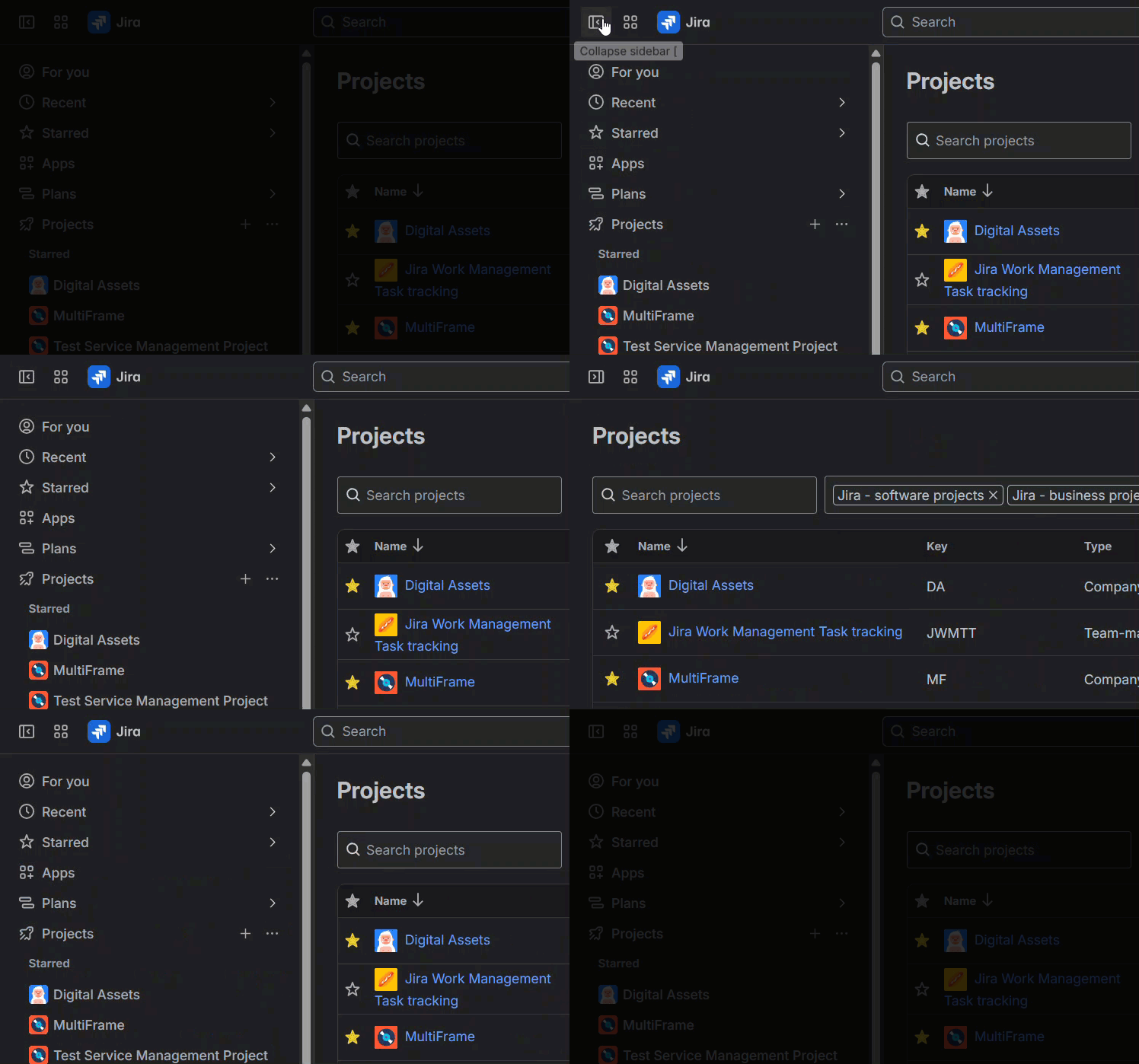
Personally, I think Jira/Confluence (and others) got it right. Rather than a hamburger menu like Miro has for their sidebar, Jira/Confluence has a sidebar icon. There shortcut is the left square bracket [, which toggles the sidebar open/closed. And, if closed, when you hover over the sidebar icon, the bar opens (saving a click).


And when you toggling using the [ shortcut, the icon changes to indicate what will happen when you move your mouse to it again:


Miro has a sidebar shortcut, too, which is Ctrl/Cmd + /, however, being a right-handed mouse user, I need to take my right off of my mouse, or move my left hand over to the right and use to fingers to use the shortcut. I’d love to see Miro use the [ shortcut too, but it looks to currently be activating the Show all action (to which there is already a shortcut of Alt/Option + 1).

Summary

I think opening the sidebar every time is the wrong approach. We need choice.

Since this is happening again, I will re-open this wish list idea post for further voting.


Robert Johnson
Forum|alt.badge.img+13
  • Volunteer Community Moderator
  • September 23, 2025
DeliveredOpen

Amanda Fenton
  • Beginner
  • September 29, 2025

Want to echo how annoying it is - and in fact is challenging from a confidentiality perspective as well as visually distracting. When I’m screensharing, clicking to open new Miro boards, I don’t want my clients to see the whole list of other boards! It’s annoying to have to stop screensharing, open the new board, close the sidebar, re-start screensharing. 


  • Contributor
  • September 29, 2025

“and in fact is challenging from a confidentiality perspective as well as visually distracting. When I’m screensharing, clicking to open new Miro boards, I don’t want my clients to see the whole list of other boards! It’s annoying to have to stop screensharing, open the new board, close the sidebar, re-start screensharing.”

That is an excellent point - that thankfully I haven’t experienced yet. Thanks for the heads up on this. I might have to think up some code names for my naming structure until they fix this.
 

This should really be escalated.


  • Beginner
  • September 29, 2025

@Amanda Fenton absolutely this 100%. I work at an agency and run into this same thing. Some Miro boards are external boards, and others are internal boards that are not shared with the client for very specific reasons. Seems Miro is simply ignoring a huge part of their user base: anyone who doesn’t work in-house where everything is shared and there aren’t any confidentiality concerns, ever.


Robert Johnson
Forum|alt.badge.img+13
  • Volunteer Community Moderator
  • September 29, 2025

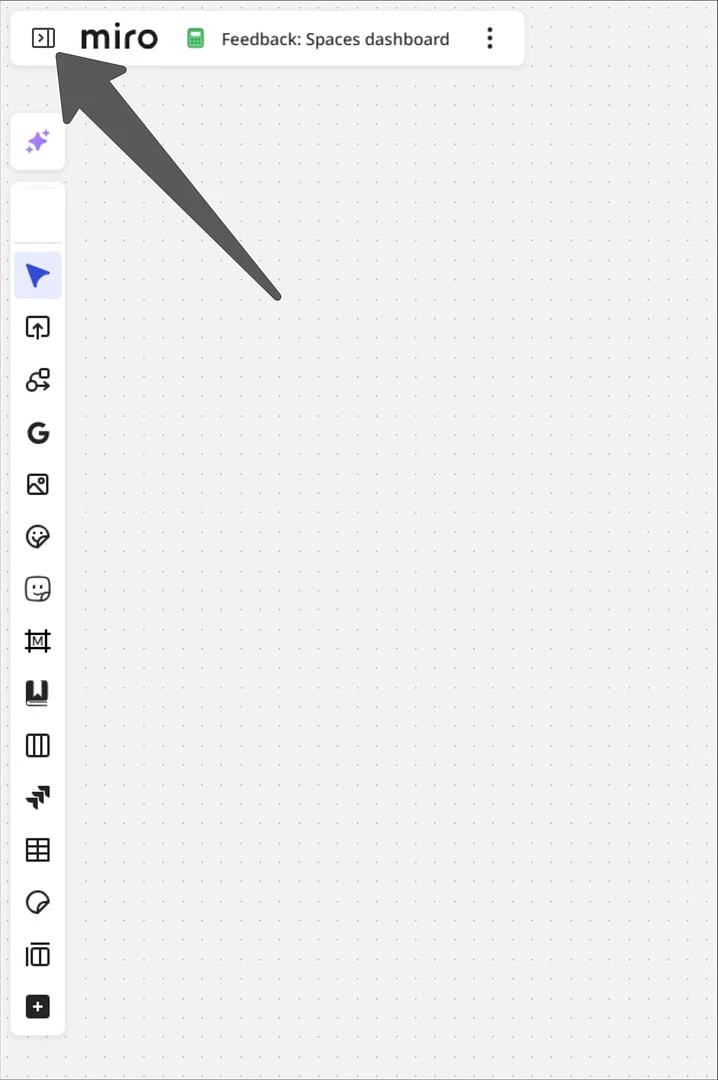
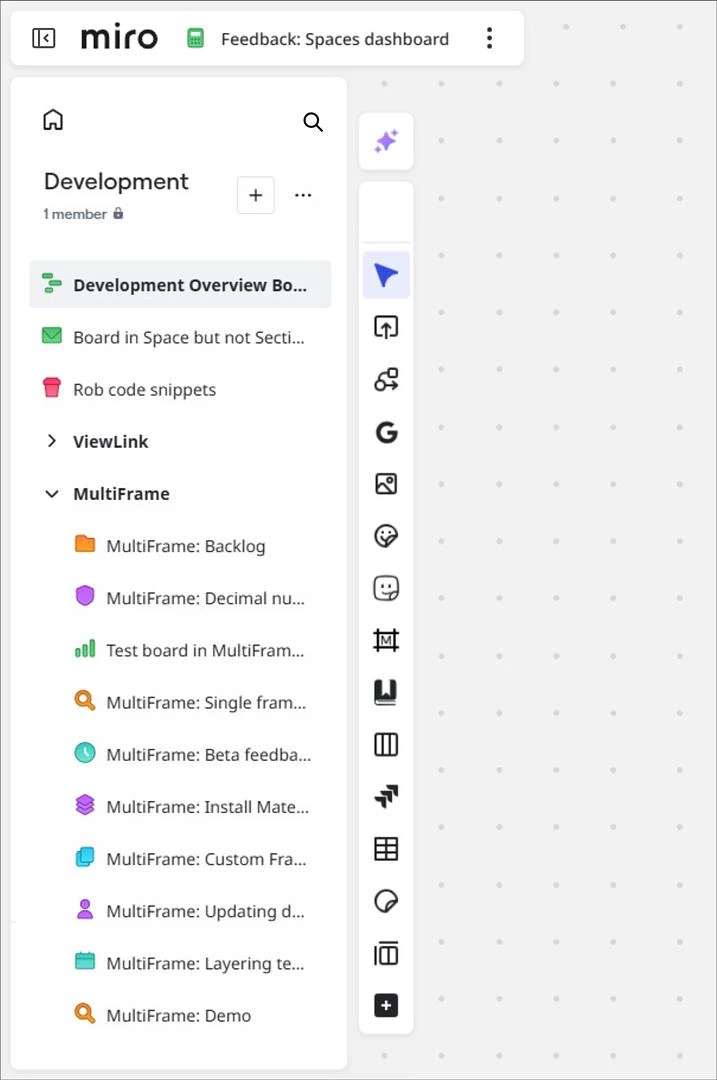
Here’s my mockup based on the Confluence & Jira experience (of which I would like to see something similar in Miro).


Closed state


Open state

 Note: the sidebar action (and entire board info boar) remains in a static location.


This design also solves the issue of moving ones cursor back and forth to open and then close the sidebar.

For example, currently, when I click on the hamburger menu to see what boards/sections are in the space and then just want to close the sidebar again, e.g., the board I wanted is not there, I have to move my cursor back over to the close action:


With Confluence/Jira’s design, you are never having to click an action, instead you just hover over the open sidebar action and then it closes when you move your cursor away (or you use a keyboard shortcut, so you don’t have to move your cursor to the sidebar action).


Forum|alt.badge.img

This only recently “turned on” for me, I never used to see the Sidebar open upon opening a MIRO Board in the MIRO App…  It is very annoying.  Is there an Open Sidebar menu setting to turn this off ? 


I sometimes leave multiple boards open so they are loaded (opened tabs) when I launch my MIRO app - I have to turn the sidebar menu off for all of them.


  • New Here
  • October 1, 2025

Adding my voice to this - It is very annoying for our team working in multiple boards at a time or in a day to have to close the sidebar *every* time they access the board (we use spaces to organize our boards since there are so many across teams). 

Having an option to set the sidebar to collapsed by default would be preferable.


  • Contributor
  • October 2, 2025

I’m really curious how this feature was even prioritized. I guess I am so far out of the persona its made for that I can’t understand what the value is. Maybe it just looked good in the Figma prototype?

Would love to know if anyone uses it, and how it helps them. What am I missing?


Robert Johnson
Forum|alt.badge.img+13
  • Volunteer Community Moderator
  • October 3, 2025

So, I validated my assumption that, if a board is not in a Space, the Spaces sidebar should not open on board load.

(Now you have an extreme workaround 😶)


  • Beginner
  • October 21, 2025

Yes, please, this is so annoying… :(


  • Beginner
  • November 12, 2025

I believe this was introduced shortly after when Miro changed the grouping of boards from ‘Projects’ to ‘Spaces’, as yes, this sidebar now only appears when opening a board within a space. This behavior was not occurring back in June.

I echo the comments of others regarding confidentiality. This is a big deal breaker. The default behavior has to be the sidebar is closed initially upon opening a board. Or there needs to be a profile setting that you can define the default behavior for the sidebar when opening boards.


  • New Here
  • November 13, 2025

I don’t understand how this is not a priority. I am a product designer too and I am wondering how this is not a settings option to toggle. Whoever is the the PM on this, Bad job for not listening designers in your team, or real users (you had data from 11 months ago!) or listening to the wrong assumption.
Miro is a confluence app as much as a mapping tool is an spreadsheet. Please remove friction and improve your scalable views with options.


Forum|alt.badge.img
  • Contributor
  • November 21, 2025

So, I validated my assumption that, if a board is not in a Space, the Spaces sidebar should not open on board load.

(Now you have an extreme workaround 😶)

Thank you very much. We have one major project (our product), and organising boards into spaces is not important for us. We will remove our boards from their space so we can save the extra click each time we view a board 👍