Open

Please remove the 32 MP image size restriction.

  • December 18, 2024
  • 5 replies
  • 198 views

Forum|alt.badge.img+1

I get that you need to have constraints, and not allow people to upload seriously large images — but so many of us are using Miro to document web site workflows and designs — and there are NUMEROUS occasions where I need to take a full-screenshot of a web page that is several screens deep and drop it onto a board — and I end up having to break it up into several images and group them, or some other workaround. If you are basically going to allow us to have an infinite whiteboard app, with a limit of 100,000 objects on a board, or whatever that is now — what difference does it make how large the images we choose to add to a board are?

If you are going to allow me to split an image into 6 images, and group them together, with the total file size of those images equaling the large image I am trying to drop onto the board, what difference does it make?

5 replies

Eca
Mironeer
Forum|alt.badge.img+5
  • Mironeer
  • December 19, 2024

Hi ​@ClassyUX,


Thank you for submitting this idea! We appreciate your feedback, and our team will review it. This suggestion is now open for votes and comments.

For those just joining the conversation, if you believe this feature would be helpful for your workflow or business, please take a moment to vote and share your use case. This will help our team better understand the demand and prioritize accordingly.

Thanks again for helping improve Miro!


Forum|alt.badge.img+1
  • Author
  • Active Contributor
  • February 12, 2026

This limit has become so ridiculous that it is by far one of the biggest workflow issues as a UX designer trying to use Miro to do their job.

I am constantly having to break up screenshots into multiple files, and even now, as I am documenting font usage for a client’s branding, I cannot even paste a block of fonts from Figma into this app.

I am seriously thinking of ditching Miro in favor of Figjam or something else if my longstanding issues with Miro are not resolved.

All you ever do is shove AI trash in front of us that none of us want, while ignoring basic UX-breaking issues and bugs in this app.


@ClassyUX This 32MP upload limit has honestly been one of my biggest frustrations with Miro 😅

  So… I ended up building a solution for it.  
 

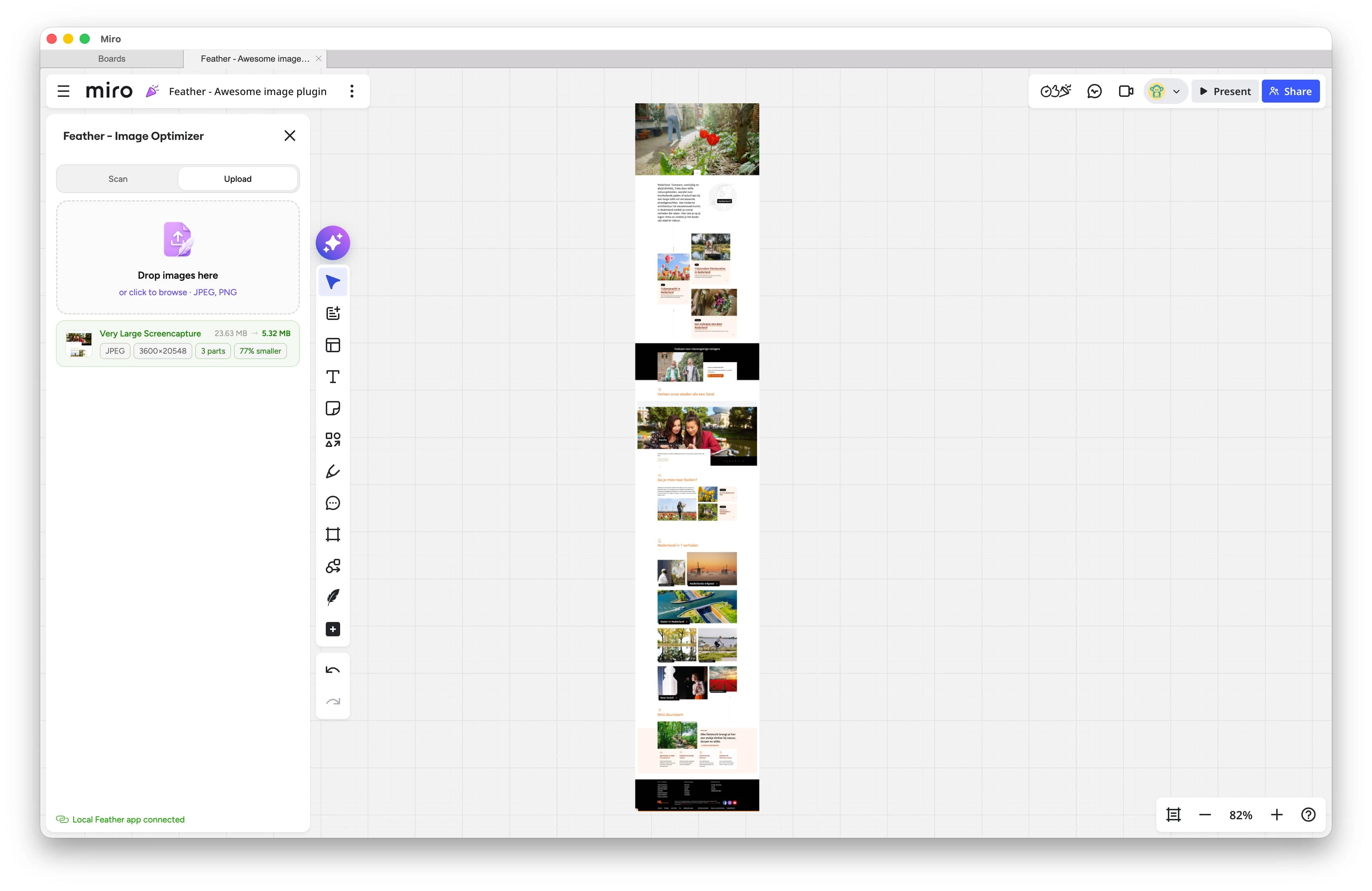
I made a macOS app called Feather - File Compressor that can compress, convert, and split (oversized) images before importing them into Miro, email or basically any website or tool.


“But that doesn’t fit my workflow.”


Exactly why I also built a native Miro plugin. The plugin connects directly with the Feather macOS app running locally on your machine, so you can import oversized images straight into Miro without manual steps.


It’s currently going through Marketplace review, but should hopefully be available within the next week.


What it basically does:

  • compresses images without noticeable quality loss (also the once you already have on your board)
  • converts unsupported or inefficient formats
  • splits oversized images into accepted chunks
  • uploads and stitches everything back together directly on the board

So to you, it just behaves like a single image.


Everything is processed fully locally on your machine, no cloud processing or external servers involved.


Feather for macOS is already available for free today in the App Store. The upcoming update just adds the Miro and Figma plugin support.


Hopefully this helps some other people here fighting the same limitation 👀


Forum|alt.badge.img+1
  • Author
  • Active Contributor
  • May 12, 2026

I may look into that. My beef with Miro is that as a UX designer sometimes I need to take a long-scrolling web page and paste the entire thing onto a board. I have plugins which take clean full-page screenshots and I can drop them in Photoshop to do any cropping, or whatever I need.

But the thing that irks me is that Miro claims we can paste up to 100,000 images on a board. Miro also allows me to take a long-scroller like that and paste it as sections from Photoshop (1,000px tall each for example), and then splice them together, and group them on my board.

So if they will allow me to do that, why won’t they allow me to paste the entire image?

I am far from the only UX designer who uses this app — and I am definitely not alone, as this conversation has come up with colleagues many times.

From a file-size standpoint it makes no sense that Miro allows me to paste all the “sections” of a large image into a board, but not the image itself. The resulting bandwidth being used by the board is the same.

I can understand a FILE SIZE limit or something along those lines, but the limit based on pixel dimensions makes no sense.


Exactly, I do think the limit makes some sense from a browser/GPU stability perspective for a single large mp image in a browser-based app like Miro.


But if users can already:

  • manually split images
  • upload all sections separately
  • stitch and group them back together

…then it becomes more of a workflow friction issue than a real platform limitation, since the board is already handling the same visual data anyway.
 

That’s actually one of the main reasons I started building the Feather Plugin for Miro. It automates the splitting, importing, and stitching process within Miro, so users no longer have to do the frustrating Photoshop slicing 😅
 

At the same time, I do hope Miro eventually introduces smarter handling for large imagery themselves, like automatic tiling or progressive image loading, because this is clearly a very common workflow for many designers, not only you and me.