

Removing access/deleting non-members

  • February 14, 2023
  • 2 replies
  • 157 views

Hi,


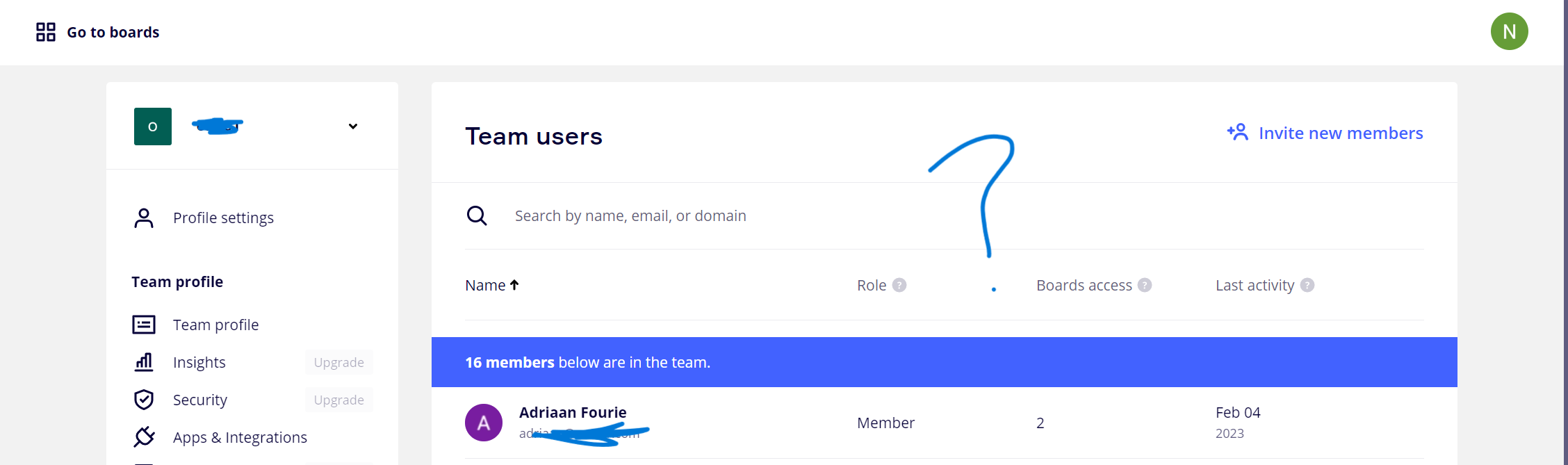
I’m on a free Miro plan. I’m trying to delete ex-employees of my business so that they don’t have access to our boards but I can’t find the ability to do this? I’ve looked at the resources that refer to 3 dots that you click on but I only have question marks - help pls!


Niki
 

2 replies

Robert Johnson
Forum|alt.badge.img+13
  • Volunteer Community Moderator
  • February 14, 2023

@NikiF - There are two roles types in a Free Plan team:

  1. Member (Adiaan is a Member)
  2. Team Admin

Only the Team Admin role can Remove users. From your screenshot, you are not a Team Admin as you do not have the ellipsis menu, where the “Delete from team” option is located.

You will need to ask a Team Admin to remove the user from the Free Plan.


  • Author
  • New Here
  • February 14, 2023

Yes that worked - thanks so much!

