

Answered

Remove a team not allowed

  • July 25, 2026
  • 1 reply
  • 31 views

Forum|alt.badge.img


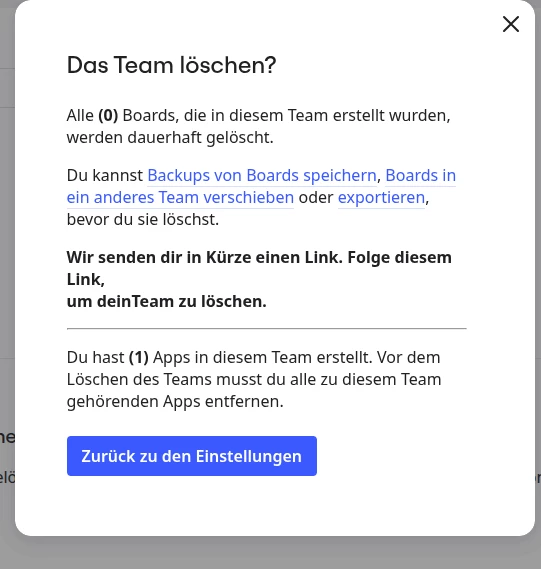
there are no apps visible in the team. How do Isuccessfully delete the team

Best answer by Robert Johnson

@Johannes Kingma The team you are trying to delete is a developer team — more on this here:

https://developers.miro.com/docs/delete-the-developer-team#:~:text=It%20requires%20deleting%20any%20existing%20apps%20that%20were%20previously%20created%20in%20the%20team%20you%27re%20about%20to%20delete

And the app it is referring to a custom app that a team member created under a developer app, and not a standard app found under the team settings → Apps tab.

WARNING — Once the custom app is deleted, anyone who had installed the app will immediately lose access it to the app (it will be gone).

To delete the app:

  1. go to https://developers.miro.com/#your-apps
  2. use the Edit app settings (pencil) icon
  3. scroll to the bottom of the page and use the Delete app action.

Once you have deleted the custom app, you can delete the developer team.

1 reply

Robert Johnson
Forum|alt.badge.img+13
  • Volunteer Community Moderator
  • Answer
  • July 26, 2026

@Johannes Kingma The team you are trying to delete is a developer team — more on this here:

https://developers.miro.com/docs/delete-the-developer-team#:~:text=It%20requires%20deleting%20any%20existing%20apps%20that%20were%20previously%20created%20in%20the%20team%20you%27re%20about%20to%20delete

And the app it is referring to a custom app that a team member created under a developer app, and not a standard app found under the team settings → Apps tab.

WARNING — Once the custom app is deleted, anyone who had installed the app will immediately lose access it to the app (it will be gone).

To delete the app:

  1. go to https://developers.miro.com/#your-apps
  2. use the Edit app settings (pencil) icon
  3. scroll to the bottom of the page and use the Delete app action.

Once you have deleted the custom app, you can delete the developer team.
