

Answered

rectangular stickies

  • Jun 15, 2020 1:29 AM UTC
  • 2 replies
  • 976 views

I noticed in the Program Increment Planning template there are rectangular sticky notes as a shape. How does one use these shapes in other boards other than using this template? 

Related, if the template was built by a developer, can we just develop our own shapes like that and add them to our toolbar?

Best answer by Kiron Bondale

@christianbhall -

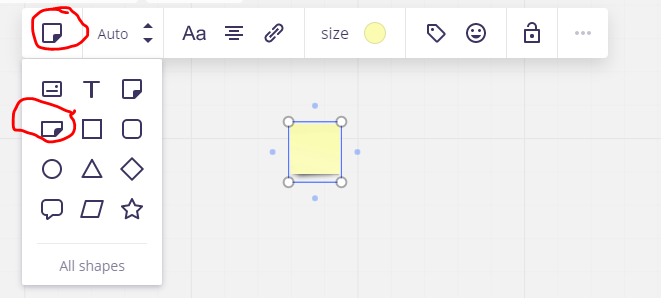
The only way I know is to create a square sticky, then click on the shapes transform icon in the toolbar, and pick the rectangular sticky shape.

Kiron

View original

2 replies

Kiron Bondale
Forum|alt.badge.img+7
  • Volunteer Community Moderator
  • Answer
  • Jun 15, 2020 12:15 PM UTC

@christianbhall -

The only way I know is to create a square sticky, then click on the shapes transform icon in the toolbar, and pick the rectangular sticky shape.

Kiron


Ha!. I had just never tried to transform a sticky...usually do that on other shapes...so never saw that option. That helps. Thanks!
