Question

more snapping points on a block

  • May 5, 2026
  • 3 replies
  • 20 views

Hi, how can I add more snapping point to a square? 

default just gives the center points but I would like to have something on 1/4

3 replies

Eca
Mironeer
Forum|alt.badge.img+5
  • Mironeer
  • May 6, 2026

HI ​@M.L.CSA 

Thanks for your question!

Just to make sure I understand correctly — are you referring to adding more alignment/snapping points on a shape (square) so you can connect or align objects at quarter points (e.g. 1/4 positions on each edge), rather than just the default center and mid-edge snapping points?

If so, could you also confirm:

  • Are you working with basic shapes, or using a specific Miro app (e.g. wireframes, diagramming, etc.)?
  • Is your goal mainly for connector attachment points or for alignment/guides?

Once I have a bit more detail, I can guide you on the workaround or available options.


  • Author
  • Beginner
  • May 7, 2026

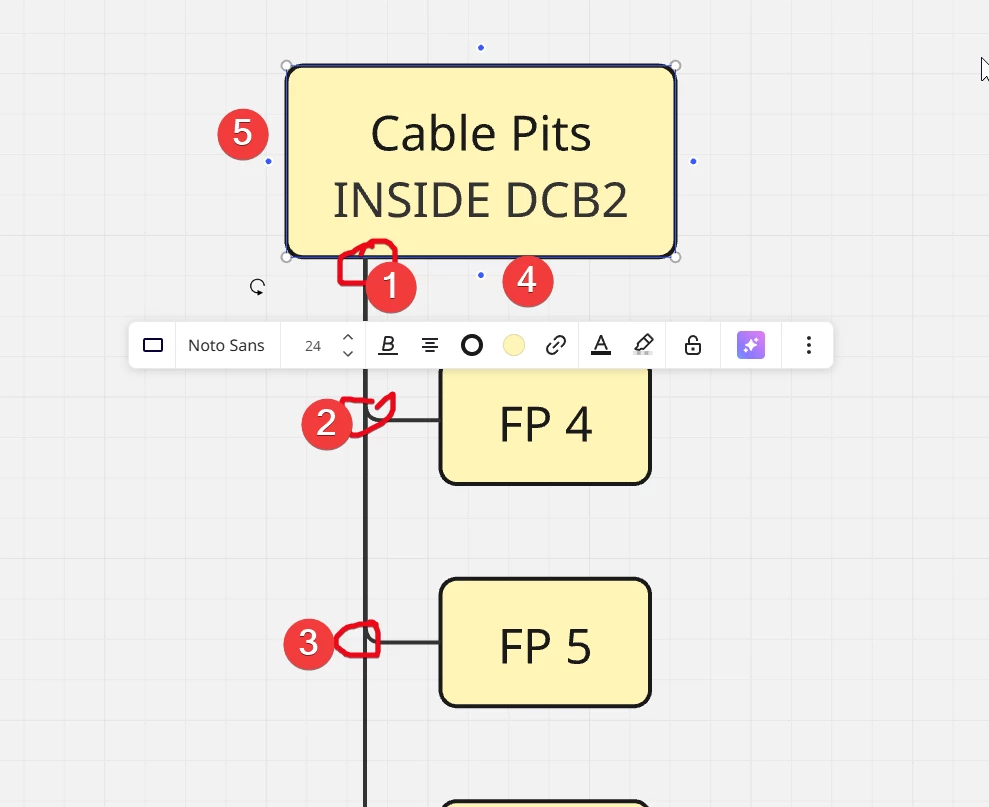
how can I make sure Miro snaps to the points 1, 2, 3 instead of 4 and 5 (default) 


  • Author
  • Beginner
  • May 7, 2026

yes i use basic, standard shapes


my goal is, that all lines snap neatly to the same “newly set up point” 


in my screenshot marked as “1” 

it is a off cengter point and I woudl like all lines to snap here


but I also want all the new blocks add below

to snap to the line jusnction above like at point “2” “3” ….