[INVESTIGATING] Miro board freezing when typing in Tables

  • February 28, 2026
  • 12 replies
  • 84 views

After my Miro desktop (Windows) automatically (forced) updated to 0.11.134, it crashes constantly when using table, both on the web and desktop versions.

So is it possible to switch back to previous version ?

March 4, 2026

@Mark Rollins / ​@DD.Hieu.San It looks like you are both having the same issue, and now both have open ticket with Miro support, so I merged your posts.

Could you drop a quick update here once your issue is resolved? It’ll help other users experiencing the same problem stay informed.🙏

12 replies

Robert Johnson
Forum|alt.badge.img+13
  • Volunteer Community Moderator
  • February 28, 2026

@DD.Hieu.San 

is it possible to switch back to previous version?

Unfortunately, users cannot specify which version they can install — I’m not saying it’s not impossible (e.g., modifying registry/config file entries), but I am not aware of a way to accomplish this.


After my Miro desktop (Windows) automatically (forced) updated to 0.11.134, it crashes constantly when using table, both on the web and desktop versions.

Have you tried resetting the desktop app’s app data?


However:

it crashes constantly when using table, both on the web and desktop versions

Are you saying that Miro is crashing for you when using tables in a browser too?


  • Author
  • Beginner
  • February 28, 2026

@Robert Johnson Hi, Robert. Thanks for replying.

I’m currently using the Free Plan, Miro app version 0.11.134.

I tried resetting the desktop app’s data, but it didn’t work. I also tried reinstalling the app, but that didn’t work either. The same problem occurs when using the web version. I did replicate problem on another device (from pc to laptop) with the same account as well. To be more specific about the problem:

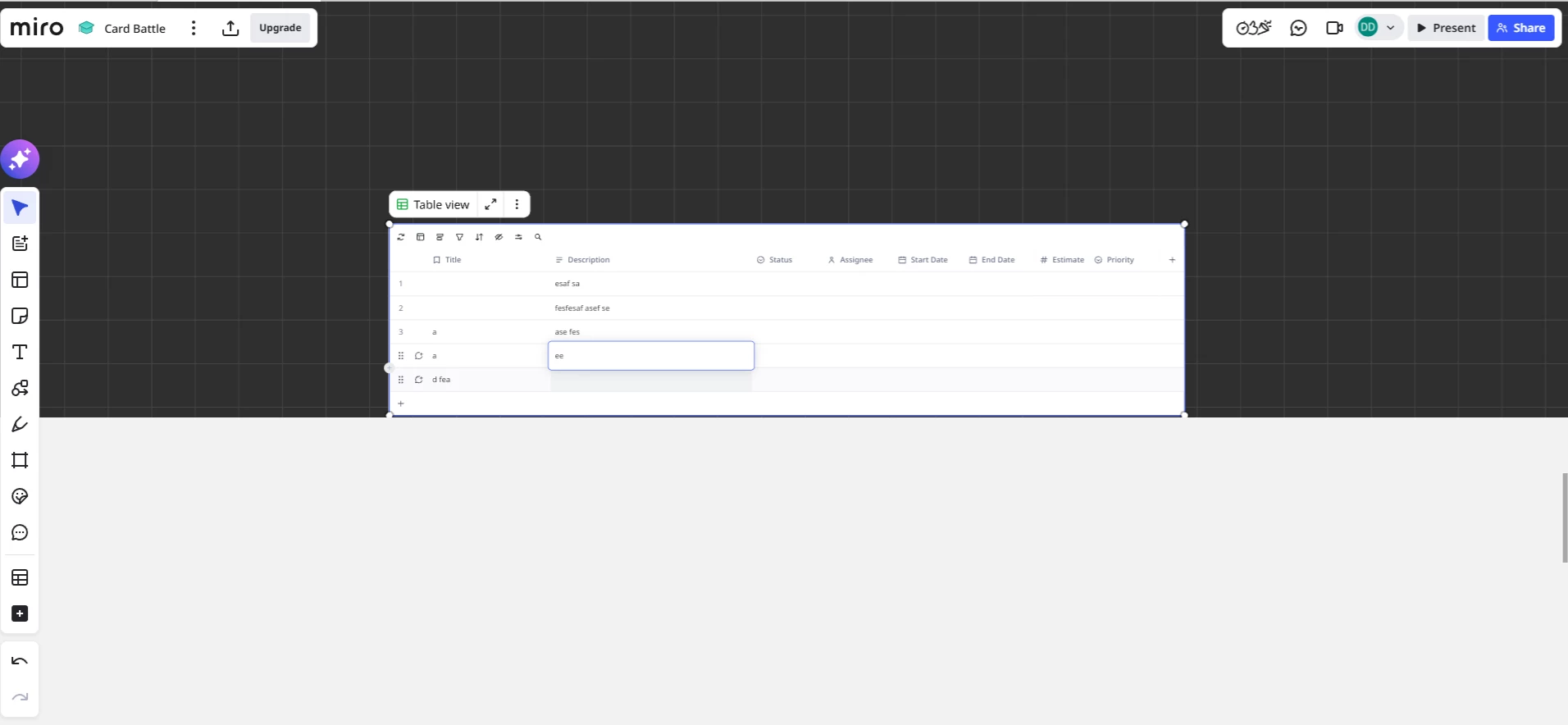
I have about 9 tables that I’m using to write dialogue for scene plays. Everything was working fine until the latest update. Now, whenever I click on a cell and write for a few moment, it freezes my board completely. (This happens to all my other boards as well).

I can’t figure out if this is a memory issue, a potential bug with tables, or if something is wrong on my end. I must stress that this happens to me on both the desktop and web versions.

Is there any way to troubleshoot this issue?

Steps to replicate the issue from my side:

  1. Open Miro.

  2. Open any board.

  3. Create a table.

  4. Double-click on one of the table cells to type.

  5. After a few moments of typing, the board freezes.

I suspect that I might be running low on memory since I also have a bunch of reference images on my board. Is there a way to check how much memory I have left on Miro?


  • Author
  • Beginner
  • February 28, 2026

Here are the screenshots I was able to captured before it froze.

I’ve also noticed the freeze happens when I duplicate an existing board and type on it for a few moments. I did try some troubleshooting:

  • Added another 20 high-resolution images to the board and tried to recreate the freeze by randomly typing on a new table. Nothing happened, so maybe it’s not a low memory issue.

  • Attempt without the images: Restart Miro, duplicated an existing table, and typed on it. It froze after a few moments.

  • Again, without the high-resolution images, I created a new table, typed on it, duplicated it, and typed for some time. It froze.

  • Final attempt: create a new table, typed on it, delete it, create a new table, type on it for a long time and then it still suddenly froze.

I don’t know what’s happening.


Robert Johnson
Forum|alt.badge.img+13
  • Volunteer Community Moderator
  • March 1, 2026

@DD.Hieu.San Thanks for the detailed information.

I wonder if this could be related to recent updates to Miro where now only Business Plan or Enterprise users with the Advanced license type have access to certain table features — more on the difference of features here:

https://help.miro.com/hc/en-us/articles/33311996124306-Understanding-Enterprise-licenses#h_01KHBZP6X2M3B1YPYEA95DY185


I will convert your post into a support ticket, so they can troubleshoot the issue with you. They will very likely want to share browser HAR and console error logs, so you could start the process of generating these logs by following the steps in this article:

https://help.miro.com/hc/en-us/articles/360017731413-How-to-troubleshoot-and-report-a-bug


  • Author
  • Beginner
  • March 2, 2026

@Robert Johnson Hi Robert, thanks for the reply and sorry for bothering you on a Sunday.

I have the logs, it took me a while to replicate the freezing on both the web and app versions since they occur quite randomly. Should I upload the logs here or submit a ticket?


Robert Johnson
Forum|alt.badge.img+13
  • Volunteer Community Moderator
  • March 2, 2026

@Robert Johnson Hi Robert, thanks for the reply and sorry for bothering you on a Sunday.

I have the logs, it took me a while to replicate the freezing on both the web and app versions since they occur quite randomly. Should I upload the logs here or submit a ticket?

@DD.Hieu.San No bother at all — happy to help!

I converted your post into a support ticket already, so you should have received a confirmation email to the email address you use with Miro/login to this forum with. The ticket number is: 949172 (you may need to check your spam folder). Or, you can:

  1. go to help.miro.com,
  2. click Sign in at the top-right,
  3. and then My activities.

From this interface, you can reply and attach the logs to the ticket.


  • Author
  • Beginner
  • March 2, 2026

@Robert Johnson Thank you Robert, I’ve already uploaded the logs and some scene shots of the issue in the ticket.


I have three boards in a project where we are using data tables to align on some database tables as part of data modelling, as well as a board that is using the Project Timelines template.

The board was working fine, but now I keep running in to an issue where when I access the tables I can update the table fields, but after doing this for say 3-5 fields, the board freezes and I need to refresh the page before being able to edit it again. This has been going on for a few days now and is making the tool unusable for the task my team is trying to perform.

Anyone else experience this and know how to resolve? It almost as if I have hit a limit on size. The tables are not that big.


Robert Johnson
Forum|alt.badge.img+13
  • Volunteer Community Moderator
  • March 2, 2026

@Mark Rollins There was a similar sounding report made a few days ago here:

https://community.miro.com/ask-the-community-45/how-to-switch-back-to-previous-version-working-in-tables-crashing-miro-27758

Are you using a paid subscription of Miro? If so, you can find the support form link by following these instructions:

https://help.miro.com/hc/en-us/articles/360020185799-Contacting-Miro-Support#h_01F010RXA0E1S9C0WFQYX75R6C


HI ​@Robert Johnson , this issue reported a few days ago is exactly the same as what we are seeing. I have a paid for Business subscription and 15 users.

I have raised the issue to support as per the details on your second link.

Thanks for your help and guidance.

Cheers, Mark


Robert Johnson
Forum|alt.badge.img+13
  • Volunteer Community Moderator
  • March 4, 2026

@Mark Rollins / ​@DD.Hieu.San It looks like you are both having the same issue, and now both have open ticket with Miro support, so I merged your posts.

Could you drop a quick update here once your issue is resolved? It’ll help other users experiencing the same problem stay informed.🙏


  • Author
  • Beginner
  • March 4, 2026

Sorry for the delay in replying! I'm currently working with support on a ticket for this.

Strangely enough, I couldn't get the board to freeze today. I tried to capture a new log by replicating the steps above, but nothing happened. I’ve continued working on the board and tables for about 2 hours now with no freezing at all (though I’m not sure if other users are experiencing the same thing).

I’ll post an update tonight to let you know whether the issue happens again. Thanks for taking the time to look into this!