Open

Nav suggestion

  • November 17, 2022
  • 4 replies
  • 84 views

Hi, this is a feature request from one PM to another - I find the user flow to navigate to the home page really annoying. Specifically….


Use case: I often have a miro board open that I’m actively working in, and I want to look at another miro board for reference. I want to be able to easily find the 2nd board that i’m looking for in a new window without navigating away from my 1st board. 


Current behavior: when i click the miro icon (top left), it takes me to navigation page, but now i’ve lost the board i was actively working on. 

What I have to do instead: I have to duplicate the tab first, and then navigate to the 2nd board. Since miro boards take some time to load, it’s an annoying lag


This happens to me literally all the time. Maybe I’m not the only one?

4 replies

  • Beginner
  • February 1, 2026

I am suprised this is 3 years ago and no one reacted. I personnaly hate the navigation and the homepage, i find it to be not practical at all 


Robert Johnson
Forum|alt.badge.img+13
  • Volunteer Community Moderator
  • February 1, 2026

@Kathleen Williams / ​@Chitchou I believe this was addressed with the dashboard/simplified board UI updates in August 2024.

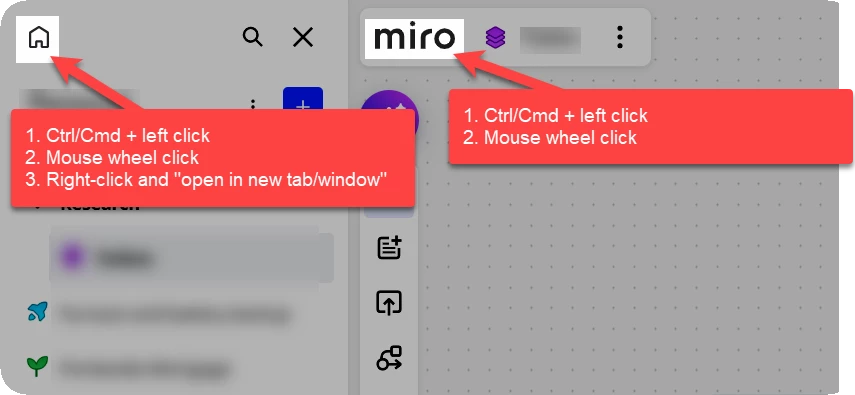
For example, you should be able to open the Miro dashboard to a new tab/window by doing one of the following:


  • Beginner
  • February 2, 2026

Hey Robert ! thanks for you help / answer ! 

I am not sure that's what Kathleen was referring to. 
Opening a second tab doesnt solve the navigation problem. When you’re in a board, you often wants to copy/look things from another board. For that you have to leave the board you re working on, go to the board you need things, then back to the one you’re actively working one. Or maybe I couldn t find a better way ? 


Robert Johnson
Forum|alt.badge.img+13
  • Volunteer Community Moderator
  • February 3, 2026

@Chitchou Yeah, there are a few things going on here.

Current behavior: when i click the miro icon (top left), it takes me to navigation page, but now i’ve lost the board i was actively working on. 

I took it as, the only way to get back to the dashboard to search for a new board is by clicking on the Miro logo which takes me away from the current board.

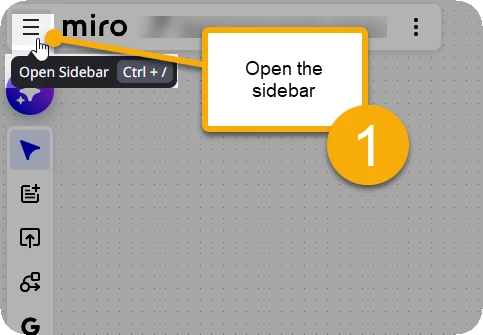
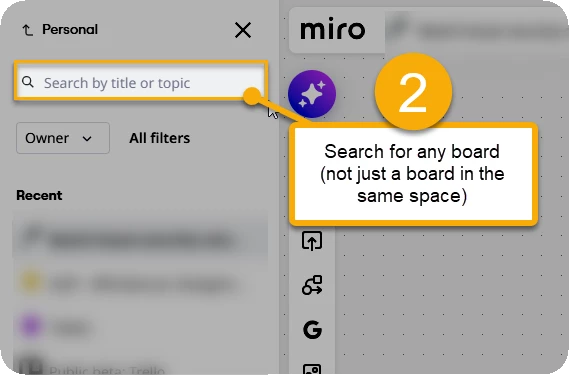
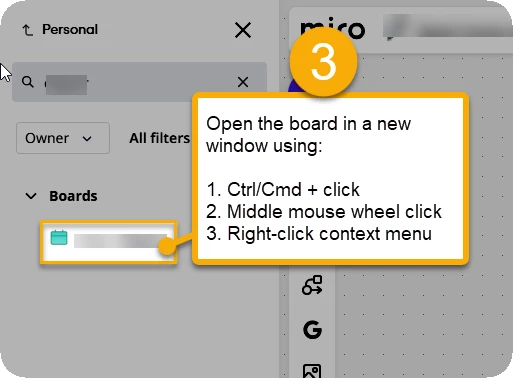
However, an even better way could be to search from the left sidebar:


Now you have both boards open. And, using the right context menu in Chrome, you could “Open link in split view” nave them side-by-side in the same display.