
Open

Managing layers as heirachy or nested

Related products:Mapping & Diagramming
  • November 12, 2025
  • 2 replies
  • 42 views

Love that Miro added the layers functionality a while back so that we can use the Z axis more than simply overlaying shapes/frames which would get ugly fast. Maybe one day Miro will extend from the 2D to finding a way to showing elevations / 3 dimensional views.


Context: I use Miro to draw floor plans, an area I think Miro can be a serious tool in vs traditional CAD design in engineering and architecure. It allows things that CAD struggle with like 1:1 scale drawings of any scale, co-editing/sharing, flexibilty in shapes/design elements, versioning & commenting, and the ability to overlay detail.

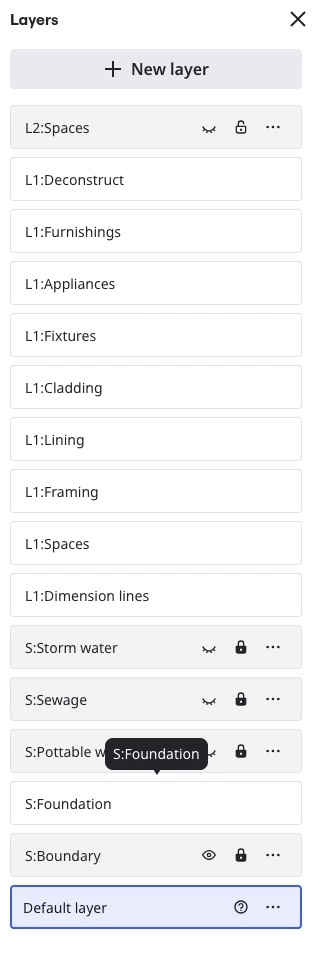
Idea: Create a hierarchy or nesting of layers so that I can hide or lock a group of layers in one go, and it provides context for the layers within the heirarchy e.g. these are all related to level 1 vs 2.



2 replies

Eca
Mironeer
Forum|alt.badge.img+2
  • Mironeer
  • November 12, 2025

Hi ​@MikeC 

Thanks so much for taking the time to submit this Wish List idea. Our team will review this and it’s open for votes and comments. 

For those coming across this idea, if you feel this would be helpful for you or your business, please be sure to vote for it and leave a comment about your use case to help our team scope this request!

Thank you again for helping make Miro better!


  • Author
  • Beginner
  • November 14, 2025

P.S> This could be done purely in the UI that manges layers without any change to the data & software that creates the layer feature.


This is solutioning but it might help explain the idea. I would not expect an object to belong (attach) to a parent layer in the heirachy as well as the child layer that I assigned it too, in fact I would not want it too. So the current concept that a shape/line belongs to only one layer would still work.

In the Layers management UI it would display the parent/child relationship and if the parent layer were locked or hidden then that would flow down to the child layers. This way child layers could be moved between parents with no effect to the objects on the board.
