Open

Getting a "Copy board link"

Related products:Mapping & DiagrammingNavigation
  • March 25, 2025
  • 4 replies
  • 97 views

When editing a diagram I can go to the left-hand side to
   Today→ <boardname> → Copy board link

… as per …

Today→ <boardname> → Copy board link 


However, why can’t I get the same from the already onscreen element:
   Miro <boardname> ⋮ → Board

… as per ...
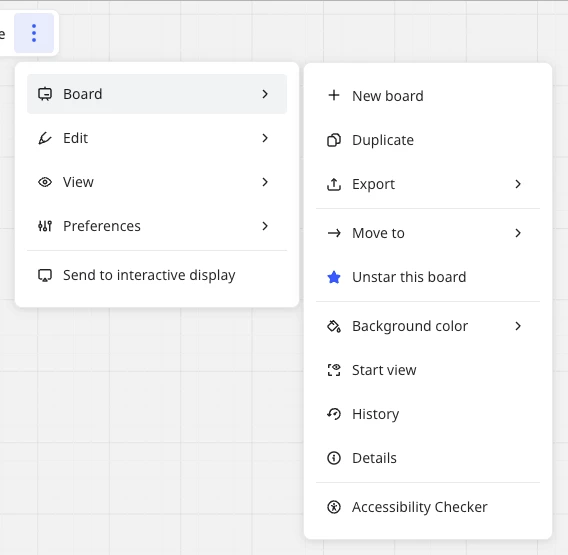
Miro <boardname> ⋮ → Board 

Please can we have that 😇

4 replies

Eca
Mironeer
Forum|alt.badge.img+5
  • Mironeer
  • March 26, 2025

Hi ​@Guy Hindle,

Thanks so much for taking the time to submit this idea. Our team will review this and it’s open for votes and comments. 


For those coming across this idea, if you feel this would be helpful for you or your business, please be sure to vote for it and leave a comment about your use case to help our team scope this request!

Thank you again for helping make Miro better!


You currently need to click on the “Share” button on the top right corner. There you can get the link for the current board.


  • Author
  • New Here
  • March 27, 2025

You currently need to click on the “Share” button on the top right corner. There you can get the link for the current board.

Ah, yes, thanks Matthias, that does also achieve what the specific goal.

However, my question - perhaps not well stated - why are there so many differences between the menu of options from inside the board using:    Miro <boardname> ⋮ → Board  menu vs using the right-hand side pop-out  <boardname> ✩ … menu?

They are similar in several respects and different in others.  Sequencing common items similarly and … (at least) including the ↱Share option 😉 … would seem a sensible choice to me.


yes, you are right. There are quite some inconsistencies that could be resolved to have a better UX!


