
Open

Editing the overlapping part of shapes

  • September 17, 2025
  • 1 reply
  • 23 views

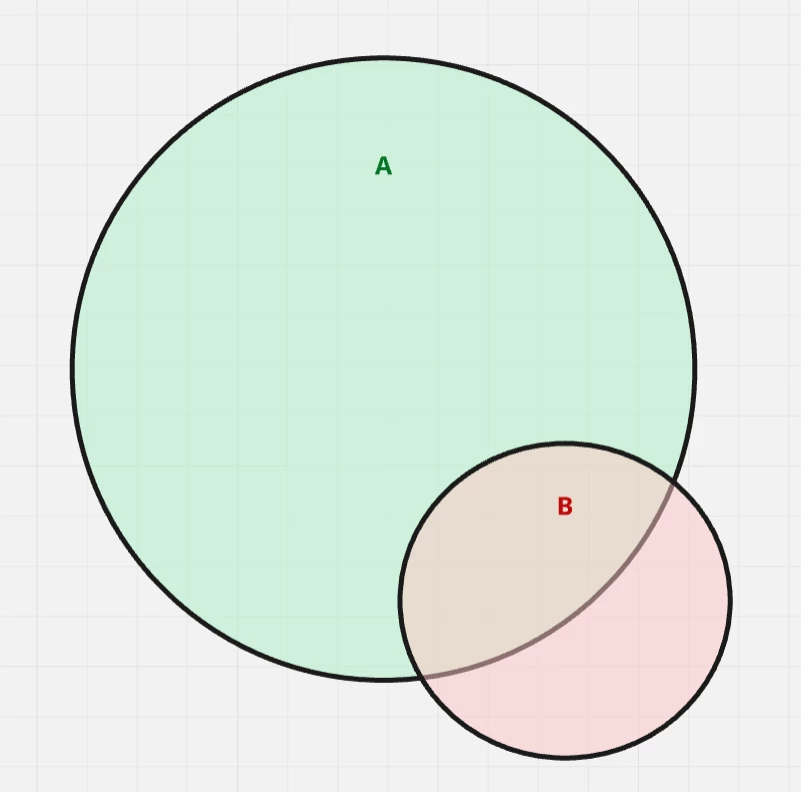
I would like to be able to highlight the part of a shape that overlaps (or does not overlap) with another shape. For example, I want to change the color or switch the outline from solid to dotted for the overlapping section.

Example: Suppose you want to draw attention to the part of circle “B” that lies outside (or inside) circle “A”. That section of circle “B” could be highlighted by using a dashed or dotted outline, changing its color, or applying other visual effects. However, as it stands now I have no possibility of doing that. 
 

1 reply

Eca
Mironeer
Forum|alt.badge.img+2
  • Mironeer
  • September 17, 2025

Hi ​@Sivert Leth 

Thanks so much for taking the time to submit this Wish List idea. Our team will review this and it’s open for votes and comments. 

For those coming across this idea, if you feel this would be helpful for you or your business, please be sure to vote for it and leave a comment about your use case to help our team scope this request!

Thank you again for helping make Miro better!

