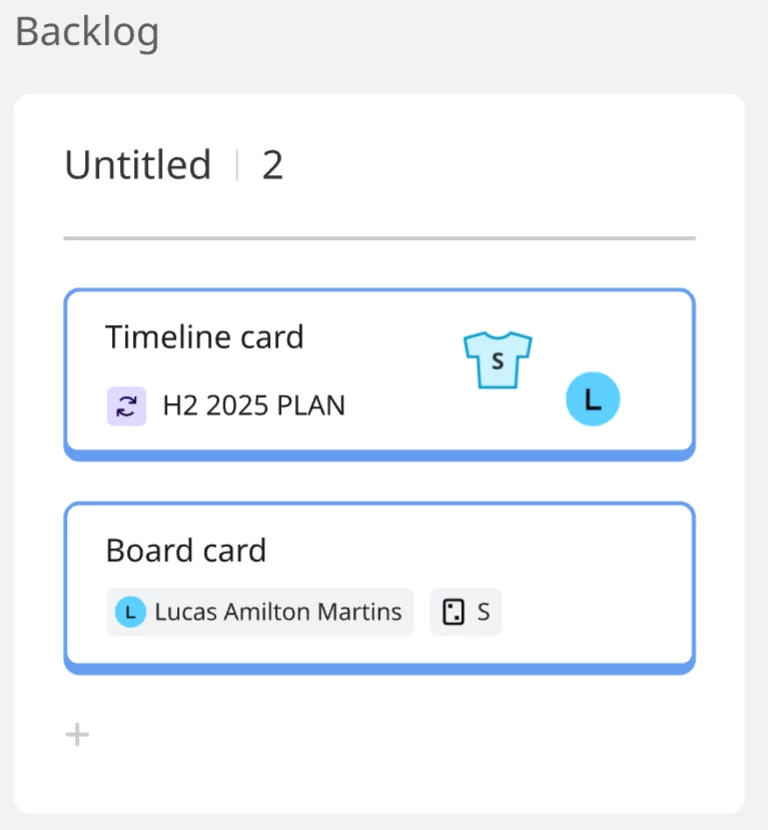
I have been using the timeline module to plan our team’s roadmap on a high level fashion, and I realized you can drag the tasks outside the timeline module, thus creating a card element. This is extremely useful as we can now move items from the roadmap view directly into planning boards (ie., Sprint board). However, the drag & drop functionalities don’t seem to work with these cards derived from tasks in the timeline module.
For example, if I drag my name over one of these cards, it does not get assigned to the task, instead a name element just floats on top of the card. The same happens for estimations (Story points / T-shirt sizes). An idea would be to enable the same functionalities to these card modules as we have in the Kanban board cards (as an example).
This will not only prevent confusion with different behavior on what is technically a same type of element (both are cards in essence), but will also allow all cards used in the board to be synced to a single source of truth, reducing the need for double work updating cards when something changes.