
Open

Cursor chat: Remove feature that blocks hotkeys

Related products:Shortcuts / Controls
  • Nov 2, 2026 2:20 PM UTC
  • 3 replies
  • 30 views

https://help.miro.com/hc/en-us/articles/39970518294674-Cursor-chat


“Start typing on the canvas. Cursor chat opens with what you typed.”
This feature is blocking other hotkeys, I basically cannot switch tools without opening cursor chat.
If I try to press two hotkeys for panning (h) and eraser (e) it will open cursor chat instead of switching to eraser.
I suggest that cursor chat will open only on specific hotkeys.
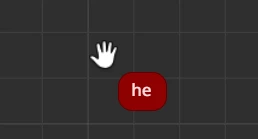


3 replies

Eca
Mironeer
Forum|alt.badge.img+5
  • Mironeer
  • Nov 2, 2026 7:48 PM UTC

HI ​@Quebec Nova 

Thanks so much for taking the time to submit this Wish List idea. Our team will review this and it’s open for votes and comments. 

For those coming across this idea, if you feel this would be helpful for you or your business, please be sure to vote for it and leave a comment about your use case to help our team scope this request!

Thank you again for helping make Miro better!


Hi, Quebec Nova!

I have the same problem, and I've already upvoted your post, please, help me with mine Miro Post. I hope, together we will solve this faster ☺️🙏


Hello, Eca!

Please, read my post about this problem (post link), I attached a video to show how this feature completely blocks all the hotkeys for a couple of seconds. I think this feature must be turned to a switch mode, so a user can turn it off completely with a single button. By the way, what is the idea of this feature? I don't understand 🫣