
Open

Auto layout should give control to space out content vertically as well as horizontally

  • February 6, 2024
  • 3 replies
  • 74 views

Lucie A
Forum|alt.badge.img
  • Experienced Community Member

LOVE auto layout. Just wish i could drag the icon downwards to also space out the content vertically.


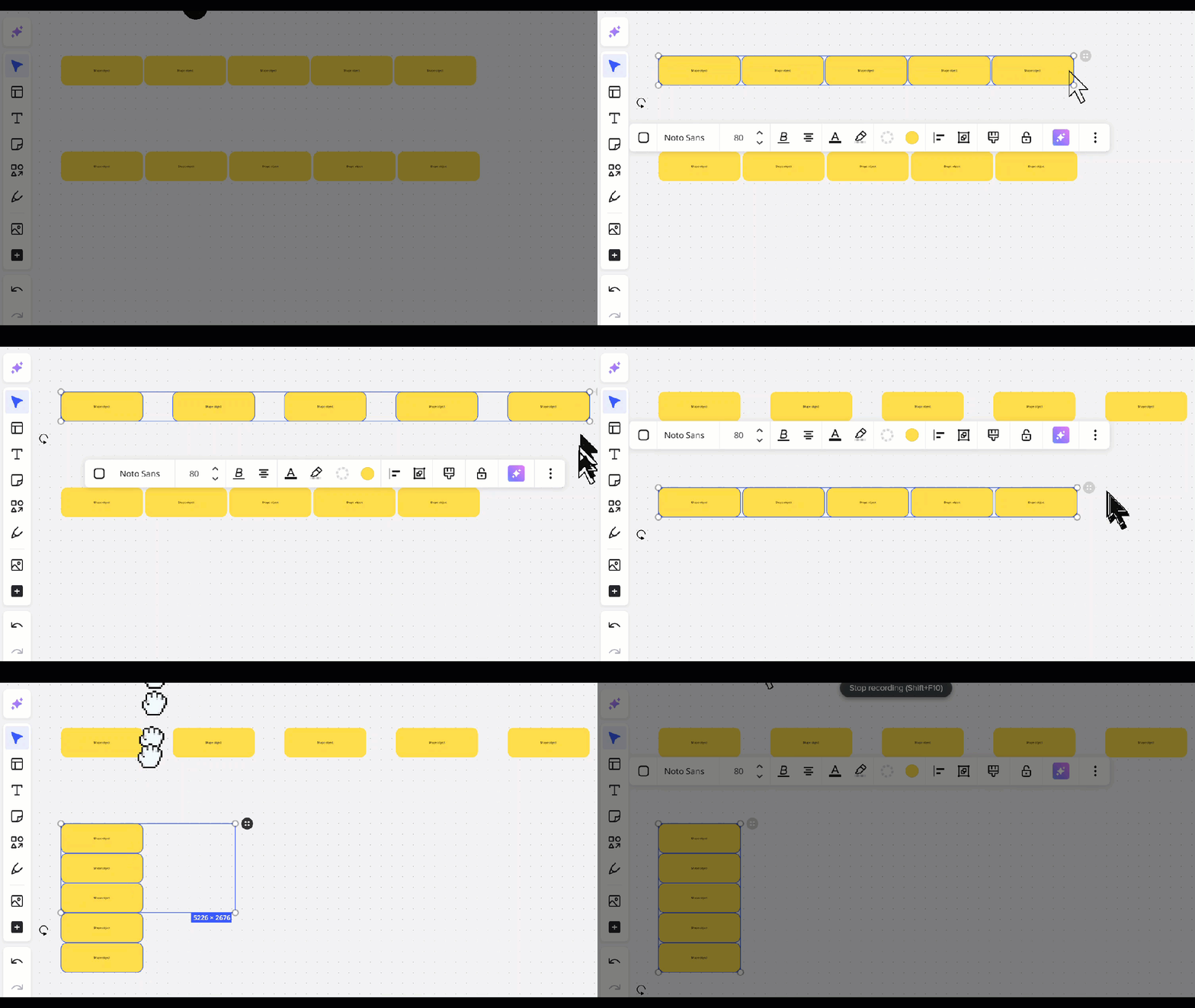
Currently you can only expand across the horizontal axis, but the rows remain same spacing - which is very tight (!) and involves manual moving to make the vertical spacing same as horizontal.


Thanks!

3 replies

  • Beginner
  • May 31, 2025

Alright! We’re up to 2 votes now!

This should definitely be on the roadmap now! 😏


Robert Johnson
Forum|alt.badge.img+13
  • Volunteer Community Moderator
  • June 1, 2025

If it help, for several objects (sticky notes, images, documents, cards, likely more) you can control the vertical space using the outer blue selection line:

However, for other objects (e.g., shapes) doing this may resize/scale the object.


  • Beginner
  • June 10, 2025

Thanks for that, but it’s not intuitive at all.

The same handle you use for horizontal distribution should be the same for vertical.

Just click and drag the auto handle for whatever you need. This would also be SO much better than having to click the tool bar to use the align buttons.

Currently, this is what I got: