Question

Question about invoice SZNWJP0X-0002 and unexpected additional seat

  • May 2, 2026
  • 1 reply
  • 21 views

Forum|alt.badge.img

Hello,

I received invoice SZNWJP0X-0002 for 2 Starter yearly seats, but I did not intentionally change my subscription plan or add an additional paid seat.

Could you please explain why this extra seat was added and charged automatically?

I would also like to request a refund for this unexpected charge, as I was not aware that my account had been upgraded to 2 paid licenses.

Additionally, could you please let me know how I can prevent this from happening again in the future (for example, how to disable automatic seat additions or restrict member access)?

Thank you for your help.

1 reply

Robert Johnson
Forum|alt.badge.img+13
  • Volunteer Community Moderator
  • May 3, 2026


@ani.mur91 If you were initially the sole team member of a paid subscription, then you were definitely the team admin, and the only person who could have expanded the team.

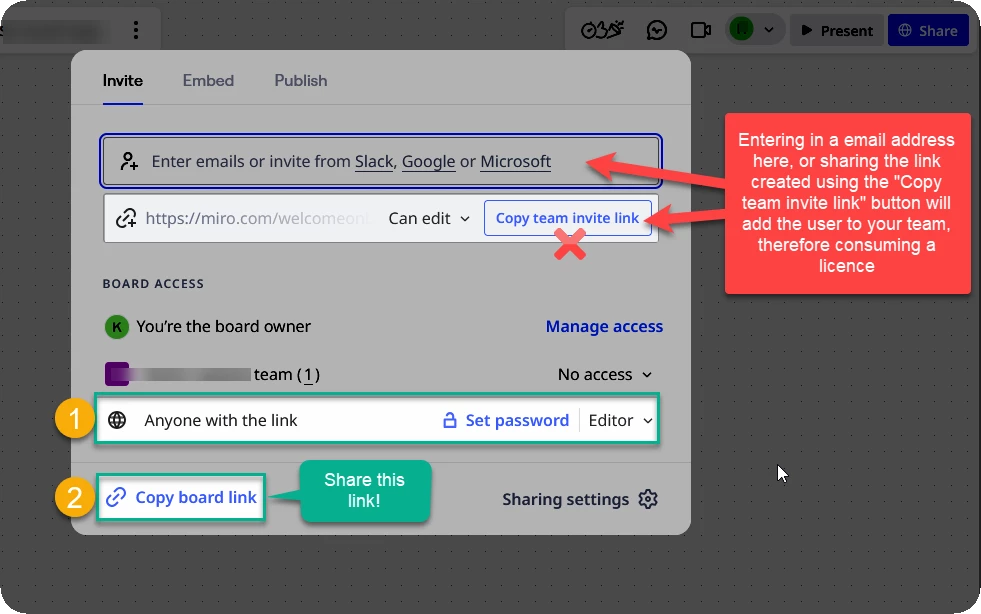
What has most likely occurred is that you invited someone to collaborate on a board with you by either

  1. entering their email address; or
  2. using the Copy team invite link button.

More info:

if you share a link by entering an email address here or using the Copy team invite link button, the recipient will become a fully licence team member — you’ll want to use the Copy board link action, or copy the board link from the browser address bar:


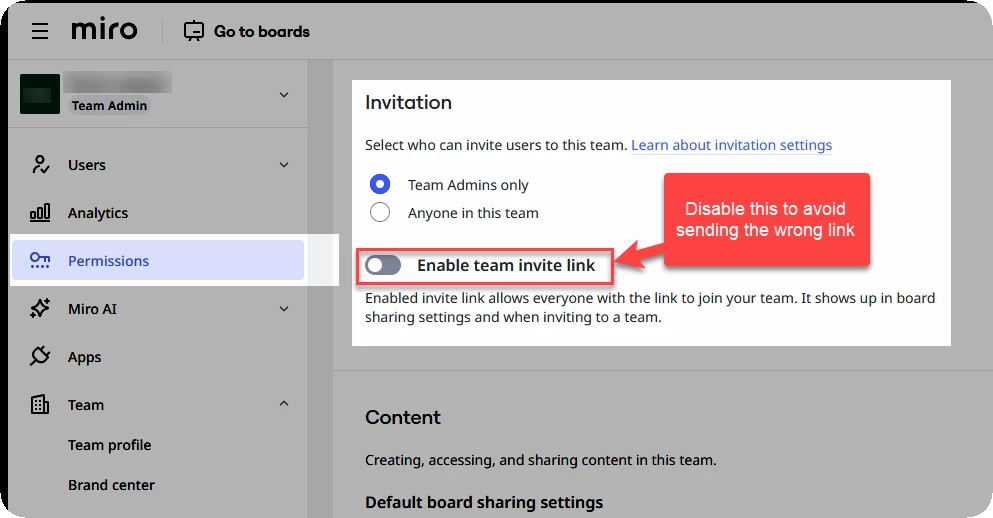
To avoid this in the future, you can disable the Team invite link, which will hide it from the share settings. The instructions are in this help center article:

https://help.miro.com/hc/en-us/articles/13205512707858-Team-invitation-settings

And here’s a visual:


Requesting a Refund

As a paid subscriber, you can open a ticket with the Miro billing support team by following these steps:

https://help.miro.com/hc/en-us/articles/360020185799-How-to-contact-Miro-Support#h_01F010RXA0E1S9C0WFQYX75R6C

Note: For Billing related questions, after you have selected Contact support from the Learning Center, select Billing & Subscription → Billing & Payments / Other.


Removing any additional team members

If you haven’t done as already, you should remove the the user who is consuming the additional paid seat/licence:

https://help.miro.com/hc/en-us/articles/360017571234-Remove-users