

Answered

MIRO and multiple JIRA instances

  • January 15, 2026
  • 3 replies
  • 24 views

Forum|alt.badge.img+1

Hello,

We have 2 instances of JIRA, one for business and another for engineering. Is it possible to connect both instances of JIRA (both are SaaS solutions of JIRA) to a single MIRO instance that we have. If not is there a work-around - if so then is there documentation that details this.

Thanks in advance,
Best answer by Robert Johnson

@Steve Tompkins Good question! So, I feel that you used to be able to just paste the URL of a Jira issue that was in another instance and Miro would prompt you to authorize that instance. However, it seems that now Miro just creates a link/embed the same as any other URL/site.

NOTE: I’ll open a support ticket to confirm if this new behaviour is (a) expected or (b) a gap (I suspect the latter).

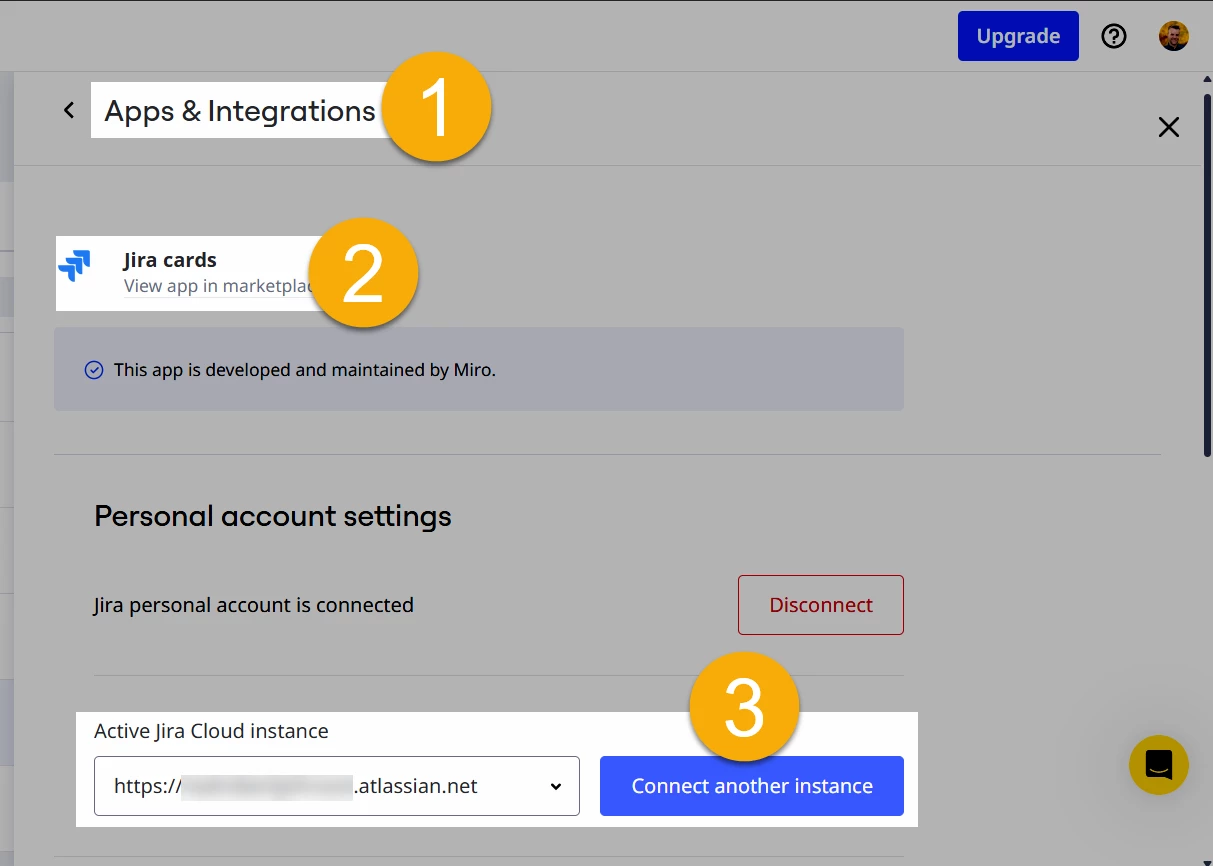
Moving forward — and what still works — it looks like you have to connect another instance from the Team settings → Apps → Jira cards:


3 replies

Robert Johnson
Forum|alt.badge.img+13
  • Volunteer Community Moderator
  • Answer
  • January 15, 2026

@Steve Tompkins Good question! So, I feel that you used to be able to just paste the URL of a Jira issue that was in another instance and Miro would prompt you to authorize that instance. However, it seems that now Miro just creates a link/embed the same as any other URL/site.

NOTE: I’ll open a support ticket to confirm if this new behaviour is (a) expected or (b) a gap (I suspect the latter).

Moving forward — and what still works — it looks like you have to connect another instance from the Team settings → Apps → Jira cards:


Forum|alt.badge.img+1
  • Author
  • New Here
  • January 16, 2026

@Robert Johnson - first, thank you so much for your response and for your help with this. 

I will have a chat to the JIRA admins, I am guessing that we will have to set up another series of reciprocal webhooks.

It will be interesting to see if MIRO can get to the right JIRA instance, being someone who overthinks everything I am wondering what would happen if both instances have spaces with the same project ID. Let’s hope that isn’t the case.

In the meantime, whatever you get from your support ticket will be very welcome. Thank you.


Robert Johnson
Forum|alt.badge.img+13
  • Volunteer Community Moderator
  • January 16, 2026

@Steve Tompkins 

I am wondering what would happen if both instances have spaces with the same project ID.

My understanding is the Jira instance/site is determined by the *.atlassian.net site you’re connected to (e.g., test.atlassian.net).

Within that site, you can have many spaces/projects (e.g., “Test Space 1”, “Test Space 2”). Each space/project has:

  • a unique backend Project ID (e.g., 10001, 10002), and

  • a human-readable Key (e.g., TS1, TS2) that shows up in issue keys (e.g., TS1-1).

And if someone also had a different site like test1.atlassian.net, it could coincidentally have the same Project IDs and Keys, because those identifiers are only unique within a site.

So if two instances have the same project ID, it should still be unambiguous as long as the integration scopes everything by the site/instance you connected to (i.e., test.atlassian.net vs. test1.atlassian.net).

