

Answered

Close the Search Bar at the bottom


Forum|alt.badge.img+1

The newest app update introduced a search bar at the bottom of the screen. I will not be using this in my workflow and want to be able to close it. It being at the center bottom of the screen gets in the way of the visuals and work I am completing.


P.S. When adding new features, please consider the ability to turn off the new additions for user flexibility and preferences. New features should never be a one-size-fits-all solution in such a dynamic application as Miro is, or should be.
Best answer by Robert Johnson

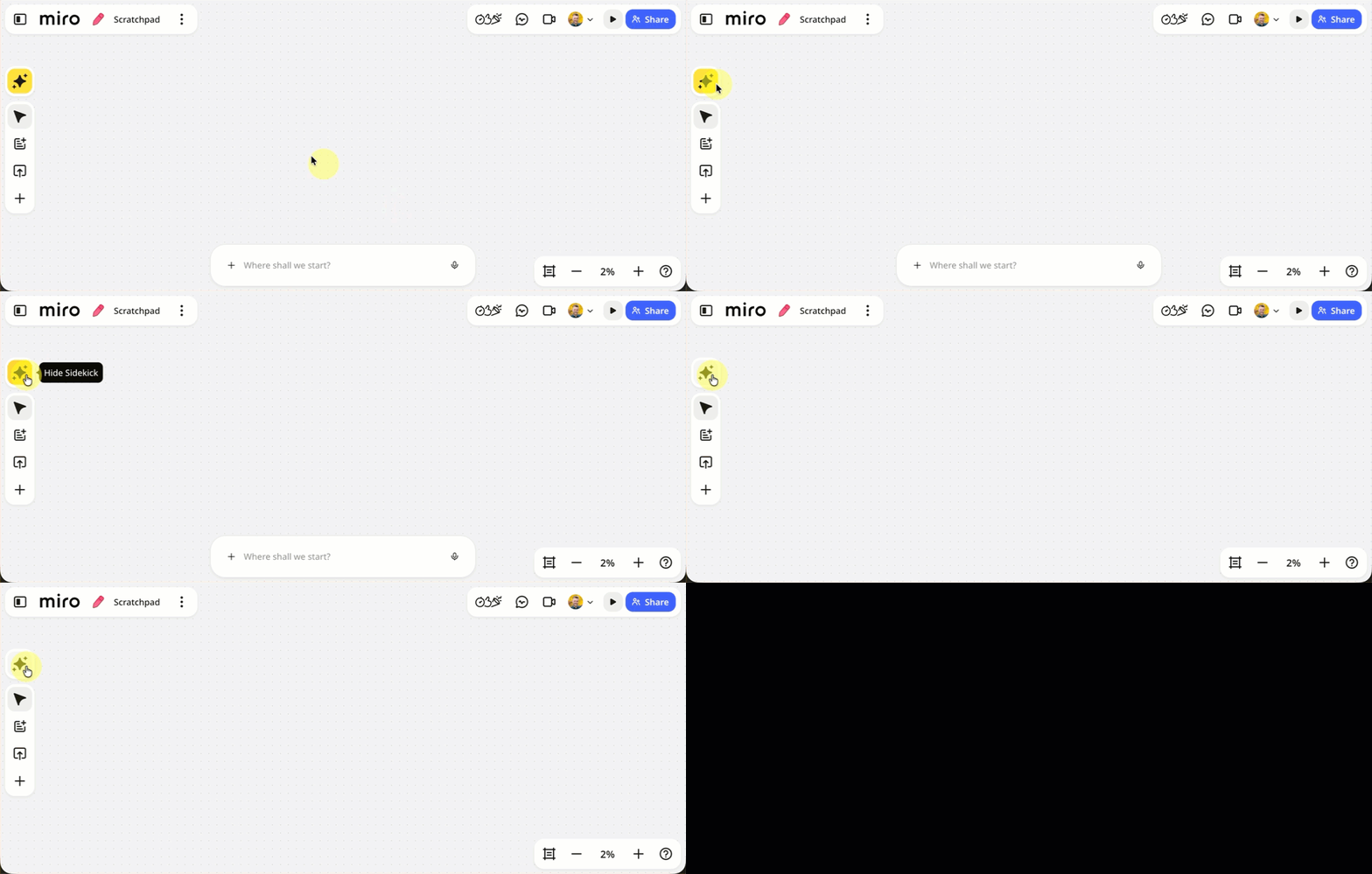
​@Brianna M ​@SOPHIA BRIEJ You can toggle the Sidekicks chat box using the yellow AI action at the top of the left creation bar:

Note: If you open a format in Focus Mode (e.g., a Miro Doc), the Sidekicks chat box will toggle back on — not sure if this is a bug, feature, or gap.

View original

3 replies

Forum|alt.badge.img

I agree! ive been confused why some things are force added or updated and they are now less intuitive. the weird unwanted chat bar is definitely one of them. would love to know how to hide it as well 


Robert Johnson
Forum|alt.badge.img+13
  • Volunteer Community Moderator
  • Answer
  • October 20, 2026

​@Brianna M ​@SOPHIA BRIEJ You can toggle the Sidekicks chat box using the yellow AI action at the top of the left creation bar:

Note: If you open a format in Focus Mode (e.g., a Miro Doc), the Sidekicks chat box will toggle back on — not sure if this is a bug, feature, or gap.


Forum|alt.badge.img+1
  • Author
  • Beginner
  • October 20, 2026

Thank you ​@Robert Johnson for the speedy reply and solution!

