XP Pen and tablet

  • February 15, 2021
  • 6 replies
  • 2033 views

I have an XP-Pen tablet to make drawing on Miro much easier - I have to mark-up student drawings. I’m having trouble making the pen and tablet function as drawing tools and have to combine pen, tablet and mouse to make everything work effectively. Am I doing something wrong? Is there a setting somewhere that I need to change? If so, I am finding it difficult to see where. Any help would be appreciated.

6 replies

Natasha Andreeva
Mironeer

Hey Duncan, 

Thank you so much for getting in touch! I’m a product manager at Miro working on the board navigation and I’d love to learn more about your experience in using Miro with a tablet. Can I ask you to make a quick Loom video to show how you use Miro and what causes the most friction?

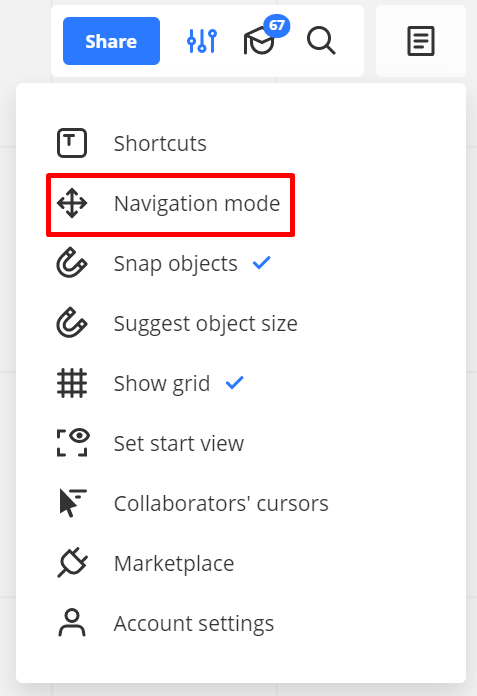
Also could you please check and let me know what navigation mode you are in? You can do that by clicking on the board settings:


I’m also using XP-PEN.


I am able to use the pen to draw and highlight, but the navigation is awkward.


I have my pen on one hand, with the second hand on the keyboard alternating between “pen” (P), “Text” (T) and “select” (V).


However, to navigate, I have to put down the pen and use the mouse or tablet. I use “mouse” navigation mode.


I tried pressing “space” and use the pen to move, but it doesn’t work.


I’m having the same problem. I can’t navigate around the board. If I use the web tool and reload, I can navigate around for a few seconds before it will no longer work. On the app. If I open and close, I can navigate for a few seconds and then same issue happens. Doesn’t matter which setting I have. 

I use Miro daily and I’ve only noticed this issue today. It’s making it extremely hard to use. 


So between the time I posted this and now I actually find a consistent solution that works for me…


I select the “select” tool by pressing “V” on the keyboard, then unselect it by pressing “V” again (so double “V”). Then I can use the pen to navigate.


I’m on “mouse” navigation mode.


  • New Here
  • January 31, 2024

Im about to buy such tablet to use miro extensively for documenting my startup and transfer knowledge to my team.


I want to know before buying if using this XP PEN tablet with an android tablet will work fine as well with MIRO.


Thanks for any help,


Paul


  • Beginner
  • June 27, 2026

This issue still exists, and is not fixed. According to this support page: https://help.miro.com/hc/en-us/articles/360017731633-Tablet-app there should be tablet specific settings for people using pen tablet devices. However, on the Windows App, when using an XP-Pen tablet display, these do not appear. As others have said, navigation is incredibly awkward when using the pen. Neither a dedicated right click button on the pen, or holding spacebar allow panning with the pen consistently. Also the spacebar navigation issue isn’t even specific to tablet devices, it happens with the mouse as well. Spacebar navigation does not work consistently when in pen drawing mode, whether using a mouse, or stylus. The issue appears to be something to do with UI focus. When clicking on a UI element, such as the pen tool, or zoom, these elements will take UI focus. From then on, pressing spacebar, will click the last selected UI button, instead of allowing panning on the board. This does not appear to be so much of an issue when the select tool is being used for some reason. A workaround (similar to what is mentioned above, but I needed a few extra steps) is to do the following sequence if spacebar has stopped panning the board (lost board focus):
1. Hit V on the keyboard (or click on the select tool) until there are no tools selected / highlighted on the toolbar UI (usually you have to hit V twice). This causes the toolbar UI to be defocused, and the board to gain focus again.
2. Press P “twice” on the keyboard (you MUST use the keyboard hotkeys for this). The first press will open the Pen tool submenu, and focus the UI, the second press will close the Pen tool submenu, and defocus the UI (it’s likely that this switches focus back to the last focused element, which is the board). Now you can draw normally, and ALSO pan using space bar, since the board now has focus again.

Can this please get fixed. This issue has been around for a very long time it seems (at least 5 years) from all the posts I’ve seen about it. I’m happy to provide more information in requested.

Edit: I mentioned the windows app, but this behavior is the same across the web app, and windows store app as well.

Lance.