Why do I constantely have problems switching from Work PC (Laptop) and MAc Mini Home Office setup

  • March 24, 2026
  • 2 replies
  • 5 views

Hi

I creatred an account as I am trying to get my department/company to use MIRO for colloboration across geographically differetly place locatioons and home offices.

But I created on My Mac Mini - Everything good.

Tried to access same account on my work Laptop as I am going to another office tomorrow. I could not. I said that my user and password did not match

Changed the Password on the laptop and I could not lok on the Mac Mini.

And trying I get send a unique link each time and that I annoying and wil not work

Don’t use SSO og G-Mail or …?.. Only mail and Password,

What to do?

PS - I am on a free accound until my boss see the light and approve for me and collegues

2 replies

Kenneth Ritley
Forum|alt.badge.img+2
  • Active Contributor
  • March 25, 2026

Howdy ​@thotha 

Sounds frustrating!  It’s a bit hard for me to understand what is happening because it is quite complex: do you have a free account, a business account? You mentioned SSO but that only happens if you are with an enterprise . . . 

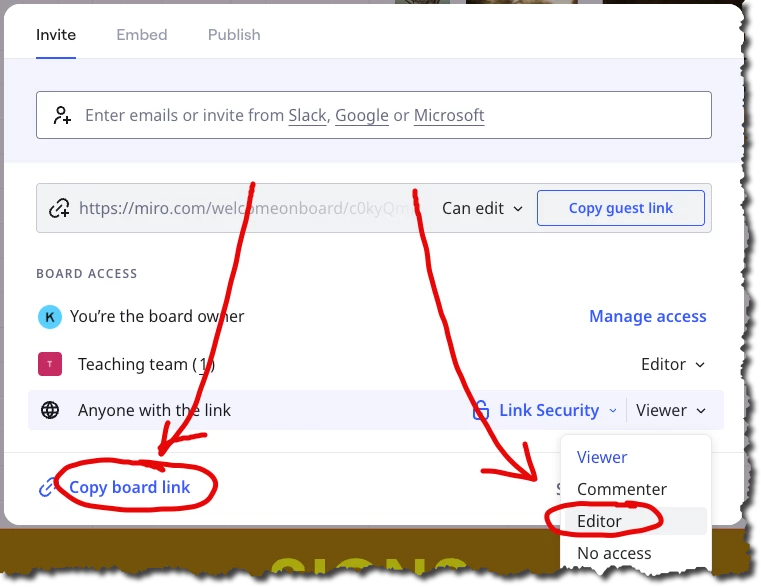
One workaround may be to set up a board on your private account on your laptop - then set the sharing of that board to “EDIT,” then use the URL you get by clicking on the link: 


On your work laptop - at least if you start by clearing your cache - you should be able to access that board with NO LOGIN NEEDED!

Now . . . not the optimal security. Anyone with the link can access your board. But if this is for a short time to impress your boss -- and if you are confident nobody will get the link who doesn’t need to have the link -- then this should be an easy approach!

Good luck! Ken


Eca
Mironeer
Forum|alt.badge.img+5
  • Mironeer
  • March 25, 2026

Hi ​@thotha 

Thanks for explaining — I can see how that would put you on the issue loop, especially when switching devices.


This usually happens when there are multiple accounts created with slightly different login methods or emails, which causes the password resets to affect only one of them.

Here’s what I recommend:

  • Make sure you’re using the exact same email address on both devices (watch out for small differences or typos)
  • Try logging in using email + password only (not the magic link), and stick to one method consistently
  • After resetting your password, log out of all sessions and then log back in on both devices using the same credentials

If you’re still getting the “credentials don’t match” error, it’s possible a duplicate account was created. In that case, let me know and we can escalate this to support to help identify the correct account and get you back in.