We are currently using the Education Plan. However, even though the board is set to public and shared accordingly, users who access it are being counted as full-license users. As a result, we are unable to share it with more than 100 people.
Could you advise on how to resolve this issue?
Best answer by Robert Johnson
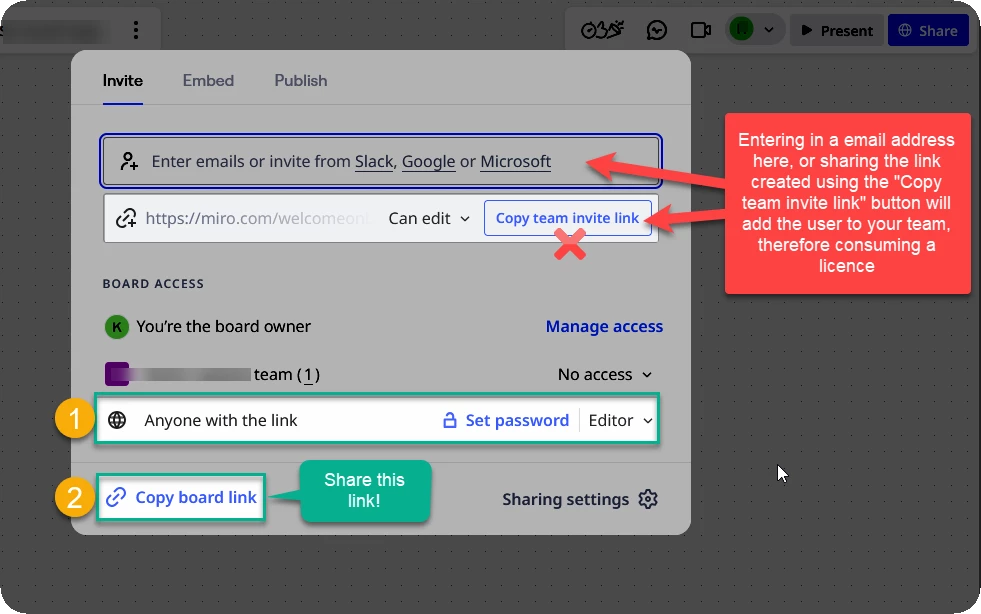
@昌弘 花谷 As Eca shared, if you share a link by entering an email address here or using the Copy team invite link button, the recipient will become a fully licence team member — you’ll want to use the Copy board link action, or copy the board link from the browser address bar:
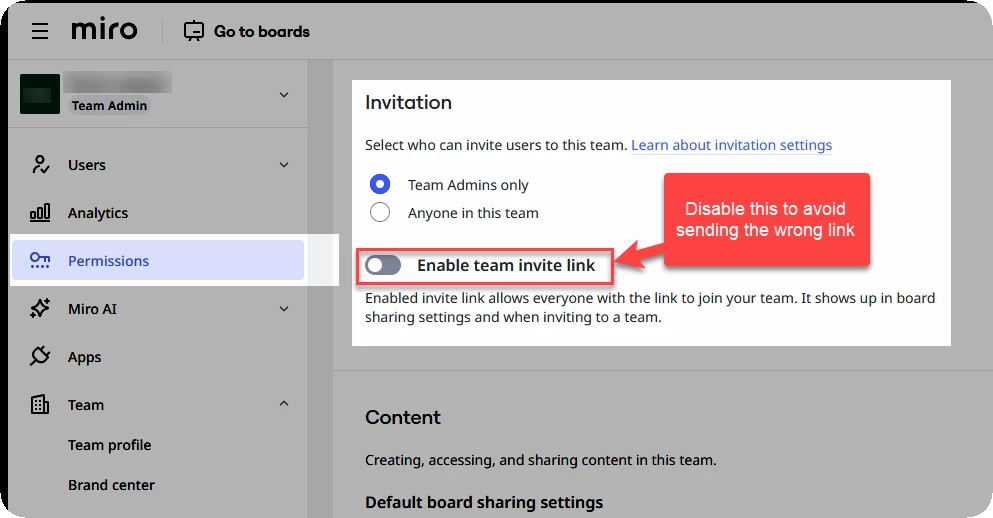
To avoid this in the future, you can disable the Team invite link, which will hide it from the share settings. The instructions are in this help center article:
Thanks for the details! This helps clarify the situation.
When sharing the board, please make sure you’re using the public board link (not inviting users as team members or assigning them licenses). If users are added via email invites or added to the team, the system may count them as full-license users, which affects your limit.
Could you please share:
A screenshot or short video of the steps you take when inviting users, or
A quick description of the exact flow you use to share the board?
This will help us see what’s happening on your end.
Also, since you mentioned you’re on the Education Plan, even if users are shown as “full licensed,” you typically should not be charged under that plan. Just to confirm, is your main concern:
avoiding charges, or
preventing users from becoming team members and only allowing board-level access?
Let us know so we can guide you to the correct setup.
@昌弘 花谷 As Eca shared, if you share a link by entering an email address here or using the Copy team invite link button, the recipient will become a fully licence team member — you’ll want to use the Copy board link action, or copy the board link from the browser address bar:
To avoid this in the future, you can disable the Team invite link, which will hide it from the share settings. The instructions are in this help center article:
As you both pointed out, I had been sharing via the “Copy team invite link” button. However, as Robert noted, it appears that instead of using “Copy board link” (option 2), I mistakenly used the “Copy team invite link” when sharing.
I did not fully understand the difference between these two options and ended up creating a team invite link and distributing it to the participants.
In the next lecture, I will try sharing again using the “Copy board link” option.