Question

Text showing as gibberish

  • April 8, 2026
  • 3 replies
  • 57 views

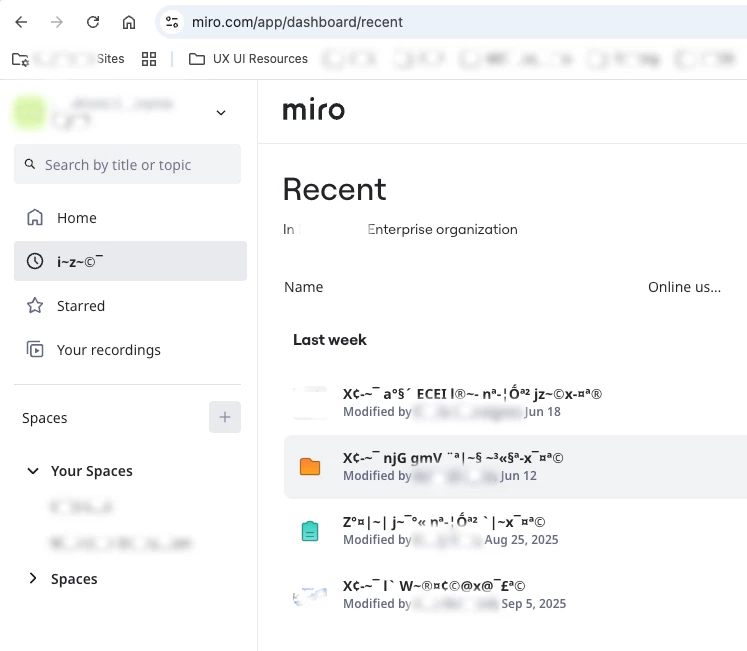
This is in various places across the site, when i edit text on boards etc - the text is showing as random letters. In this pic you can see ‘home’ shows as 5XVN. It’s making the site impossible to use. I am in the web browser. Any suggestions for a fix? I can’t contact support because I’m on a free account. 

3 replies

Robert Johnson
Forum|alt.badge.img+13
  • Volunteer Community Moderator
  • April 8, 2026

@Pistachi Bow I suspect this is caused by a JavaScript language file not fully loading.

Are you using a Miro-supported browser?

If it is still happening, I would suggest that you

  1. clear your browser cache
  2. relaunch your browser
  3. try again

You could also try:

  1. disabling any firewall/VPN software
  2. another browser
  3. the Miro desktop app

This is in various places across the site, when i edit text on boards etc - the text is showing as random letters. In this pic you can see ‘home’ shows as 5XVN. It’s making the site impossible to use. I am in the web browser. Any suggestions for a fix? I can’t contact support because I’m on a free account. 

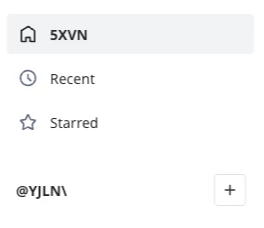
I have this same problem and asked Miro support for help August 2025. I had multiple Miro support people try to help me with various potential solutions...and sadly nothing worked.


This is in various places across the site, when i edit text on boards etc - the text is showing as random letters. In this pic you can see ‘home’ shows as 5XVN. It’s making the site impossible to use. I am in the web browser. Any suggestions for a fix? I can’t contact support because I’m on a free account. 
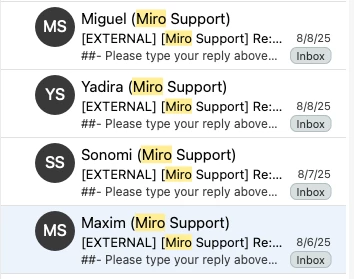
I have this same problem both when viewing the dashboard and when editing a board. I reached out to Miro support but the ideas that generated didn’t solve the problem.  When on the dashboard and clicking on left rail navigation, it will alternated between gibberish and legible. Also when I use Noto Sans on a board, it is gibberish. Noto Sans is my company’s brand alternate font. Wondering if there is some enterprise level custom font choice that is causing this, that I don’t have access to... to switch it. Other fonts don’t seem to have this problem.

Notice how the left rail selected item is gibberish but the non-selected is readable. Also the titles of the board results has gibberish but the “Modified by...” is readable. I’ve gotten used to this defect but still wish it would go away.

This definitely slows down my workflow.


Eca
Mironeer
Forum|alt.badge.img+5
  • Mironeer
  • June 22, 2026

Hi ​@Sheila Oberaigner thanks for reporting this!

Since the text alternates between readable and unreadable states, affects both the dashboard and boards, and appears to be related to specific fonts such as Noto Sans, it seems more likely to be a font rendering or display issue.

To help investigate this further, I'll convert your post into a support ticket so the team can conduct a more in-depth investigation. You should receive a response shortly.