
Space loading issue

  • April 20, 2026
  • 1 reply
  • 7 views

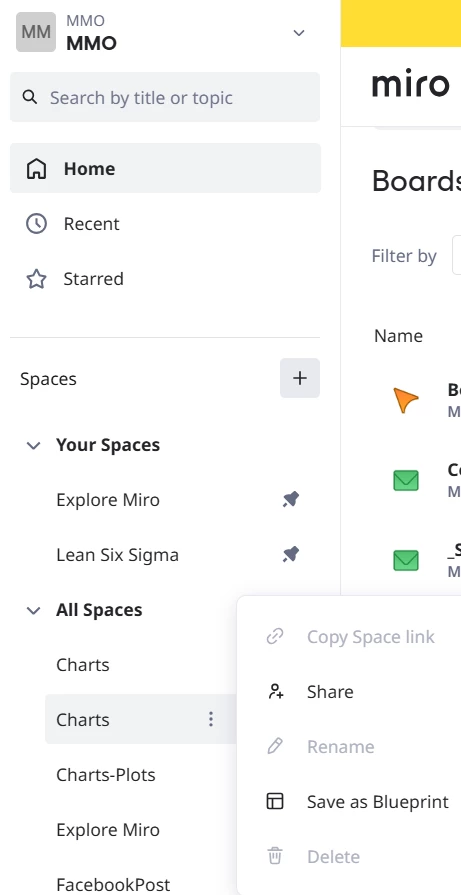
I cannot delete spaces, when right click on the ellipse button, the option is greyed out (disabled)

Also, the side menu for Spaces is working inconsistently. Most of the time the home menu is showing, and there is no way to add new section to organize the space if that Home menu keep popping up.

 

1 reply

Eca
Mironeer
Forum|alt.badge.img+5
  • Mironeer
  • April 22, 2026

Hi ​@Richard Duong Nguyen Thanks for sharing the screenshot — that really helps clarify what’s going on.

From what I can see, the “Delete” and “Rename” options are greyed out, which usually points to a permissions limitation rather than a bug. This typically means that the space you’re trying to modify is not owned by you, or you don’t have sufficient rights (example: you’re not a Space owner or Team Admin).


Confirm your role in the team/space

  • If the space was created by someone else or belongs to a shared/team structure, only the owner or admins can delete or rename it.
  • You may want to check with your team admin to confirm your permissions.


About the sidebar / Home menu issue:

The behavior you described (Home menu reappearing and preventing organization) does sound like a UI inconsistency. Please try the following:

• Hard refresh the page
Ctrl/Cmd + Shift + R

• Try incognito or another browser
This helps rule out caching or extension conflicts.

• Disable browser extensions temporarily
Some extensions can interfere with sidebar rendering.

• Resize or zoom reset
Set zoom to 100% and expand the window — sidebar glitches can sometimes be layout-related.


If it’s still happening, please share the following:

  • A short screen recording of the sidebar behavior
  • Your browser and OS version
  • Whether this happens across all teams or just this one

We’ll be happy to investigate further from there.
