


Sources for AI Image Generation with Action Shortcut Button

  • October 24, 2025
  • 2 replies
  • 40 views

Forum|alt.badge.img

Hello Miro Community!

Hope I’m not missing something obvious here.  :-P 

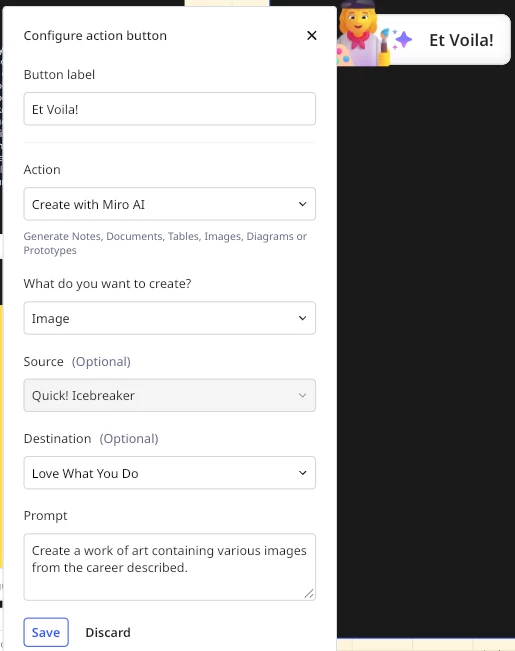
Had high hopes I could configure the Action Shortcut button to generate an image based on stickies within a source frame.  Unfortunately what is generated was completely disconnected to what’s in the frame.  I’ve tried turning the stickies into Text, Jira Cards, a Doc, etc., and none seem to get “picked up” by the AI image generator.  

Given the “Source (Optional)” option stays active when you select “Image” in the dropdown above, and frames are your only Source options, what exactly is the AI able to pull from the Source frame?  

Any thoughts?
 

2 replies

Eca
Mironeer
Forum|alt.badge.img+4
  • Mironeer
  • October 27, 2025

Hi ​@Erin Barton-Wynne thanks fo reaching out! I could not replicate this on my end. I have your case converted to a support ticket. You should receive a response soon!


Forum|alt.badge.img
  • Beginner
  • March 12, 2026

From what I have seen, the AI image tool in Miro mostly focuses on the prompt you provide rather than automatically pulling detailed context from items inside the frame. Even though the source frame can be selected, stickies or cards are not always interpreted as prompt content unless the text is clearly structured.

Sometimes it helps to summarize the key idea from the frame into a short prompt and use that for the generation instead. Outside of Miro, there are also dedicated tools like a brat image generator that focus more on turning text ideas into stylized visuals quickly, which might be closer to what you are trying to achieve.

