Question

Scroll on mouse

  • May 25, 2025
  • 2 replies
  • 84 views

How can i switch when scrolling up and down on my mouse to make chart go up or down instead of zooming in and out (smaller/bigger)?

2 replies

Robert Johnson
Forum|alt.badge.img+13
  • Volunteer Community Moderator
  • May 25, 2025

@Oscar Lönnberg The only way I currently know to do this without forcing your navigation mode to trackpad, would be to put the chart in a Miro Doc and switch to focus/full screen mode.


Eca
Mironeer
Forum|alt.badge.img+2
  • Mironeer
  • May 28, 2025

Hi ​@Oscar Lönnberg, thanks for reaching out!

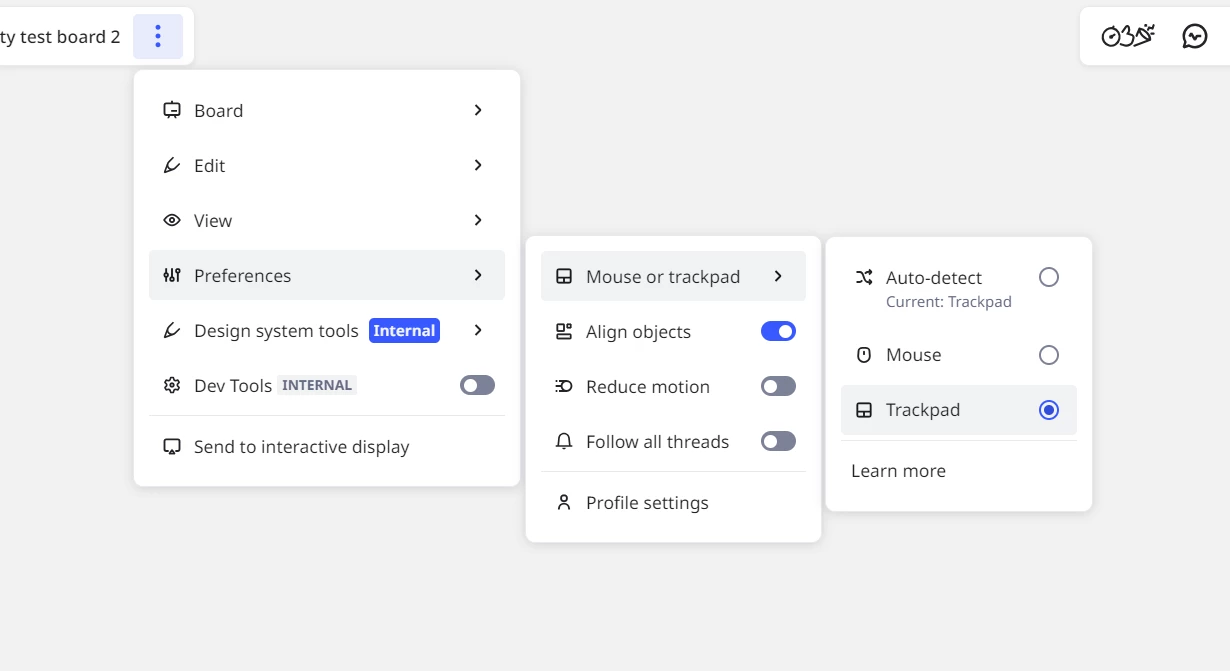
Just like what Rob has mentioned, you can change this in the setting:

  1. Go to Board Settings.

  2. Under Preferences > Trackpad

Once toggled, scrolling will move the board vertically instead of zooming.

Let me know if this doesn’t work on your end so we can note it and escalate to the team if needed.