Answered

[RESOLVED] Side panel missing - Roadmap

  • February 17, 2026
  • 5 replies
  • 66 views

Hey! 


My team has been trying out the Roadmap Planning template for a couple of weeks now, we’ve been very happy with it. However, today we logged in and came up with the surprise that the side panel view for the tickets is not available anymore. 

¿Is this normal? ¿Or how could we get the option back? The view is crucial to edit and acces the description for me and my team, since we all work remotely. 

 

Best answer by grace.fox

Seems like it has been reinstated in the last hour. 

5 replies

Robert Johnson
Forum|alt.badge.img+13
  • Volunteer Community Moderator
  • February 17, 2026

@Gina Falduto I have been hearing other reports of this — it sounds like a bug, and not intentional.

I would suggest that you report the issue to Miro support.

Paid subscribers you can open a Miro support ticket by following these instructions:

https://help.miro.com/hc/en-us/articles/360020185799-How-to-contact-Miro-Support#h_01F010RXA0E1S9C0WFQYX75R6C


Workarounds

  1. I heard from one user that the option to open the side (or center) panel view is still available when the card is outside of the Table/Kanban/Timeline format.
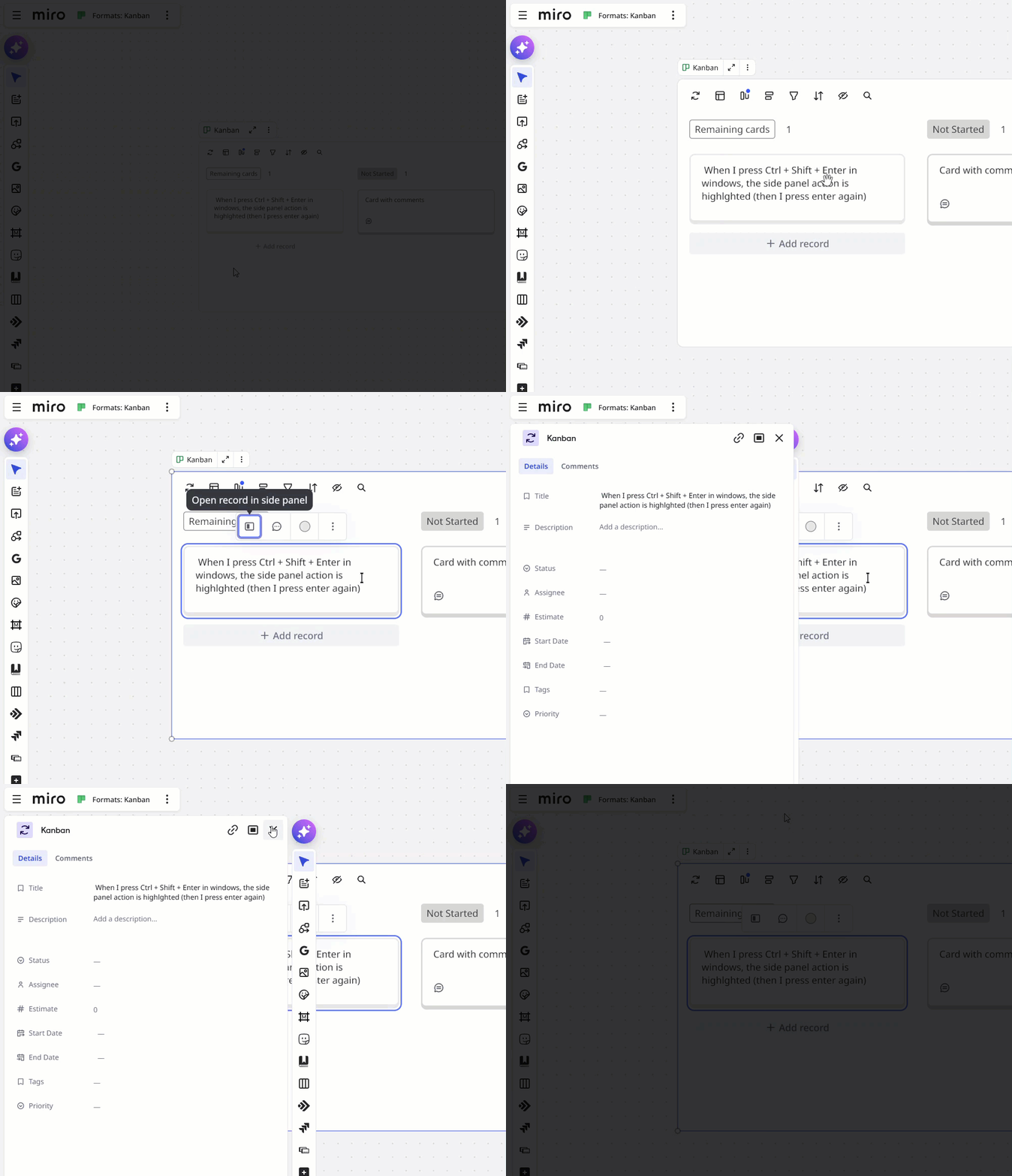
  2. Additionally, you could try the Ctrl/Cmd + Shift + Enter shortcut while the card is selected — this works for regular Miro cards, and for these new cards (however, when I try the shortcut, it highlights the action and then I press enter again. Maybe try Ctrl/Cmd + Shift + Enter and then press Enter a second time?


  • Author
  • New Here
  • February 17, 2026

@Robert Johnson thank you very much for your response.

We tried the workarounds you suggested. The first one works as expected and syncs correctly with the Table/Kanban/Timeline views. 

The second option technically works as well; however, the side panel feature is still missing. As you mentioned, this may not be intentional and could likely be a bug.

I’ve already contacted ​@Miro Support Team through the link you shared, and I’m currently waiting for their response.

Thanks again for your help — I truly appreciate it.


  • New Here
  • February 17, 2026

Same issue here. It just desappeared. I have only an option to change the color, duplicate and remove.


Hi,

I also encountered the same issue here. Only the option to change the color is visible.

  • I tried to clear the cache and incognito, but no result.
  • The Ctrl/Cmd + Shift + Enter shortcut workaround doesn’t work because the icon of the action to open the sidepanel is simply not there, it highlights the color button.
  • When I move an instance of the record outside it works indeed, but it’s not very nice or efficient to work like that of course.

Hope it could be solved!
Thanks in advance.


  • New Here
  • Answer
  • February 18, 2026

Seems like it has been reinstated in the last hour.