I’m reaching out regarding the ADF Product workspace.
The current Team Admin associated with this workspace is no longer with the company, and as a result, our team has lost the ability to manage users, roles, and security settings. This workspace is actively used by our product team, and the lack of admin access is now blocking our ongoing work.
I am an active member of the ADF Product workspace and represent the team that owns and operates it. I would like to request a transfer of Team Admin rights to my account so that we can continue managing the workspace properly.
We are also planning to upgrade this workspace to a Starter or Business plan, however, we would like to resolve the admin access and user management issue first to ensure the upgrade is done correctly.
Please let me know what information or verification you need from my side to proceed with this request. I’m happy to provide any additional details required.
Thank you in advance for your help.
Best regards,
Viktoriia Khramovich
Best answer by Robert Johnson
For anyone else in the situation where you are working in an independent, non-company administered application and have run into the situation where the only admin is not long available, here are a few ways to get back in control of the situation:
Create a new Free Plan team and move all users/boards to the new team — detailed steps on how to do this here.
Purchase a paid subscription, and then similar to the above, move all team members are boards to the new subscription.
Creating a Paid Subscription vs. upgrading a Free Plan team
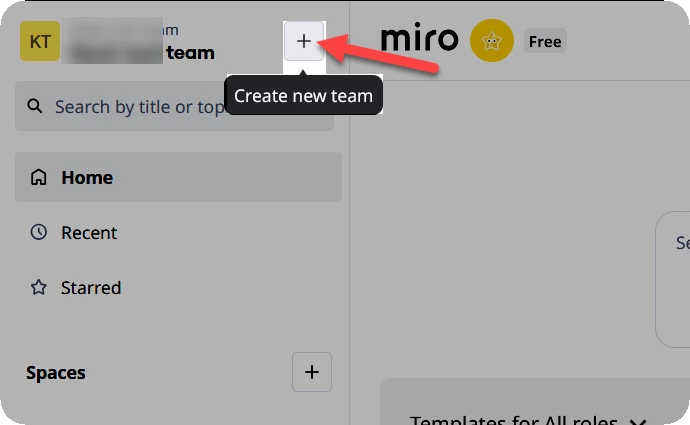
If your account profile is only a member of one team space, you should see a Create new team action to the right of your current team name:
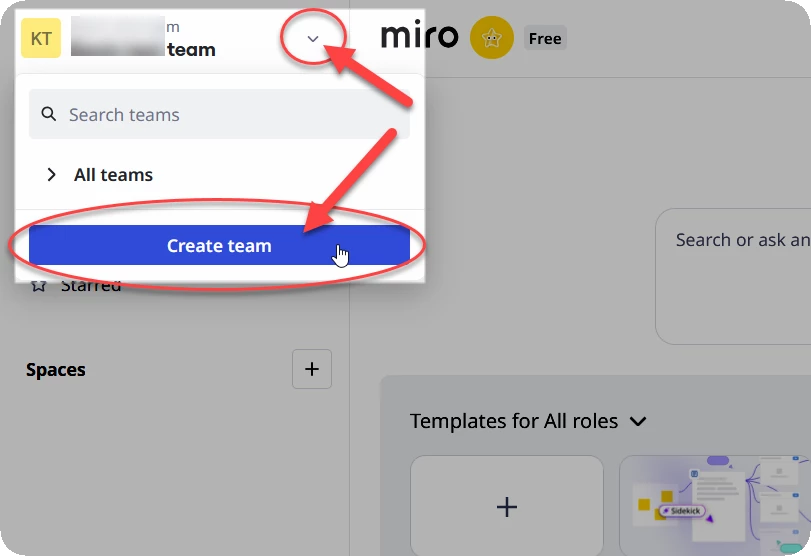
And if your account profile is a member of two or more team spaces, you should see a Crate team action in the team switcher menu:
A third option is to browse to https://miro.com/pricing/ (NOTE: You should already be signed into Miro before doing this as it will create a new team under your current account profile!)
@Vikkhram I will convert your request into a support ticket to see if there is anything they can do for you.
This is a common issue when a primary admin leaves an organization. Most workspace tools have a verification process for transferring admin rights, so support should be able to help once ownership is confirmed.
The current Team Admin of the ADF Product workspace has left the company and no longer has access to the corporate email or Miro account. At the moment, there is no one with admin-level access to manage users, permissions, or security settings, which is blocking our team’s work.
I’m an active member of this workspace and part of the team responsible for it. I’m also using a corporate email associated with the company.
We are planning to upgrade this workspace to a paid plan, but need to resolve the admin access issue first.
Please let me know what verification steps are required from my side to proceed.
@Bairstow1020 Thanks for the clarification — appreciate you confirming that this is a common case. I’ve followed up with additional details and am waiting for the support team’s guidance on the verification process.
For anyone else in the situation where you are working in an independent, non-company administered application and have run into the situation where the only admin is not long available, here are a few ways to get back in control of the situation:
Create a new Free Plan team and move all users/boards to the new team — detailed steps on how to do this here.
Purchase a paid subscription, and then similar to the above, move all team members are boards to the new subscription.
Creating a Paid Subscription vs. upgrading a Free Plan team
If your account profile is only a member of one team space, you should see a Create new team action to the right of your current team name:
And if your account profile is a member of two or more team spaces, you should see a Crate team action in the team switcher menu:
A third option is to browse to https://miro.com/pricing/ (NOTE: You should already be signed into Miro before doing this as it will create a new team under your current account profile!)
@Vikkhram I will convert your request into a support ticket to see if there is anything they can do for you.