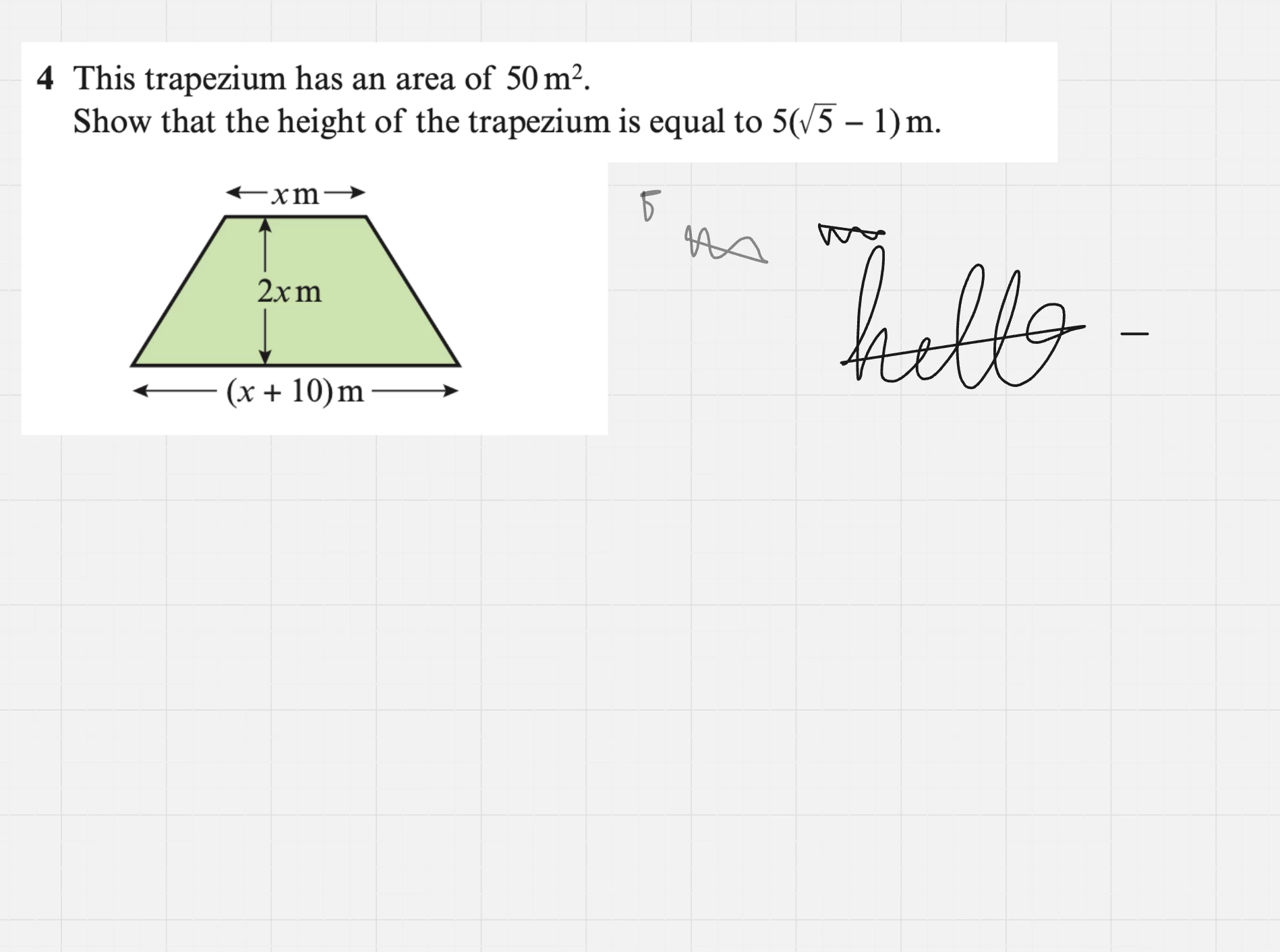
One of my tutoring clients has started having a strange issue with the standard Pen tool on Miro.
When she writes with an Apple Pencil on an iPad, Miro will sometimes automatically draw a straight line from the end of a word/stroke back to the beginning, creating a line that basically scores out the word or working and makes it really hard to read. (see attached image).
A few details:
- She is definitely using the standard Pen tool, not Smart Drawing.
- She's been using Miro weekly for nearly a year, so this isn't a case of getting used to the app.
- The issue only started yesterday.
- It isn't consistent.
- Refreshing the board will sometimes stop it for a few minutes, but then it starts happening again.
- It happens in both iPad app and the browser version on the same iPad.
- It even happens when making a very quick scribble, so it doesn't seem related to holding the Pencil down for too long.
- Because it only happens on her device, it's difficult for me to do deeper troubleshooting remotely.
The image below shows it clearly - she tried a couple of quick “squiggles” and a line appeared from the end to start, and you can see it on the word “hello” that she wrote out too.
Has anyone else experienced this, or know if it's a known bug? Any suggestions would be much appreciated.
Thanks!