[RESOLVED] No access to public board

  • Feb 8, 2022 1:07 PM UTC
  • 12 replies
  • 739 views

Hello community,

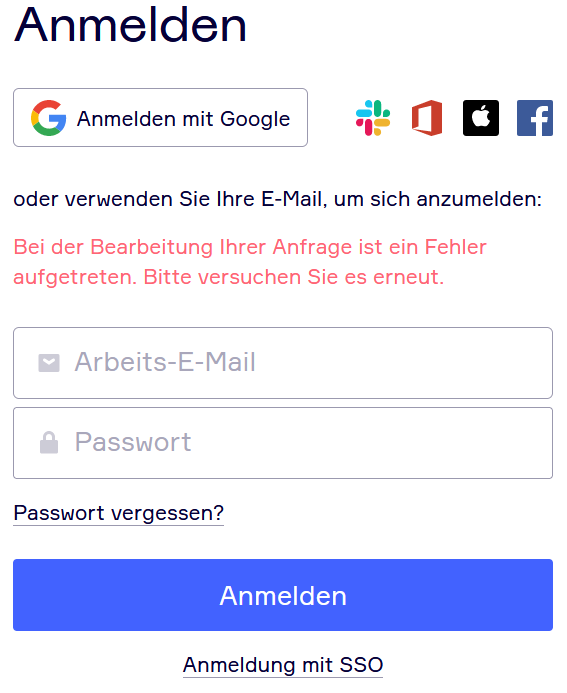
as of today, people we invited to our public miro-Board are not able to access anymore. The link settings are set to “Can view”, but people are alws asked to sign in, when opening the link (see screenshot). Red text says “An error occurred processing your request. Please try again.”

Any ideas? Thank you!

EDIT: Deleting Cache and Cookies doesn’t help. Problem appears in Chrome and Firefox in normal and private mode.

Robert
 

Mar 22, 2022 10:56 AM UTC

Hi guys, good news! 🙂

The team has released the fix for the public view access. Now the users can access these boards via their public links without being forced to sign in to Miro.

Can you please check whether everything’s running smoothly on your end?

12 replies

  • Author
  • Beginner
  • Feb 9, 2022 7:33 AM UTC

SOLVED
Seemed to be a technical issue :shrug:


  • Author
  • Beginner
  • Feb 10, 2022 7:49 AM UTC

It’s not working anymore again :slight_frown:


I got the same shitty problem.  The only workaround is to put your board in “Edit mode” while they sort this out.


I have the very same problem.

In your answers it seemed like this was only a temporary technical issue? So normally this shouldn’t be the case and in the past this wasn’t an issue yet, is that right? (I am very new so I cannot say what’s “normal”)


  • Author
  • Beginner
  • Feb 11, 2022 8:17 AM UTC

I don’t know if this has been an issue before. It seemed to work the day after I posted the questions (that’s wh I thought it had to be a “technical/system” problem), but again, one day after...same problem.


Exact same bug here!


  • New Here
  • Feb 28, 2022 9:37 AM UTC

Same problem here, seems to have occured only yesterday.


  • Beginner
  • Mar 8, 2022 10:39 AM UTC

Same issue, different day.

What is happening, guys??


Kiron Bondale
Forum|alt.badge.img+7
  • Volunteer Community Moderator
  • Mar 8, 2022 12:49 PM UTC

@Rodrigo EV - 

Could you open a Miro support request here so it can be investigated by the support team as it looks like a few folks are having this issue? Submit a request – Miro Support & Help Center

I just tried it out with one of my test board - I set it to public view access and then was able to successfully access it via a Google Chrome incognito session (Windows 10 laptop).

Kiron


  • Beginner
  • Mar 8, 2022 4:50 PM UTC

New public boards seems to work for a week, then this error shows up.


Apollonia
Mironeer
Forum|alt.badge.img+1
  • Mironeer
  • Mar 9, 2022 11:27 AM UTC

Hi guys!

Thank you all for reporting your cases here and bringing our attention to the issue! 

I'm afraid that currently, there's a bug on our end that causes this behavior. Our team is currently working on a fix for it! 🛠️

We'll make sure to keep you all updated on the issue within this thread!


Apollonia
Mironeer
Forum|alt.badge.img+1
  • Mironeer
  • Mar 22, 2022 10:56 AM UTC

Hi guys, good news! 🙂

The team has released the fix for the public view access. Now the users can access these boards via their public links without being forced to sign in to Miro.

Can you please check whether everything’s running smoothly on your end?