
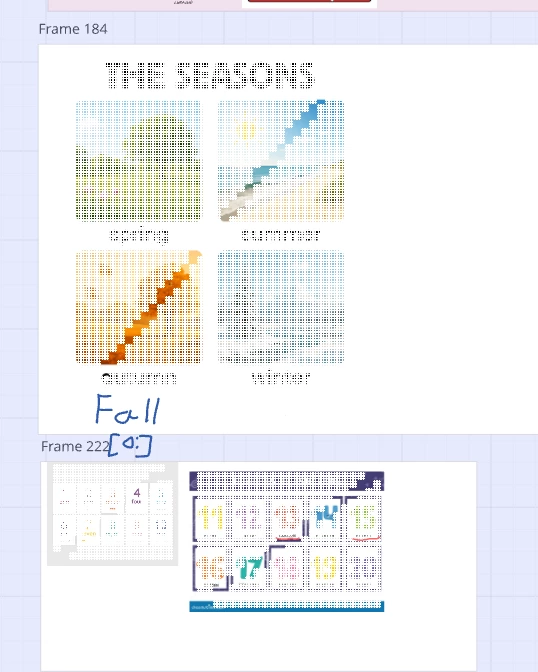
My pictures turn into this

  • April 6, 2026
  • 5 replies
  • 28 views

I’ve got a problem, where after some time all my pictures started turning into this when I zoomed to them. Sometimes it disappears when I move the screen, but after I zoom-in or zoom-out it appears again. I’ve tried Firefox, Chrome browsers but they are still the same.


5 replies

Kenneth Ritley
Forum|alt.badge.img+2

Hi ​@Quinta 

You didn’t provide too many details - maybe other people have seen this behavior? But I see in your screenshot “Frame 222” - that’s potentially a lot. Have you experimented with a fresh board and just 1-2 images?

Depending how nuch memory your board is consuming I could easily imagine that the you are putting a strain on the Miro rendering engine . . . 

Good luck!  Ken


Eca
Mironeer
Forum|alt.badge.img+5
  • Mironeer
  • April 6, 2026

Hi ​@Quinta thanks for reaching out!

To help narrow things down, here are a few things you can try:

1. Disable hardware acceleration

  • In Chrome: Settings → System → turn off “Use graphics acceleration when available”
  • In Firefox: Settings → General → Performance → uncheck “Use recommended performance settings” → disable hardware acceleration
  • Then restart your browser

2. Make sure everything is up to date

  • Update your browser to the latest version
  • Check for any available system or graphics updates

3. Test in a private/incognito window

  • This helps rule out any extensions affecting behavior

4. Try different zoom methods

  • Use the zoom buttons (+ / -) or mouse scroll instead of trackpad gestures to see if there’s any difference

5. Reduce load if possible

  • If the board contains many large images, try closing other tabs/apps and reloading the board

If the issue continues, could you share a short screen recording along with your OS and browser version? That will help us take a closer look.


  • Author
  • Beginner
  • April 7, 2026

Hi ​@Quinta 

You didn’t provide too many details - maybe other people have seen this behavior? But I see in your screenshot “Frame 222” - that’s potentially a lot. Have you experimented with a fresh board and just 1-2 images?

Depending how nuch memory your board is consuming I could easily imagine that the you are putting a strain on the Miro rendering engine . . . 

Good luck!  Ken

Unfortunately this same happens when I create a new board and paste a picture in it :(


  • Author
  • Beginner
  • April 7, 2026

Hi ​@Quinta thanks for reaching out!

To help narrow things down, here are a few things you can try:

1. Disable hardware acceleration

  • In Chrome: Settings → System → turn off “Use graphics acceleration when available”
  • In Firefox: Settings → General → Performance → uncheck “Use recommended performance settings” → disable hardware acceleration
  • Then restart your browser

2. Make sure everything is up to date

  • Update your browser to the latest version
  • Check for any available system or graphics updates

3. Test in a private/incognito window

  • This helps rule out any extensions affecting behavior

4. Try different zoom methods

  • Use the zoom buttons (+ / -) or mouse scroll instead of trackpad gestures to see if there’s any difference

5. Reduce load if possible

  • If the board contains many large images, try closing other tabs/apps and reloading the board

If the issue continues, could you share a short screen recording along with your OS and browser version? That will help us take a closer look.

  1. Didn’t help
    2. Everything is up to date 100%
    3. Private windows, still the same
    4. I already use mouse, but +/- behaves the same.
    5. Tried
    My video: https://drive.google.com/file/d/1yQNXsLHV64ZCDBuPMNMukC79YQXg7--y/view?usp=sharing

Eca
Mironeer
Forum|alt.badge.img+5
  • Mironeer
  • April 7, 2026

HI ​@Quinta thanks for following up! I have your case converted to a support ticket for further investigation. You should receive a response shortly.

