Answered

My pen tool disappeared

  • April 4, 2025
  • 2 replies
  • 91 views

Hello! I was wondering, where did my pen go? I svear, I looked everywhere, on a toolbar, in the settings - it is non-existent. It is crucial for my lessons - so it is a bit frustrating. What can I do to find it? 

Best answer by Miro Community Team

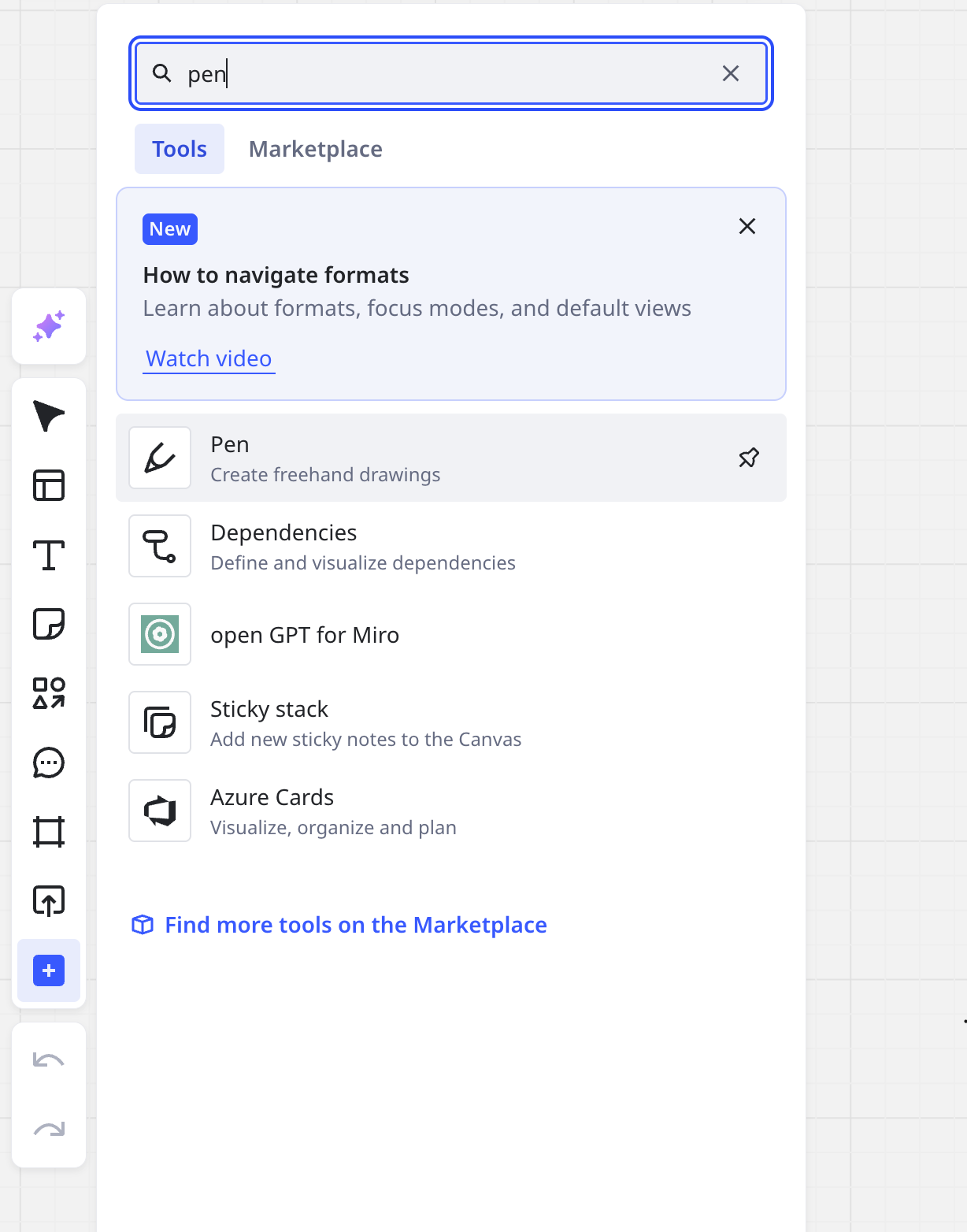
Hi ​@Mari Nihongo, thank you for your post. You can enable pen by simply using a shortcut - “P”. If you would like to have it visible in the toolbar, you can click on the “+” button on the bottom of the toolbar and type “pen” in the search bar. I’m attaching an image of where to find it below. Please let us know if it answered your question :) 


2 replies

Hi ​@Mari Nihongo, thank you for your post. You can enable pen by simply using a shortcut - “P”. If you would like to have it visible in the toolbar, you can click on the “+” button on the bottom of the toolbar and type “pen” in the search bar. I’m attaching an image of where to find it below. Please let us know if it answered your question :) 


  • Author
  • New Here
  • April 4, 2025

Thanks so much for you kind answer :)
Honestly, I didn’t know about the shortcut, definitely will be using it from now on