Answered

Is there a way to turn off shortcuts in browser?

  • Dec 16, 2020 1:49 PM UTC
  • 2 replies
  • 655 views

Miro is hijacking the shortcuts I typically use to toggle between tabs in my browser on Mac. For instance, if I want to check an email in tab 1, I hit command + 1 expecting to see my inbox but instead the miro board just zooms out to the stratosphere.

Best answer by Robert Johnson

@AndrewG - Miro doesn’t offer a way for users to disable these shortcuts. Depending on which browser you are using, there may be a setting a way to do this in the browser itself or using a browser plugin/extension.

View original

2 replies

Robert Johnson
Forum|alt.badge.img+13
  • Volunteer Community Moderator
  • Answer
  • Dec 16, 2020 2:06 PM UTC

@AndrewG - Miro doesn’t offer a way for users to disable these shortcuts. Depending on which browser you are using, there may be a setting a way to do this in the browser itself or using a browser plugin/extension.


Robert Johnson
Forum|alt.badge.img+13
  • Volunteer Community Moderator
  • Dec 10, 2025 4:32 PM UTC

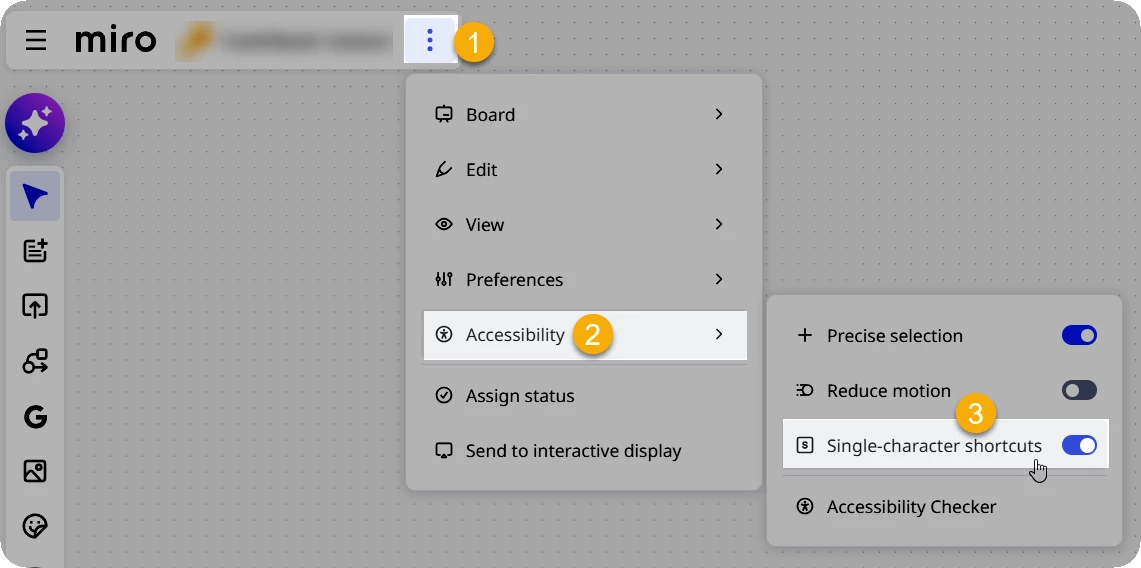
While this won’t cover every scenario, users can now disable Single-character shortcuts at their user-profile level: