Answered

Is it possible to make notes on the board that only the creator can see? 

  • February 15, 2026
  • 4 replies
  • 40 views

Is it possible to make notes or stickies on the board that only the creator can see? 

Currently everyone has access to the board and we want to keep it that way, but just make some notes that aren't visible to everyone. 

Thank you.

Best answer by Robert Johnson

@rina.w What you are describing is not currently possible in Miro. 

Here are a few options that would keep you on the current board:

- Embed a private Miro board into your working board

- Embed a private Google Doc or Word Doc (or some other 3rd-party live embed it o your working board.

4 replies

Robert Johnson
Forum|alt.badge.img+13
  • Volunteer Community Moderator
  • Answer
  • February 16, 2026

@rina.w What you are describing is not currently possible in Miro. 

Here are a few options that would keep you on the current board:

- Embed a private Miro board into your working board

- Embed a private Google Doc or Word Doc (or some other 3rd-party live embed it o your working board.


  • Author
  • New Here
  • February 16, 2026

Thank you for your answer and suggestion Robert, much appreciated.


Kenneth Ritley
Forum|alt.badge.img+2
  • Active Contributor
  • February 16, 2026

​This suggestion is a good idea for “nuclear strength” privacy. Another idea that I use is simply to put anything secret onto a frame, then hide the frame. As the owner of the board I am the only one to be able to unhide the frame. Naturally if I unhide it other people will see it when it is unhidden, so that’s a disadvantage.

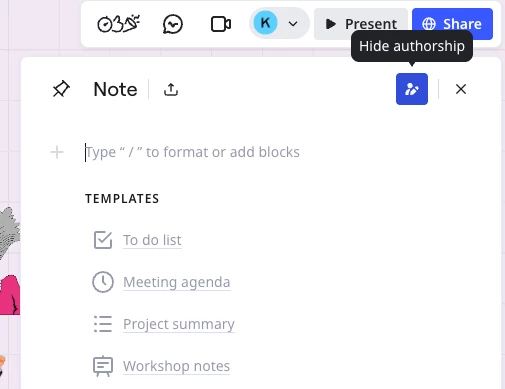
I also have never used Notes myself, but maybe that is an option?  I suspect “hide authorship” may be just that, hiding who created the note not hiding the note itself. So it could work well if you could develop your own secret language then not share it with anyone. 😉


Robert Johnson
Forum|alt.badge.img+13
  • Volunteer Community Moderator
  • February 16, 2026

Great shoutout ​@Kenneth Ritley with the Frames hide/reveal! The downside, as you mentioned can be that an unhidden frame can be viewed by anyone also on the board at the same time the frame is unhidden. To read more about the hide/reveal frames feature ​@Kenneth Ritley is referring to here:

https://help.miro.com/hc/en-us/articles/360018261813-Frames#01H7YR4H1CWPG1PH1N2AT3ZXAP

Re the Visual notes authorship, it’s as Ken suspected — it simply shows who typed what:

Click the Show authorship icon to see the initials of content creators to make it easier for other contributors to determine who is responsible for changes and additions to the note.

visual-notes-show-authorship.png