[INVESTIGATING] Internal links breaks when making a copy of the Miro board

  • April 14, 2026
  • 3 replies
  • 38 views

Forum|alt.badge.img

Hi!

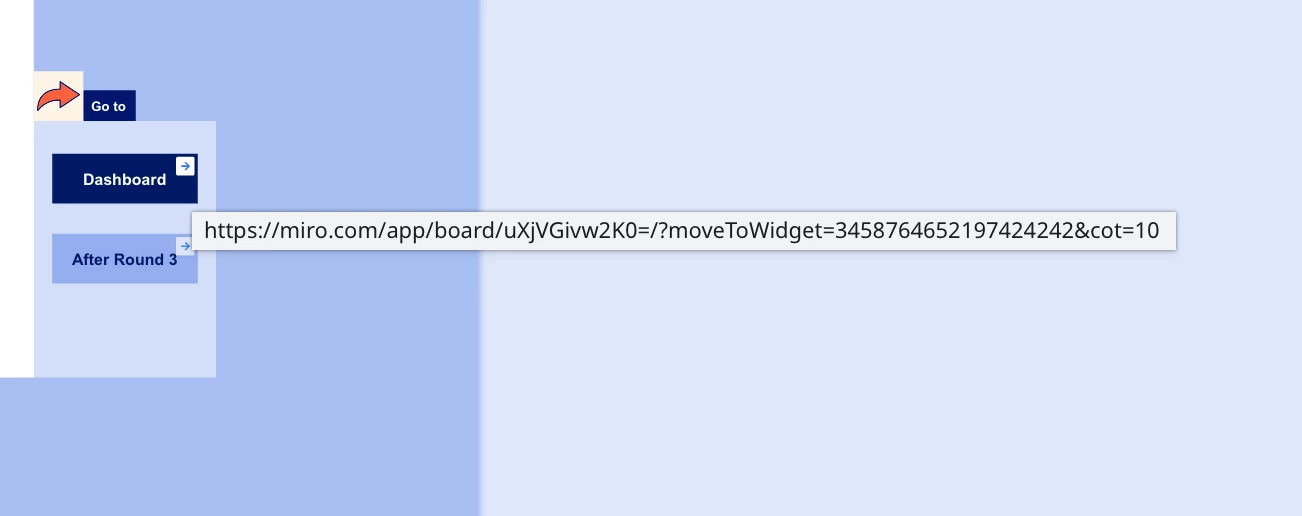
I have a Miro board that contains several internal links between graphic objects. When I create a copy of the board or import from backup file, some of these links stop working. What’s strange is that only certain links are affected—others continue to work just fine. I haven’t been able to identify any pattern that explains why some links break while others don’t.

How can I solve the problem?

April 15, 2026

@Ane Bang Thanks for confirming. Honestly, I have ran into this myself in the past, but just haven’t taken the time to stop for a closer look. Now that I have, the issue looks to be related to any links that are later updated. Here’s what I believe is happening…

There is an ampersand in the URL. When it is saved in the back end, Miro encodes it as &

When the value is displayed in the UI edit box, it isn’t being decoded back to &. Then, when saved, it is double-encoded and we end up with &,  and the link still works fine as the moveToWidget and related ID are still intact. What seems to break is the process of updating the board ID in the links when a board is duplicated or restored as the pattern in the URL is broken.

I have opened a support ticket to report the issue and update this post as I hear back.

3 replies

Robert Johnson
Forum|alt.badge.img+13
  • Volunteer Community Moderator
  • April 14, 2026

@Ane Bang If by "some of these links stop working", you mean 'they are opening a new window to the original board and are notinking to an object on the current board', this can be explained by the difference between links created by using Link to vs. Insert link - I breakdown the difference here:

https://community.miro.com/inspiration-and-connection-67/linking-objects-together-in-miro-7614?postid=31968#post31968

Does this explain what's happening with your boards?


Forum|alt.badge.img
  • Author
  • Beginner
  • April 15, 2026

No, the links does just not work at all - nothing happens when I click on them. It show the link but nothing happens. The links are created with “Link to”. 


Robert Johnson
Forum|alt.badge.img+13
  • Volunteer Community Moderator
  • April 15, 2026

@Ane Bang Thanks for confirming. Honestly, I have ran into this myself in the past, but just haven’t taken the time to stop for a closer look. Now that I have, the issue looks to be related to any links that are later updated. Here’s what I believe is happening…

There is an ampersand in the URL. When it is saved in the back end, Miro encodes it as &

When the value is displayed in the UI edit box, it isn’t being decoded back to &. Then, when saved, it is double-encoded and we end up with &,  and the link still works fine as the moveToWidget and related ID are still intact. What seems to break is the process of updating the board ID in the links when a board is duplicated or restored as the pattern in the URL is broken.

I have opened a support ticket to report the issue and update this post as I hear back.