Question

Import Oracle OCI icons into Miro

  • March 27, 2026
  • 6 replies
  • 26 views

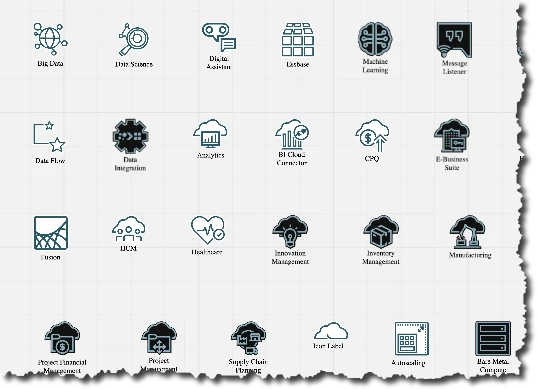
I’d like to use Miro board to create architecture diagrams for Oracle Cloud (OCI). I can see AWS , Azure, Google icon library listed under “More Shapes”, but I do not see for Oracle OCI.

Now the question is how do I  import Oracle OCI icons into Miro so I can create architecture diagrams using these icons?

From this link https://docs.oracle.com/en-us/iaas/Content/General/Reference/graphicsfordiagrams.htm, I see Oracle provides three different icon library formats ( ppt, draw.io and viso) . Can I use any of these to import into Miro board and start using them?


 

6 replies

Robert Johnson
Forum|alt.badge.img+13
  • Volunteer Community Moderator
  • March 28, 2026

@epaphras.k.kasapagu If you're on the Education, Business, or Enterprise plan, you can create your own custom diagram shape pack (SVG format only). 

More on this feature here:

https://help.miro.com/hc/en-us/articles/20352896814866-Custom-Shapes-for-Diagramming


Kenneth Ritley
Forum|alt.badge.img+2
  • Active Contributor
  • March 28, 2026

HI ​@epaphras.k.kasapagu  Not sure if this helps? I had a quick look. The PPT file contains icons that you can cut-and-paste into Miro - that’s probably your best approach. The DRAW.IO file contains the icons in XML format - with a little Python script it’s pretty easy to convert them to SVG files and - from there - bulk upload them


into a Miro board: 


I put the Python script into the Miro board above - courtesy of Claude!

Not sure if this will help?

This gives you little images - I don’t really know the ins and outs of diagramming so could be the step above from ​@Robert Johnson is unavoidable.

Cheers, Ken


Thanks ​@Kenneth Ritley . ​@Robert Johnson , I’m on a Starter plan, so this rules out importing icon toolkit into Miro, but most importantly I dont have this toolkit in SVG format, so even if I upgrade my plan it is of no use.

@Kenneth Ritley , just as you said, I have copy each icon individually into Miro board in SVG format and then I can use them in my diagrams. Even though it is little cumbersome, it is doable and Thank you. btw, I do not see the python code you mentioned, can you provide the link for that code, so I can try it out.


Robert Johnson
Forum|alt.badge.img+13
  • Volunteer Community Moderator
  • March 28, 2026

@epaphras.k.kasapagu A lesser-known feature that may be of use to you is the Saved Files library.

Note:

  • Items in the saved library are only available to the user who saved them there.
  • And they are stored at the team level — this is usually only an issue for those who are constantly moving between teams.

More on the Saved Files feature here:

https://help.miro.com/hc/en-us/articles/360017731013-Uploading-files-to-boards#h_01HNJK4CFM4JNRP1DD1QE1WCQ2


Hellen charless
Forum|alt.badge.img
 

Hi!

Yes, you can use Oracle OCI icons in Miro, but you’ll need to convert them into a format Miro supports. Currently, Miro doesn’t directly import PowerPoint (.ppt), Visio (.vsdx), or draw.io libraries as native icon sets. Here’s what you can do:

  1. Export icons as images
    • From the Oracle OCI libraries, save the icons you need as PNG or SVG files (usually you can copy them from PPT or draw.io).
    • SVG is preferred if you want them to scale without losing quality.
  2. Upload to Miro
    • Open your Miro board → click Upload → select your PNG or SVG icons.
    • Once uploaded, you can drag and drop them like regular shapes.
  3. Create a custom “library”
    • To make it easier, group your uploaded icons in a frame or use a separate board as your “icon library” so you can copy them into future diagrams.

So while Miro doesn’t support direct import from PPT, Visio, or draw.io, exporting as images works perfectly for creating OCI architecture diagrams.

If you want, I can outline a step-by-step process to quickly convert all OCI icons into SVGs for Miro. Do you want me to do that?


Thanks ​@Hellen charless and appreciate if you can provide me with an outline for bulk converting all OCI icons into SVGs. However does your converting process work in my Miro Starter plan? I don’t want to sign up for upgraded plan without knowing if Miro is the right fit for my work. 

So far as ​@Kenneth Ritley suggested I export the icon from draw.io in SVG format, and paste it in the Miro board and start using it in my diagrams. It is working just fine, but I have to run these steps for each individual icon