Answered

Image opacity

  • Jun 11, 2025 11:30 PM UTC
  • 4 replies
  • 590 views

This was asked 3 years ago "Is there a way to make the images one imports or download more/ less opaque. It would be interesting to have as a way to “see through” one image to see someone else collaborating on top and behind" has there been any updates to Miro to be able to do this?

Best answer by Kenneth Ritley

Hi ​@Mauricio Ortega & ​@Eca 

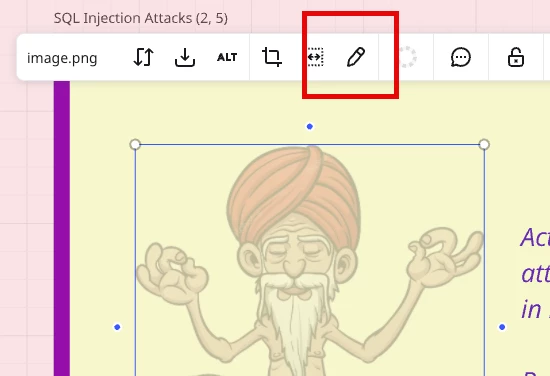
I don’t contradict Eca’s statement, but I can add this. If you are a user of Adobe, there is an integration with Miro. So for example, I can select an image like this and press “edit”:
 

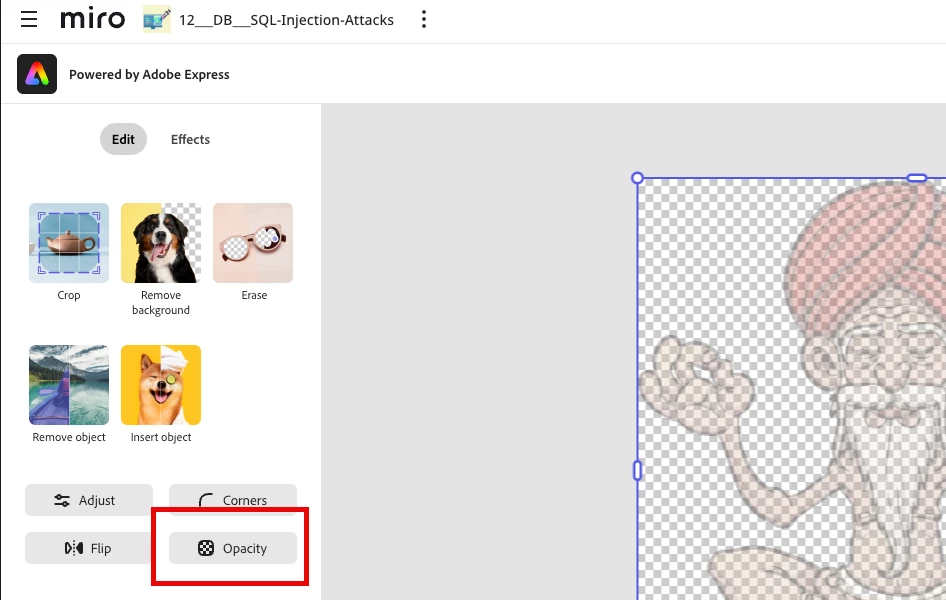
At this point the Adobe integration will start up and it looks like this, with an Opacity button:
 

Now, having said that, I actually never do this. I find it so lightening fast to have PowerPoint running. I’ll paste the image in PowerPoint, do whatever needs to be done, then cut it out and paste it into Miro. Especially because you can re-arrange the menu options in PowerPoint, you can put your most used editing tools in your main toolbar - further speeding things up.

So that’s 2 ideas that could help!

Cheers, Ken

View original

4 replies

Eca
Mironeer
Forum|alt.badge.img+5
  • Mironeer
  • Jun 13, 2025 9:53 PM UTC

Hi ​@Mauricio Ortega


Thanks for bringing this up again — it's a great idea and definitely a feature that many users would find helpful!


As of now, Miro doesn’t support adjusting image opacity directly within the board. If you need to make an image more transparent, the current workaround is to edit the image in an external tool (like Canva, or even PowerPoint), adjust the opacity there, and then re-upload it to Miro.


You’re welcome to add your vote or feedback to this feature idea in the Miro Wish List if you haven’t already.


Let me know if you'd like help with editing tips or a tool recommendation!


Kenneth Ritley
Forum|alt.badge.img+2
  • Active Contributor
  • Answer
  • Jun 15, 2025 7:34 AM UTC

Hi ​@Mauricio Ortega & ​@Eca 

I don’t contradict Eca’s statement, but I can add this. If you are a user of Adobe, there is an integration with Miro. So for example, I can select an image like this and press “edit”:


At this point the Adobe integration will start up and it looks like this, with an Opacity button:


Now, having said that, I actually never do this. I find it so lightening fast to have PowerPoint running. I’ll paste the image in PowerPoint, do whatever needs to be done, then cut it out and paste it into Miro. Especially because you can re-arrange the menu options in PowerPoint, you can put your most used editing tools in your main toolbar - further speeding things up.

So that’s 2 ideas that could help!

Cheers, Ken


Thanks so much Kenneth, this is exactly what I was looking for. 


I’m surprised this still isn’t natively supported in Miro, especially given how often it has been requested over the years. Using an Adobe integration as a workaround seems excessive for something as fundamental as image opacity.

What’s particularly odd is that Miro can already render transparency. If I adjust an image’s opacity elsewhere and paste it into Miro, the transparency is preserved. So why can’t we simply adjust that same opacity directly in Miro?