Answered

Full licence member bug

  • June 12, 2025
  • 4 replies
  • 43 views

Hi,

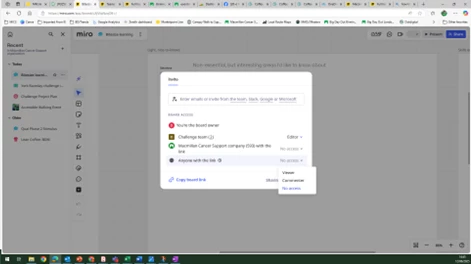
I have a full licence, granted by my employer, but when sharing boards that I’ve created I don’t have the option to assign editor rights to people inside or outside of my organisation. 

Everyone else with the same level of licence (i.e. full) as me has the ability to assign editor rights, but for some reason that option is not available to me as it doesn’t show in the drop down list. 

Can someone help? Is this is a bug? How do we fix it?

Thanks
Best answer by Robert Johnson

@Dom Moniz Thanks for sharing.

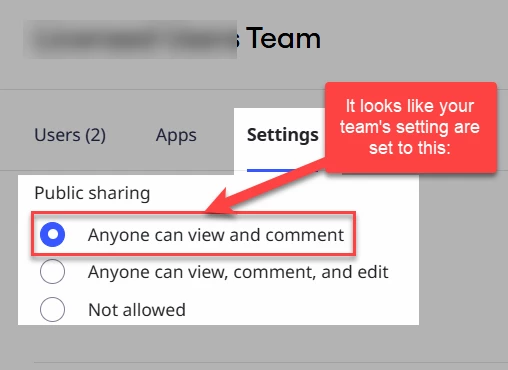
If others can enable Edit for “Anyone with the link”, i.e., Visitor/public access, your Company Admin has blocked public editing at the team level.

For example:

You’ll need to contact your Miro Company Admin.

More on these settings here:

https://help.miro.com/hc/en-us/articles/360017730133-Sharing-policy-on-Enterprise-Plan#h_01EZFP6NDB1ZKPJYB9JZVMCBKW

4 replies

Robert Johnson
Forum|alt.badge.img+13
  • Volunteer Community Moderator
  • June 12, 2025

@Dom Moniz Where exactly in the share dialogue window are you trying to do this? Can you share a screenshot?

Enterprise Sharing Policies

Your Miro Company Admin may have disabled public editing at the team level:

https://help.miro.com/hc/en-us/articles/360017730133-Sharing-policy-on-Enterprise-Plan#h_01EZFP6NDB1ZKPJYB9JZVMCBKW

Miro Support

If you don’t feel comfortable sharing screenshots of your organizations Miro settings, since you are using a paid Miro subscription, you can open a Miro support ticket by following these instructions:

https://help.miro.com/hc/en-us/articles/360020185799-How-to-contact-Miro-Support#h_01F010RXA0E1S9C0WFQYX75R6C


  • Author
  • Beginner
  • June 12, 2025

Thanks for the reply. Screenshot below


Robert Johnson
Forum|alt.badge.img+13
  • Volunteer Community Moderator
  • Answer
  • June 12, 2025

@Dom Moniz Thanks for sharing.

If others can enable Edit for “Anyone with the link”, i.e., Visitor/public access, your Company Admin has blocked public editing at the team level.

For example:

You’ll need to contact your Miro Company Admin.

More on these settings here:

https://help.miro.com/hc/en-us/articles/360017730133-Sharing-policy-on-Enterprise-Plan#h_01EZFP6NDB1ZKPJYB9JZVMCBKW


  • Author
  • Beginner
  • June 12, 2025

That looks like it could be the issue. I’ll raise that with our internal team. Thanks very much for your help, much appreciated.

Dom