Answered

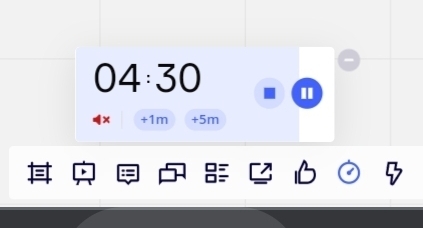
Eliminate shutting down the music in Timer

  • August 4, 2021
  • 6 replies
  • 725 views

Ravid Aloni
Forum|alt.badge.img+1

I have noticed that other members in the board can shut down the sound of the timer. How can I eliminate it?

Best answer by Robert Johnson

@Ravid Aloni - They can mute it on their board, but if you are playing the music on your board and are sharing your computer audio through Teams, they will not be able to mute the music on your board and, therefore, the sound your computer is sharing (at least there is no option that I am aware of where MS Teams meeting participants can mute the host).

Are you enabling this setting before sharing your screen?

https://support.microsoft.com/en-us/office/share-sound-from-your-computer-in-a-teams-meeting-or-live-event-dddede9f-e3d0-4330-873a-fa061a0d8e3b

6 replies

Robert Johnson
Forum|alt.badge.img+13
  • Volunteer Community Moderator
  • August 4, 2021

@Ravid Aloni - I'm not sure that you can disable the Timer shutdown/end sound. Perhaps the other users can show you how they did this?

Even if there is music selected to play with the timer, I am 99% sure that muting the music does not also mute the time end sound, but I can't test this at the moment.

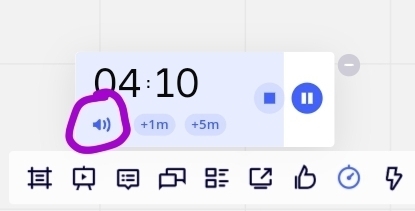
As for disabling music, I notice that the Timer Help Center does not include information on muting the timer music.

To do this, you can click on the speaker icon:


Ravid Aloni
Forum|alt.badge.img+1
  • Author
  • Contributor
  • August 4, 2021

I just want to avoid that others mute the music


Robert Johnson
Forum|alt.badge.img+13
  • Volunteer Community Moderator
  • August 4, 2021

I just want to avoid that others mute the music

@Ravid Aloni - You cannot do this. The only way around this would be to share your screen over Zoom/Teams/etc. while also sharing your computer's sound. However, they could still just mute their computer or headset if they really don't want to hear the music.


Ravid Aloni
Forum|alt.badge.img+1
  • Author
  • Contributor
  • August 4, 2021

I shared my screen via Teams including sound and they could still mute it :-(


Robert Johnson
Forum|alt.badge.img+13
  • Volunteer Community Moderator
  • Answer
  • August 4, 2021

@Ravid Aloni - They can mute it on their board, but if you are playing the music on your board and are sharing your computer audio through Teams, they will not be able to mute the music on your board and, therefore, the sound your computer is sharing (at least there is no option that I am aware of where MS Teams meeting participants can mute the host).

Are you enabling this setting before sharing your screen?
https://support.microsoft.com/en-us/office/share-sound-from-your-computer-in-a-teams-meeting-or-live-event-dddede9f-e3d0-4330-873a-fa061a0d8e3b


Ravid Aloni
Forum|alt.badge.img+1
  • Author
  • Contributor
  • August 4, 2021

OK tested it again and other participators cannot mute it.


Strange, an hour ago they did.


Anyway - solved 4 now!