Question

Creating a mindmap with depth

  • January 14, 2026
  • 2 replies
  • 13 views

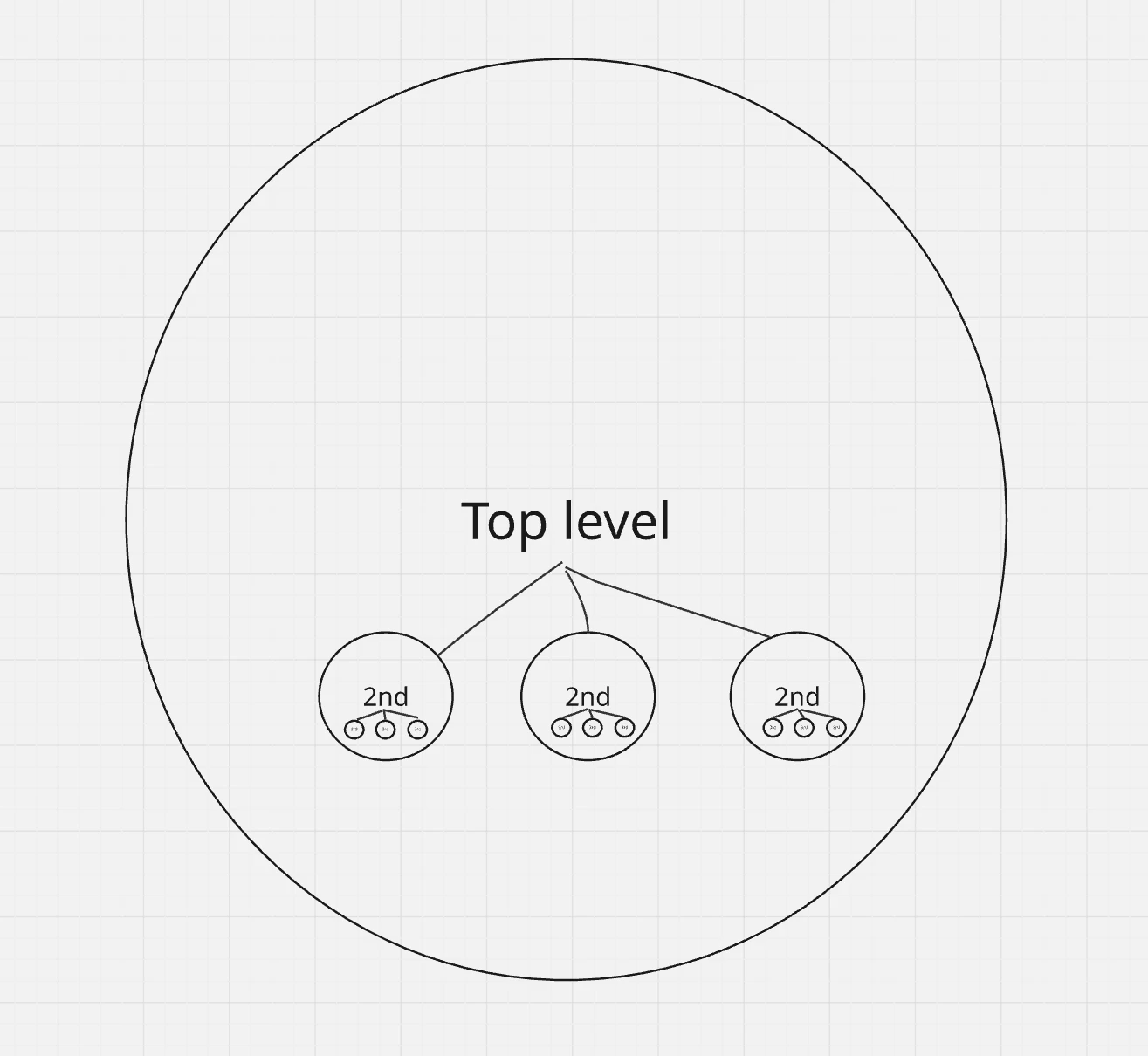
Is it possible to create a branching scenario that has depth rather than being flat, such that as you zoom in you see more detail (which is possible currently) but you can also see the branches/lines joining the bigger idea to the smaller idea and “follow the lines” to greater depth? It’s like a flat branching scenario but viewed “on its side”.

Using an education context, let’s say I have a summative assessment “Essay” at the top level, then I want branches that show how that summative assessment links to formative assessments at the next level, which has branches joining to learning activities at the next level, which has branches joining to learning resources at the bottom level.

All the levels fit visually within the top level but as I zoom in the lower levels become more visible and I can zoom along a particular path to reveal more levels. Hope that makes sense. I can’t find a visualisation of it on Google images. 

2 replies

Eca
Mironeer
Forum|alt.badge.img+2
  • Mironeer
  • January 15, 2026

Hi ​@Ken Johnson thanks for reaching out!

Here are few approaches:

  1. Mind Maps – top-level nodewith branches for assessments → activities → resources; zoom reveals more detail while keeping connections.

  2. Frames + Linked Boards – each level in a frame, connectors show relationships; zooming feels like diving deeper.

  3. Layered Flowcharts – stack levels horizontally/vertically, use grouping to collapse/expand details.

  4. Templates - you can also explore Miro’s premade templates so you can check what fits your needs


  • Author
  • New Here
  • January 18, 2026

Thanks for the reply, ​@Eca. I don’t really understand the approaches you’ve described.

I’ve tried to mock up (very badly) the sort of thing I was after (see image). The idea is that there is a Miro template that allows you to create a flowchart/branching scenario/mindmap but rather than it spreading out vertically or horizontally it gets “deeper” (i.e. the 2nd level visually fits within the label for the top level but is a smaller font size. When you zoom in you see that beneath the 2nd level there is a 3rd level. If you zoom in further there could be a 4th level, and so on). Ideally you could create links between the levels (eg. a line could join one of the 2nd levels to one of the 3rd levels). In my mind this is just a different visualisation of the existing (flowchart/branching scenario/mindmap) templates and it would be great if you could change the view from 3D to flat for printing purposes.

For now I can create it manually but it takes longer.