Constant crashes on Chrome / Windows on fairly big board

  • April 13, 2026
  • 2 replies
  • 21 views

I’m running MIRO on Chrome on Windows 11 with a fairly big board - it’s crashing constantly.  I mean every few minutes.  The desktop app is stable, but I need to run multiple MIRO sessions at once - this is very necessary, it’s extremely inconvenient to have to move around in a single board.


Any suggestions ?


I’m on a fibre to home network, so that’s not the issue.


Thanks!

2 replies

Kenneth Ritley
Forum|alt.badge.img+2

Howdy ​@Jon Ison 

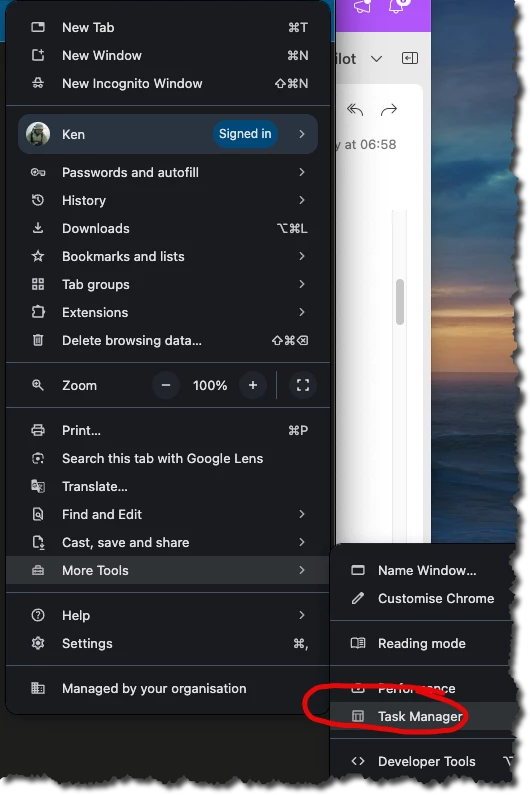
One thing you can check on Chrome is how much memory the boards are taking up:


If memory is the reason for these crashes then that gives you a starting point because (probably) your computer only has so much!

I also have huge boards, so when I teach there is no way around it - I simply cannot run certain apps at the same time or have more boards open at once than I need - awkward, but a sad reminder I should have bought more memory!

Good luck! Ken


Robert Johnson
Forum|alt.badge.img+13
  • Volunteer Community Moderator
  • April 15, 2026

@Jon Ison I was having an issue with a specific board I had used for over a month without problems. It was fairly large, though “large” can be subjective.

From my troubleshooting, I was seeing browser console errors around a “diagram”. While I didn’t have an original diagram format on that particular board, i did have a synced copy of a diagram. When I removed the synced copy, the freezing went away. I added the synced copy back, and the freezing returned… but then also stopped again. It has since been back to normal. I am thinking there was some bad code that was fixed.

Are you still experiencing the issue on your end?