Question

Confidentiality

  • July 17, 2026
  • 4 replies
  • 141 views

I work in  the mental health field. I have previously used Miro within a Project management role in the NHS, and everyone could see each other’s boards, when they were part of the same team.

Now I am using the boards with clients in mental health field, I worry that if clients share their boards with me, they can see all the boards that are shared with me, which would be extremely inappropriate.  Also if I create my own board will everyone else be able to see that board?

As I work for myself, I am only using a free plan which will remain the case. Please advise how to maintain confidentiality within the free plan. 

4 replies

Dina Sapongay
Mironeer
Forum|alt.badge.img+1

Hi ​@Mays, thanks for reaching out.

On the Free plan, boards within the same team are accessible to team members. If your clients are added as members of your team, they may be able to see other boards in that team, which likely isn't suitable for your use case.


One option is to avoid adding your clients as team members. Instead, you can share only the specific board you want them to access using a public board link. This way, they'll only have access to the board you've shared and won't be able to browse other boards in your team.


If your workflow requires your clients to be members of your team, you may want to consider upgrading to a paid plan, which provides more flexible sharing and permission controls to better support confidential collaboration.


Robert Johnson
Forum|alt.badge.img+13
  • Volunteer Community Moderator
  • July 17, 2026

@Mays 

I work in  the mental health field. I have previously used Miro within a Project management role in the NHS, and everyone could see each other’s boards, when they were part of the same team.

If you were using a Free Plan team, then yes, that will always be the case. If you were using a paid subscription, it is possible to hide boards (aka, private boards) — however, from what you are saying, the team(s) you worked on were not configured this way.


I worry that if clients share their boards with me, they can see all the boards that are shared with me

No, this would not happen — as long as each client's board lives in their own team, not yours. But here's how it can go wrong without anyone noticing: you invite a client to edit one of your boards, which makes them a full member of your Free Plan team. Later, that client creates a board to share with you — and because your team was the last one they were viewing, Miro creates their new board in your team. Now every member of your team can see that client's board, including any other client who was added the same way.

This is why I'd treat "never invite a client to a board in your own team" as a hard rule on the Free Plan — one Edit invite is all it takes.


Questions

To best advise a workflow that maintains confidentiality, I have two questions around your intended use of Miro with your clients:

  1. Do you both need to edit the board?
  2. Who will own the board (e.g., when you say “worry that if clients share their boards with me”, I take that as “your clients will create a board and share it with you”)?


Re:

One option is to avoid adding your clients as team members. Instead, you can share only the specific board you want them to access using a public board link. This way, they'll only have access to the board you've shared and won't be able to browse other boards in your team.

It’s worth noting that, with the Free Plan, the public link would only give the link recipient View or Comment access — they would not be able to edit the board. The only people who can edit a board that resides in a Free Plan team are full team members, who can also then see (and export) all boards that are in that team.


  • Author
  • New Here
  • July 21, 2026

Apologies Dina and Robert, I was away, hence the delay in replying. 

Thank you both so much for your excellent tips, and super quick replies.  I will ensure I do not make any clients into team members. 

To answer your Questions Robert: 

  1. The different clients create their own boards, they share them with me, in our meetings. It would be nice for me to be able to edit them in the meetings we have together- as they are timelines of major events and their impact, most clients have not used miro before, so I would just use it with them to show them the tools. However it sounds best and safest to only have viewing rights. 
  2. Dina and Robert, when you say public board link, do you mean the one at the top of the page in blue which says share? None of the clients would be given an invite to any of my boards. 
  3. Clients would own their own boards, but from this, it sounds important to let them know that if they use a work email address and others are in their team, they may be able to view their boards which would be disastrous for their confidentiality.
  4. I want to create boards for myself, which I would only share with another professional- by the sounds of it, I should only let them share that specific board, not make them a member of my team. Is it safer to create different email address profiles to ensure they remain separate? My boards need to be very confidential too. It sounds like any editing right privilege means someone can automatically become member of your team without your permission is that right Robert? That is quite scary- Robert thank you very much for the heads up on this, as it haas GDPR implications too- people accessing other people’s data without their consent. 
  5. Thanks again both. 

Robert Johnson
Forum|alt.badge.img+13
  • Volunteer Community Moderator
  • July 22, 2026

Apologies Dina and Robert, I was away, hence the delay in replying. 

Thank you both so much for your excellent tips, and super quick replies.  I will ensure I do not make any clients into team members. 

To answer your Questions Robert: 

  1. The different clients create their own boards, they share them with me, in our meetings. It would be nice for me to be able to edit them in the meetings we have together- as they are timelines of major events and their impact, most clients have not used miro before, so I would just use it with them to show them the tools. However it sounds best and safest to only have viewing rights. 


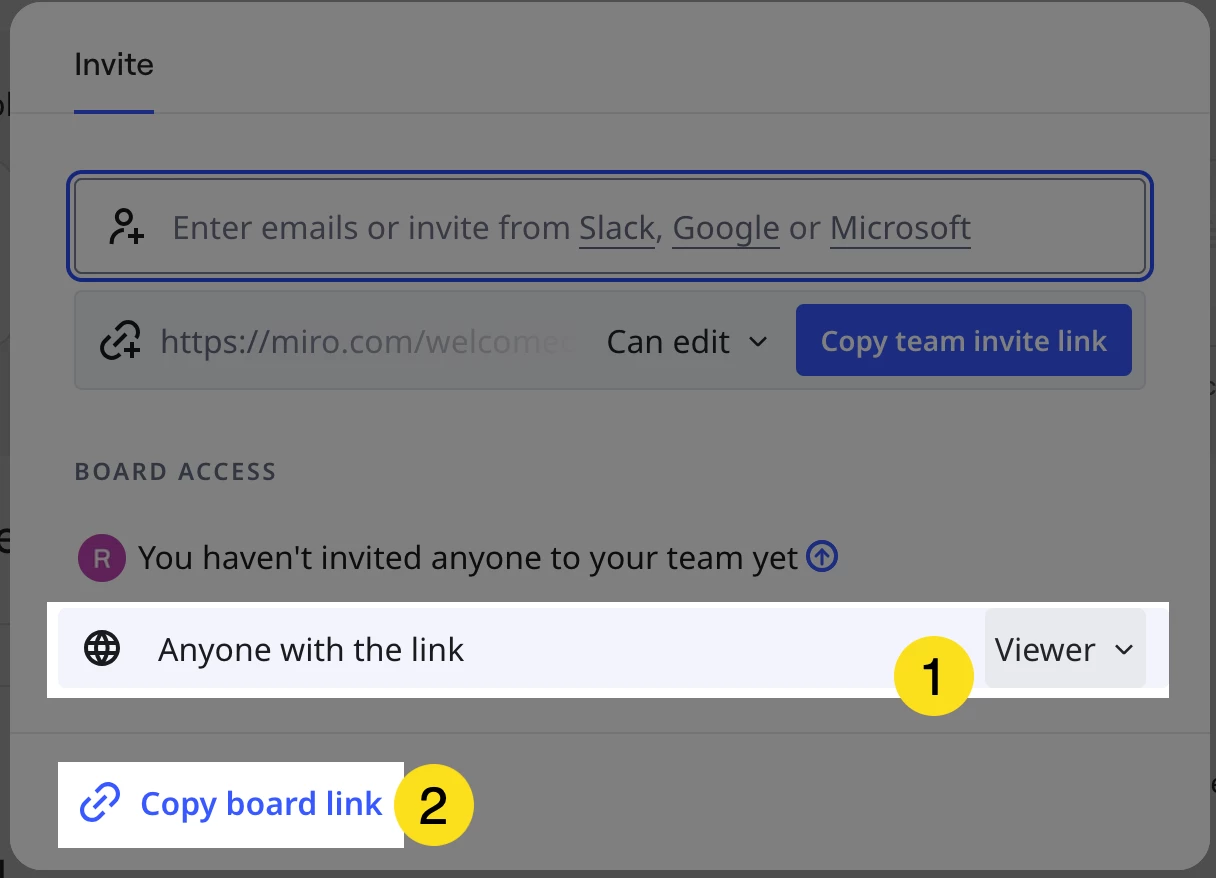
Yes — I would recommend not joining their free team (so you can edit the boards), and instead, ask them to use the public/Anyone with the link feature, which is accessed from the Share button at the top-right corner of the board, setting the Anyone with the link to Viewer:


This feature is called the Visitors feature — more on this here:

https://help.miro.com/hc/en-us/articles/360012524559-Collaboration-with-Visitors


  1. Dina and Robert, when you say public board link, do you mean the one at the top of the page in blue which says share? None of the clients would be given an invite to any of my boards. 


Yes (see above).


  1. Clients would own their own boards, but from this, it sounds important to let them know that if they use a work email address and others are in their team, they may be able to view their boards which would be disastrous for their confidentiality.


100%. If the board is for personal reasons, it would be best to:

  1. Create a free Miro account using a person email address
  2. Only ever invite anyone to edit their boards or join their team whom they are okay with seeing their boards.


  1. I want to create boards for myself, which I would only share with another professional- by the sounds of it, I should only let them share that specific board, not make them a member of my team. Is it safer to create different email address profiles to ensure they remain separate? My boards need to be very confidential too. It sounds like any editing right privilege means someone can automatically become member of your team without your permission is that right Robert? That is quite scary- Robert thank you very much for the heads up on this, as it haas GDPR implications too- people accessing other people’s data without their consent. 


it sounds like any editing right privilege means someone can automatically become member of your team without your permission is that right Robert?

Correct (for the Free Plan, this will always be the case).


That is quite scary- Robert thank you very much for the heads up on this, as it haas GDPR implications too- people accessing other people’s data without their consent.


Agreed. Miro’s free plan team is designed to both give users the option to try some of Miro’s features for free, but also to quickly grow their user base.


One more thing to note about the public/Visitors feature: On the free plan, literally anyone who gets a hold of the link can view the board (there is zero authentication required). With the Starter Plan, you could add a password to the board, and also give non-team members edit permissions.

For added security, if you had the Business Plan, you could:

  1. Required board editors to create a free Miro account and give that user profile access to the board.
  2. Create multiple team workspaces (e.g., one for each client).

More on the differences between Visitors, Guests, and Members here:

https://help.miro.com/hc/en-us/articles/7045408248594-Visitors-guests-and-members


  1. Thanks again both. 

You’re welcome!