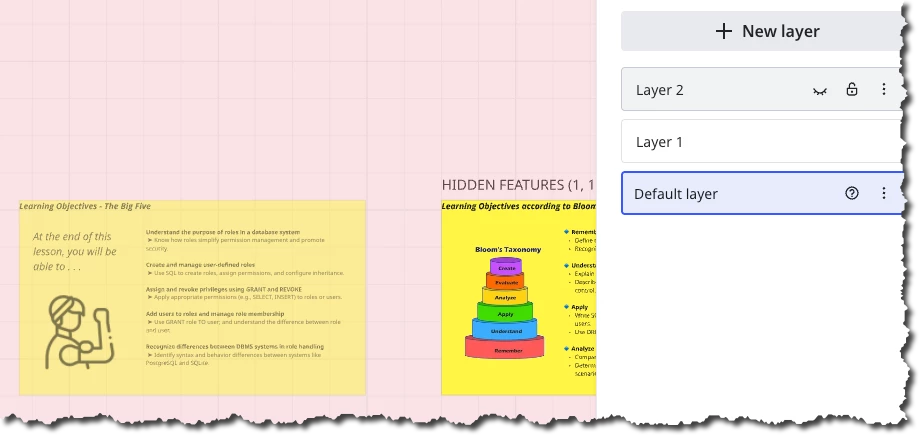
Can't see Frame within the board, only when exporting.

  • March 10, 2026
  • 2 replies
  • 13 views

I have created a board, framed up my work and then when I reopened it to keep working on it, the space is completely blank.

If I export it however to PDF, it appears. 

I have cleared cache, tried incognito mode, a different browser and all the same outcome. So it is there, i just can’t see it unless I export it.

2 replies

Kenneth Ritley
Forum|alt.badge.img+2
  • Active Contributor
  • March 10, 2026

Hi ​@SLA_Marketing 

I have a feeling this feedback won’t help, but please keep in mind that Miro has a layer concept. If for some reason you moved your content into a frame in a layer, and if that layer were set to invisible, then you would not see your content:

But if you’ve tried everything else, opening up the layer panel (accessible from the toolbar on the left, you have to search for it) might give you something additional to try.

Good luck! Ken


Eca
Mironeer
Forum|alt.badge.img+4
  • Mironeer
  • March 10, 2026

Hi ​@SLA_Marketing 


Thanks for sharing the details. Since the content appears in the PDF export but not on the board, it suggests the objects are still present but may not be rendering correctly in the board view.

A few things you can try:

  1. Zoom out fully on the board (or press Fit to screen) to check if the frames or objects are positioned far away from the visible canvas.

  2. Open the Frames panel and click on one of the frames to jump directly to its location.

  3. Check if the content might be placed in a different layer.

Since you’ve already tried clearing cache, using incognito mode, and switching browsers, this may require a deeper check from the Support team in Miro.

If the issue continues, I can help convert this case into a support ticket so the team can investigate the board rendering and help recover the visible view of your content.