
Answered

Bulk mode from bullet list

  • May 24, 2024
  • 2 replies
  • 252 views

How do I use bulk mode for postit from a bullet list or lines of text?

Best answer by Robert Johnson

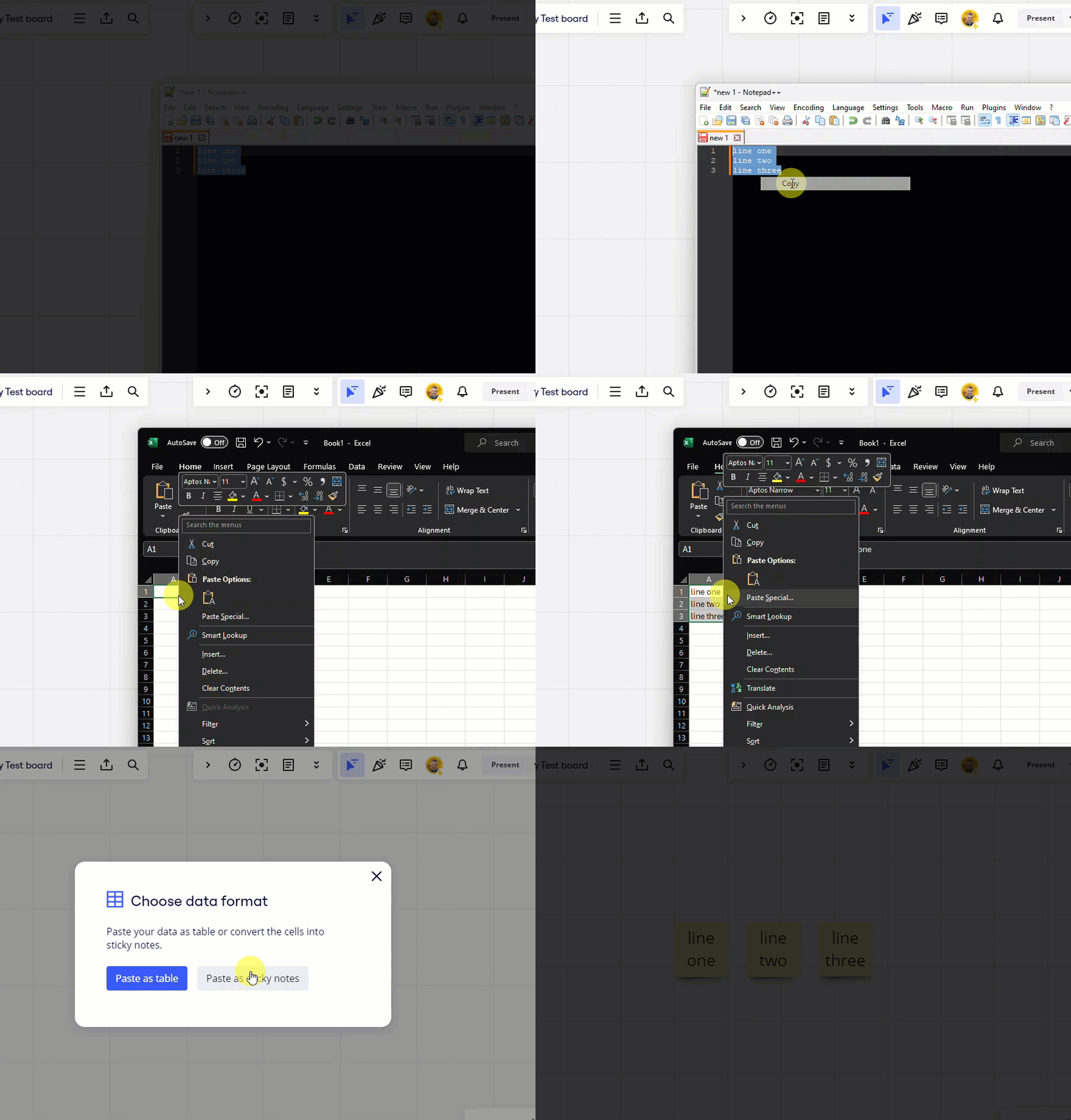
@joki - What I have done in the past, is to

  1. paste those lines of text into a spreadsheet
    1. optional is bullets appear in spreadsheet is to remove them with a find in replace, with in the spreadsheet app or first in a text editor
  2. copy the cells to my clipboard
  3. paste them onto a Miro board at which point Miro will prompt you to create either a table or sticky notes with copied spreadsheet cells.

 

2 replies

Robert Johnson
Forum|alt.badge.img+13
  • Volunteer Community Moderator
  • Answer
  • May 24, 2024

@joki - What I have done in the past, is to

  1. paste those lines of text into a spreadsheet
    1. optional is bullets appear in spreadsheet is to remove them with a find in replace, with in the spreadsheet app or first in a text editor
  2. copy the cells to my clipboard
  3. paste them onto a Miro board at which point Miro will prompt you to create either a table or sticky notes with copied spreadsheet cells.



  • Author
  • Beginner
  • May 27, 2024

Thanks! Yeah, I ended up doing exactly that