Answered

Board is empty on a different computer

  • December 17, 2025
  • 5 replies
  • 44 views

Hey all, I created a board. When I try to access it on a different computer however, it’s empty. Same thing happens when I create a copy of my board. Can anyone help me with this?


Thanks

Max

Best answer by Robert Johnson

@gruezi.max My pleasure!

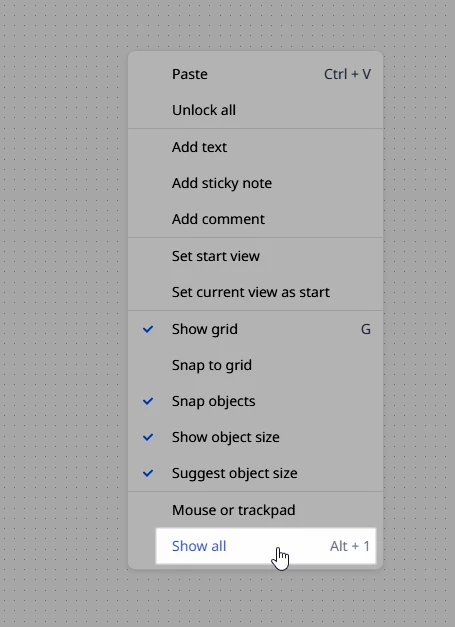
BTW, for anyone reading this, the issue was that there were two sets of objects spread very far apart on the board — some added by gruezi.max and some added by Miro (i.e., a template) at the time of board creation. The Show all was doing what it should, however, the items were so far apart that they were almost not visible. To confirm where objects were on the board, we did a Ctrl/Cmd + A to select all, and then moved one of the blocks of objects up beside the other.

Tip: locked objects will not be picked up in a Select all, so you may need to first right-click on the canvas and Unlock all.

5 replies

Robert Johnson
Forum|alt.badge.img+13
  • Volunteer Community Moderator
  • December 17, 2025

@gruezi.max What happens when you right-click on the canvas and select Show all? (Or you can use the Alt/Option + 1 shortcut).


  • Author
  • Beginner
  • December 17, 2025

@Robert Johnson Thanks for the tip! I’m afraid nothing happens, the board remains empty.


Robert Johnson
Forum|alt.badge.img+13
  • Volunteer Community Moderator
  • December 17, 2025

@gruezi.max Hmmm. Interesting. Check your private messages: https://community.miro.com/inbox/overview


  • Author
  • Beginner
  • December 17, 2025

Thank you so much for fixing this ​@Robert Johnson !


Robert Johnson
Forum|alt.badge.img+13
  • Volunteer Community Moderator
  • Answer
  • December 17, 2025

@gruezi.max My pleasure!

BTW, for anyone reading this, the issue was that there were two sets of objects spread very far apart on the board — some added by gruezi.max and some added by Miro (i.e., a template) at the time of board creation. The Show all was doing what it should, however, the items were so far apart that they were almost not visible. To confirm where objects were on the board, we did a Ctrl/Cmd + A to select all, and then moved one of the blocks of objects up beside the other.

Tip: locked objects will not be picked up in a Select all, so you may need to first right-click on the canvas and Unlock all.