Background Objects have gone invisible! I need them back

  • February 17, 2026
  • 3 replies
  • 24 views

The background objects (the squares and other objects) have went invisible. I loaded my board on Monday after having a workshop on the Friday and all the backgrounds were still there, but invisible. Is there any way to revert this / reload the board? Is there a limit on the number of objects a board can hold? Also sad because I was quite proud of how it looked 😅 


The objects were all locked as I didn’t want the users to move them while attaching sticky notes.


Any help into this issue is very appreciated, thanks in advance!

3 replies

Eca
Mironeer
Forum|alt.badge.img+2
  • Mironeer
  • February 17, 2026

HI ​@AndrewMungall 

Thanks for reaching out! These are the possible reasons and workarounds:


  1. Open the Layers panel and see if the background objects are:
  • Hidden (eye icon turned off)

  • Moved to another layer

  • Sent behind something large covering them
    Try selecting the area and using Bring to front / Send backward to test.

  1. Since you mentioned they were locked, try: Ctrl/Cmd + A → Unlock. Sometimes locked background elements can behave oddly after heavy board activity.

  2. If you're on a paid plan, check Board version and revert to a version from Friday or Monday before the issue appeared.

Hope this helps!


Robert Johnson
Forum|alt.badge.img+13
  • Volunteer Community Moderator
  • February 17, 2026

@AndrewMungall

The objects were all locked

Ctrl/Cmd + A will not select locked objects, so you may need to either:

  1. Unlock each one-by-one or
  2. Right-click the canvas and and use the Unlock all action.

As ​@Eca mentioned, they may have been moved behind an object (e.g., if they are in a frame, select the frame and then from the ellipsis from the context menu to open the overflow menu and then use the Arrange > Send to back action).


  • Author
  • New Here
  • February 18, 2026

Hi ​@Eca, thank you for your response!

I never had layers implemented, I have checked the panel and it was blank. I am not on a paid board either and cannot revert 😓.


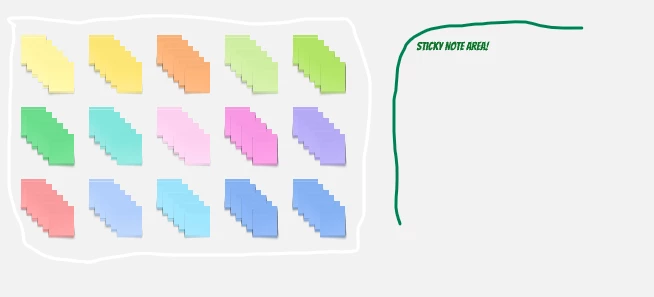
@Robert Johnson thank you for your reply as well. As you both mentioned the locked objects, I have unlocked all now. I imagine I may have to give it some time as I can’t manually reload the board. I have attached a picture below:


The sticky notes should have the white square behind it. The green text is included in the light green box that should be behind it as well (which would mean it is not a layering issue or the text would not be visible either). 

I wondered I maybe had too many objects on the board.

Thanks for the suggestions!