How do you resize the table columns? When I go to edit the table, it gets super small and I can’t see how to change the column size.

Answered
Resize table columns?
Best answer by Kiron Bondale
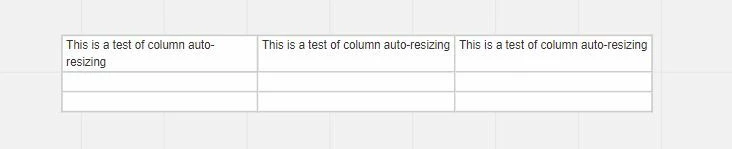
Once you have finished editing a cell where you had typed in more text than the width of the cell, it will auto-resize to fit most of the text and wrap the rest. There does not appear to be any way to manually re-size the column width however.
What I find odd is the auto-resizing is not consistent for all columns. I entered the same text into three adjacent cells - two resized to fit the full text and the first column wrapped it 
I find the table widget to be pretty restrictive as only one person can edit cells at a time (i.e. the “locking” granularity is the full table). Since there isn’t any Excel-like behavior on the table widget, I have found that using a frame with dividing lines and multiple text boxes is a more collaborative means of completing a table as each text box can be independently edited.
Kiron


Enter your E-mail address. We'll send you an e-mail with instructions to reset your password.