[POSSIBLY RESOLVED] My toolbar has completely changed - cannot reorder or unpin

  • January 19, 2026
  • 19 replies
  • 156 views

Forum|alt.badge.img

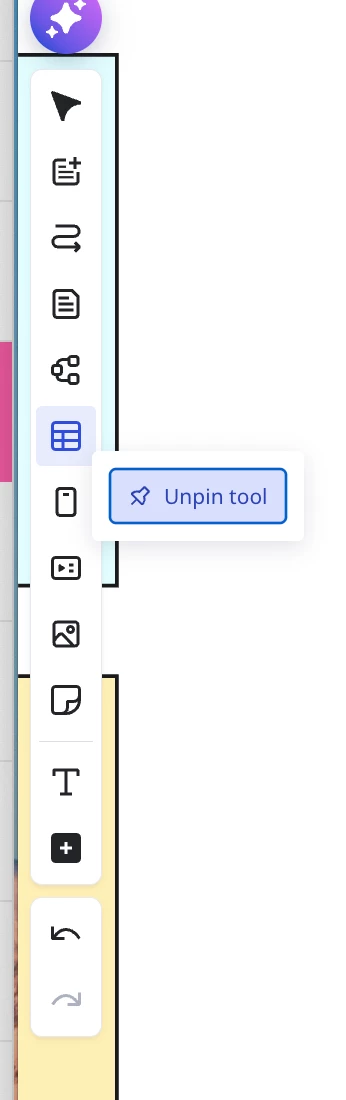
Hi guys, what’s going on with the toolbar? First of all, it’s completely rearranged - all the tools that were pinned for convenience are now hidden. On top of that, I just can’t unpin this useless stuff from the toolbar. I tried reloading the app and pinning other buttons from the hidden section, but they just don’t appear. Can you do anything about it? I never use or need docs flows etc there



January 19, 2026

As ​@martamyyyyzak pointed out, the issue may have been resolved.

I am able to do the following again:

  1. Reorder items
  2. Unpin items.

However, your user-level preferences may have been lost in the shuffle. I will leave this post labelled as “POSSIBLE RESOLVED” until I hear back from the support team.


Lost Your Toolbar Order? Here’s a Smarter Way to Rebuild It (1–9 + Shortcuts)

I’ll take this opportunity to share a post and accompanying video on my creation bar customization strategy that could help you move faster in Miro.

https://community.miro.com/inspiration-and-connection-67/video-moving-fast-in-miro-25846

19 replies

Forum|alt.badge.img
  • New Here
  • January 19, 2026

I have the same issue and, frankly, I’m mad. I also can’t unpin all this useless stuff and add the tools I’m used to.


Forum|alt.badge.img+1
  • Beginner
  • January 19, 2026

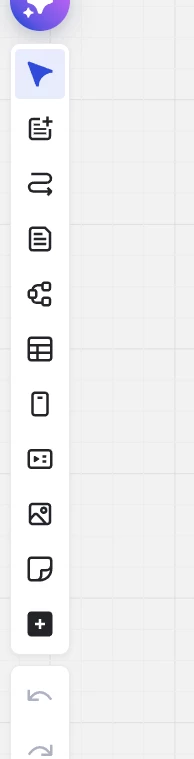
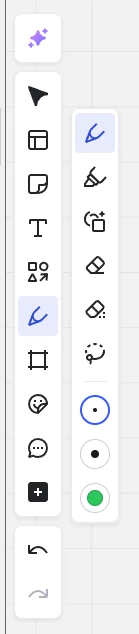
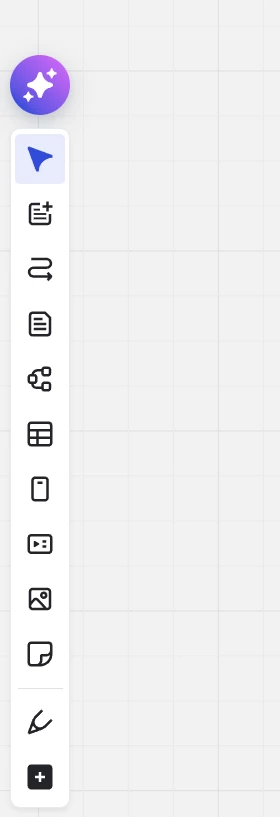
It looks like there has been some sort of change in toolbar, which now includes a long list of things I will never use, but the useful pen, shape, highlighter, text etc icons are gone (and can only be found in more tools). The worst part is that none of them can be pinned/ unpinned, which is a huge issue when trying to navigate the board efficiently but all of my tools are gone! Can Miro please fix this if this is a bug, return to the previous design or at least allow me to pin and unpin what I need there? Has anybody found a solution to this? Thank you!

Old layout:

New layout:


Forum|alt.badge.img+1
  • Beginner
  • January 19, 2026

It looks like there has been some sort of change in toolbar, which now includes a long list of things I will never use, but the useful pen, shape, highlighter, text etc icons are gone (and can only be found in more tools). The worst part is that none of them can be pinned/ unpinned, which is a huge issue when trying to navigate the board efficiently but all of my tools are gone! Can Miro please fix this if this is a bug, return to the previous design or at least allow me to pin and unpin what I need there? Has anybody found a solution to this? Thank you!

Old layout:

New layout:


Forum|alt.badge.img+2
  • Experienced Community Member
  • January 19, 2026

Today I unfortunately have a lot of options in the left menu that I do not need. And they don’t disappear if I click “unpin tool”. But the pen is missing.

Was this changed just 2 minutes ago?


lofmakey
Forum|alt.badge.img
  • New Here
  • January 19, 2026

All of my previously pinned tools have been unpinned from the toolbar. I can't pin them again or unpin the ones that appeared on their own, even though I had never used them. How can I fix this?


Robert Johnson
Forum|alt.badge.img+13
  • Volunteer Community Moderator
  • January 19, 2026

Moderator note: We are combining posts about this issue and will advise further shortly.


Forum|alt.badge.img
  • Beginner
  • January 19, 2026

The toolbar has changed today, how can I get it back to how it was before?

The first screenshot shows how it was, the second shows how it is now.


Robert Johnson
Forum|alt.badge.img+13
  • Volunteer Community Moderator
  • January 19, 2026

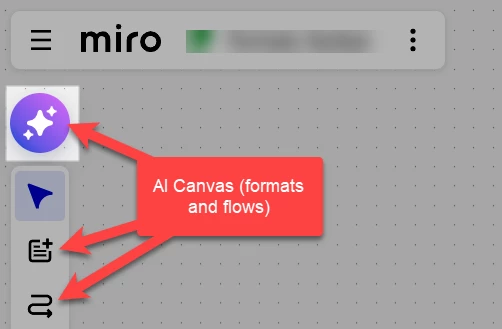
From what I can tell, the issue appears to be limited to AI Canvas users (i.e., with Flows and Sidekicks enabled) - anyone with the round AI action:


I have flagged this with the Miro Community Team who will provide an update shortly.

Contacting Miro Support

If you are using a paid Miro subscription, you can open a Miro support ticket by following these instructions:

https://help.miro.com/hc/en-us/articles/360020185799-How-to-contact-Miro-Support#h_01F010RXA0E1S9C0WFQYX75R6C


Accessing Tools (e.g., pen, shapes)

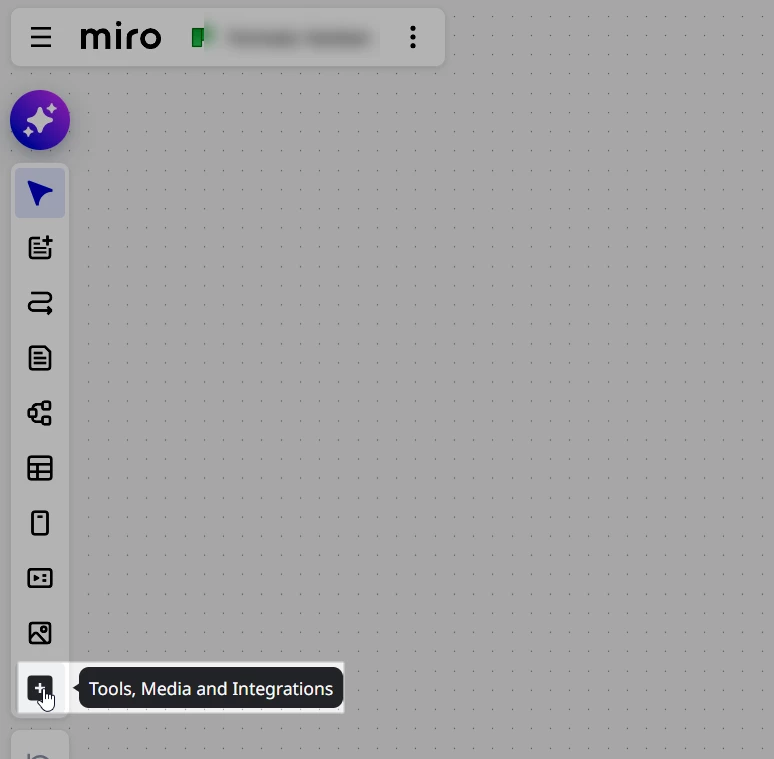
Here are a few ways:


Tools, Media, and Integrations:


Shortcuts:

https://help.miro.com/hc/en-us/articles/360017731033-Shortcuts-and-hotkeys


Command palette (Ctrl/Cmd + K):

https://help.miro.com/hc/en-us/articles/10389262146706-Command-palette


Forum|alt.badge.img+2
  • Experienced Community Member
  • January 19, 2026

From what I can tell, the issue appears to be limited to AI Canvas users (i.e., with Flows and Sidekicks enabled) - anyone with the round AI action:


Is it possible to disable “AI Canvas” (in existing boards)?


Forum|alt.badge.img
  • New Here
  • January 19, 2026

My toolbar is rearranged and I cannot pin or unpin anything. 


Robert Johnson
Forum|alt.badge.img+13
  • Volunteer Community Moderator
  • January 19, 2026

From what I can tell, the issue appears to be limited to AI Canvas users (i.e., with Flows and Sidekicks enabled) - anyone with the round AI action:


Is it possible to disable “AI Canvas” (in existing boards)?

@OleZ I cannot find any way to do this — presumably there is no front-end UI to disabled it due to it still being a free add-on until Feb 16, 2026.


Forum|alt.badge.img
  • New Here
  • January 19, 2026

My toolbar is rearranged and I cannot pin or unpin anything. 

I also have this new toolbar set up, and I cannot pin or unpin anything. I did not turn on this AI mode, I do not want it, I never chose it. How do I turn it off?! 

Miro needs to fix this now, as it has essentially become non functional for me and I use it constantly for school 


Forum|alt.badge.img

Same thing. We don’t need AI in everything.


Forum|alt.badge.img+1

Hi dear Miro support team

I really enjoy your platform, but I am very upset with the latest update. the tool bar is now changed and it is very hard to work with. I got the tools that I absolutely do not need and I cannot unpin them (I click the button “unpin” but nothing changes. And worse, I cannot pin the tools I need. I makes the work much more inconvenient. Please fix it, or help to change it

thank you


Forum|alt.badge.img+1

same it’s just awful its so awfully inconvenient to work with the board


Robert Johnson
Forum|alt.badge.img+13
  • Volunteer Community Moderator
  • January 19, 2026

same it’s just awful its so awfully inconvenient to work with the board

@martamyyyyzak Agreed!

What’s particularly frustrating is that this completely breaks my Miro workflow where I have very thoughtfully and intentionally organized my creation bar to support my working as fast as possible while on the canvas — I even created a video to highlight my strategy.

For those who didn’t know, the number keys activate the first nine spots in the creation bar. And, even though Miro added a few more actions (that cannot be unpinned, regardless of this bug) that are Canvas AI specific, these new actions are not activated using the number keys, which is great because it didn’t break my workflow.

Here’s the part of the video where I demo my strategy for customizing the creation bar and using the number keys as custom shortcuts:

  • 5:33 Part 3: Customizing the Creation Bar


And here’s a link to the full post on this forum:

https://community.miro.com/inspiration-and-connection-67/video-moving-fast-in-miro-25846

Once this bug is resolved, you may even want to consider customizing your creation bar using the tips in my video.


Forum|alt.badge.img+1

yaaay! it has resolved)) thank you guys


Robert Johnson
Forum|alt.badge.img+13
  • Volunteer Community Moderator
  • January 19, 2026

As ​@martamyyyyzak pointed out, the issue may have been resolved.

I am able to do the following again:

  1. Reorder items
  2. Unpin items.

However, your user-level preferences may have been lost in the shuffle. I will leave this post labelled as “POSSIBLE RESOLVED” until I hear back from the support team.


Lost Your Toolbar Order? Here’s a Smarter Way to Rebuild It (1–9 + Shortcuts)

I’ll take this opportunity to share a post and accompanying video on my creation bar customization strategy that could help you move faster in Miro.

https://community.miro.com/inspiration-and-connection-67/video-moving-fast-in-miro-25846


same problem here, the tool bar is now filled with usless AI garbage I can’t unpin. With the direction Miro is going with all this AI slop I’m thinking it’s time to start looking for a new platform for my team