Answered

I sent a guest link but the person was converted into a Member

  • February 18, 2026
  • 6 replies
  • 12 views

I used the Copy Board Link, as recommended by Miro to send out my board to ‘guests’ for an upcoming session. A day later, one of the guests who received the link showed as a Member in my Admin Portal. How did that happen? and how can I avoid that in the future. I have the Business plan.

 

Best answer by Robert Johnson

@ahgiardello 

Ok thanks! So, in case I don’t hear back from the support team in time, what is the best method to just invite them as one-time collaborators? Which link and what settings should I use?

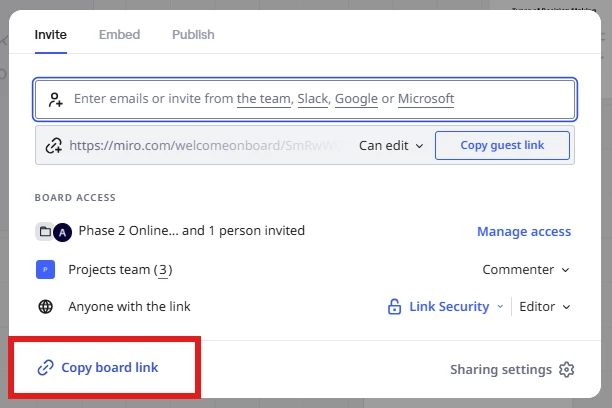
If all users need the same access (e.g., they need to edit the board), and if you don’t want them to have to require a Miro account, then the Visitors access (i.e., Anyone with the link) is the way to go:


And, to be absolutely certain that you are sending the correct link (e.g., Visitor link vs. “Copy guest link”), you would just open the board and copy the link from the browser’s address bar.

Tools available to Visitors

It’s important to note that, not all tools will be available to Visitors (e.g., basic tools such as shapes, lines, text, sticky notes, and use the pen tool are, while other tools are not). For basic workshop experiences, these should be enough — more on this here:

https://help.miro.com/hc/en-us/articles/360012524559-Collaboration-with-Visitors#01H8KKTECGTY9YS43JZRFX48QP

I would suggest that you test the experience before hand. You would either do it with another human, or replicate the experience yourself by opening the board in an incognito browser window (simulating not being signed into any Miro account).

6 replies

Robert Johnson
Forum|alt.badge.img+13
  • Volunteer Community Moderator
  • February 19, 2026

@ahgiardello 

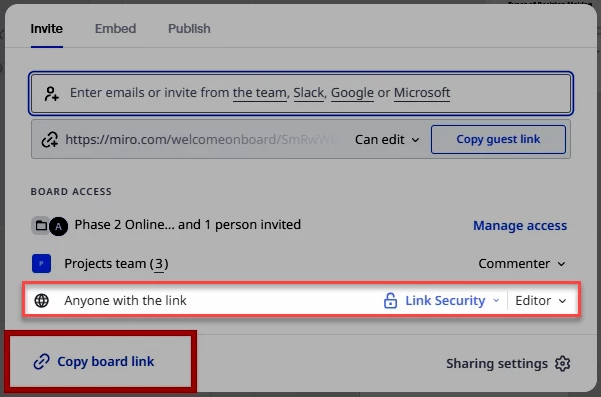
I used the Copy Board Link, as recommended by Miro to send out my board to ‘guests’ for an upcoming session.

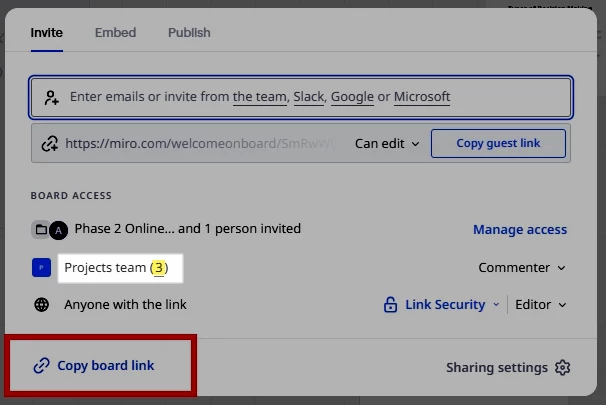
Using From your screenshot, you have the Anyone with the link setting set to Editor — people accessing your board using just the link while you have the Anyone with the link enabled are called Visitors, which are different than Guests. More on the differences here → https://help.miro.com/hc/en-us/articles/7045408248594-Visitors-guests-and-members

That said, there are a few explanations as to why the user was converted to a fully licensed team member. For example, the visitor clicked on a “request to join team” link while on the board and another member of the team added them — I see there are at least two other members of your team:


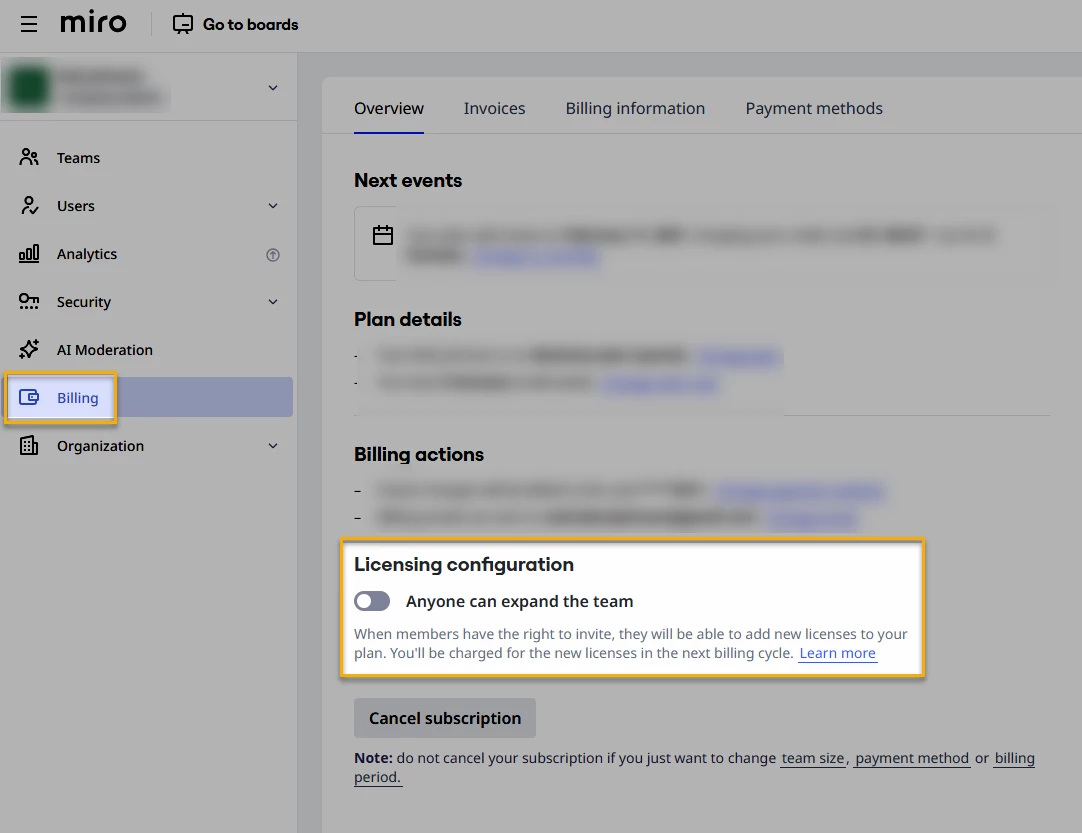
The other prerequisite here would be that your Business Plan is configured to allow other team members to expand the team as per this setting under Biling:


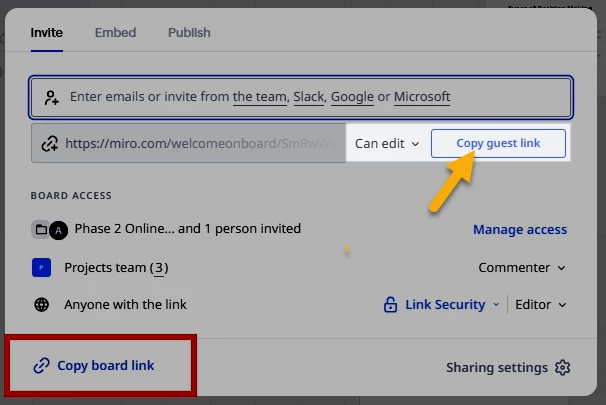
Or perhaps you accidentally used the Copy guest link button instead - what I immediately thought you had used given the title of your post, which would have resulted in the user appearing in your admin console (but under the Guests tab vs. Members tab), so this is less likely:


The link/URL from this button would look something like this:

https://miro.com/welcomeonboard/VG###############4b25velBrU1dFems0TDlEbndyb0oxc0VIeThzeXZKMjVGMFRDeURRbnFoM0dsTkZaYWtYTjQvMzhKN3lOVkVpbUVsQ0llWkFtbW9#######################################k5IS3hSMWZNakdSWkpBejJWRjJhRnhhb1UwcS9BPT0hdjE=?share_link_id=115846372588


Getting to the bottom of this with the help of Miro Support

For an official answer as to how the user came to be a fully licensed member of your team, you should contact the Miro Support team. Since you are using a paid Miro subscription, you can open a Miro support ticket by following these instructions:

https://help.miro.com/hc/en-us/articles/360020185799-How-to-contact-Miro-Support#h_01F010RXA0E1S9C0WFQYX75R6C


  • Author
  • Beginner
  • February 19, 2026

Thanks Robert - I definitely used the Copy board link (I’ve been prepping for this session for a while so I double checked all my settings). I did have that Licensing configuration turned on, so thank you for that - but this particular user wouldn’t have received a member link from anyone else. Are you saying he would’ve had to receive a member link from someone else, or does that toggle give him the option to convert himself into a user?

I also appreciate the Miro support link - I wasn’t sure how to find the link myself (before a Miro rep sent me a link) so now I know! I have also submitted this question there, too, since my session is tomorrow and I need to figure this out.

Appreciate the help.


Robert Johnson
Forum|alt.badge.img+13
  • Volunteer Community Moderator
  • February 19, 2026

@ahgiardello 


Are you saying he would’ve had to receive a member link from someone else, or does that toggle give him the option to convert himself into a user?

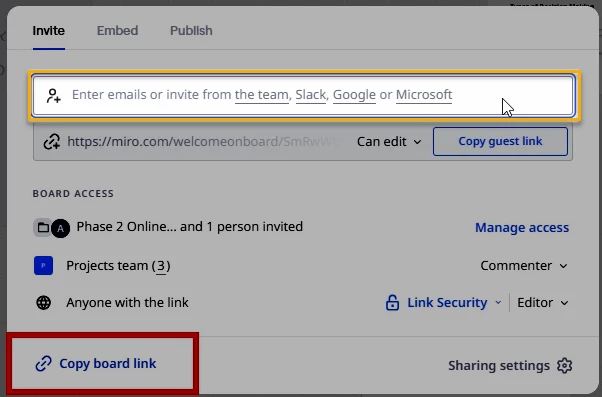
That toggle would have allowed any of your team members to invite people as fully-licensed members to your Business Plan. So, in theory, someone could have entered that user’s email address into this box and made them a full member:


The support team should be able to confirm exactly how the user was made a full team member, or least who took the action.


  • Author
  • Beginner
  • February 19, 2026

Ok thanks! So, in case I don’t hear back from the support team in time, what is the best method to just invite them as one-time collaborators? Which link and what settings should I use?


Robert Johnson
Forum|alt.badge.img+13
  • Volunteer Community Moderator
  • Answer
  • February 19, 2026

@ahgiardello 

Ok thanks! So, in case I don’t hear back from the support team in time, what is the best method to just invite them as one-time collaborators? Which link and what settings should I use?

If all users need the same access (e.g., they need to edit the board), and if you don’t want them to have to require a Miro account, then the Visitors access (i.e., Anyone with the link) is the way to go:


And, to be absolutely certain that you are sending the correct link (e.g., Visitor link vs. “Copy guest link”), you would just open the board and copy the link from the browser’s address bar.

Tools available to Visitors

It’s important to note that, not all tools will be available to Visitors (e.g., basic tools such as shapes, lines, text, sticky notes, and use the pen tool are, while other tools are not). For basic workshop experiences, these should be enough — more on this here:

https://help.miro.com/hc/en-us/articles/360012524559-Collaboration-with-Visitors#01H8KKTECGTY9YS43JZRFX48QP

I would suggest that you test the experience before hand. You would either do it with another human, or replicate the experience yourself by opening the board in an incognito browser window (simulating not being signed into any Miro account).


  • Author
  • Beginner
  • February 19, 2026

Thank you! That’s exactly what I did :) I even tested with several users several times to confirm.

Glad to know at least I was on the right path.. I’ll do it again before my call to confirm everyone has the right link. Appreciate your help!