Question

Cannot edit countdown timer


Hi,

since today I can no longer edit the countdown timer on my Miro boards. Instead of the usual clock I get this image:
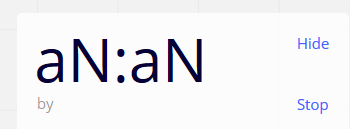
I cannot edit these. Has anybody had this problem before?


Thank you!

6 replies

I and another member of my team have the same issue.
Tested in Firefox and Safari on Mac.
(Also: The voting feature is broken for us as well)


Tested now Chrome as well. Everything is working, but now it seems to be working in other browsers again, too.


Marina
Mironeer
Forum|alt.badge.img+5
  • Mironeer
  • April 23, 2020

Hi @Manu Fritzl and @Christoph,

This issue with the timer has just been fixed. Can you check it on your side?

If the issue persists, I’d recommend reaching out to the Support team at support@miro.com.


Also, @Christoph, can you please describe the case with voting to the Support team (support@miro.com) in more detail?


Awesome, it works now! Thank you so much @Marina 


@Marina As I wrote in my second message, seems to be working again for me.

Regarding the now also fixed voting: Basically every voting would show up as already finished, even if it was just started and still in progress. This left 2 out of 5 participants unable to vote.
We did manually vote with adding marker icons to each item we wanted to vote on as a quick workaround.


gregoire
  • Beginner
  • October 23, 2020

Hello, I can’t edit the timer on my macbook.

For accessing numbers I have to use shift + numbers on the top row of my keyboard, but when I try to do it nothing happen, and when I click without shift it just put “0”.

MacBook Pro 2020, macOS Catalina 10.15.7

Chrome 86.0.4240.80

And I’ve got a french keyboard (AZERTY)