
Answered

Archive Teams with related boards

  • March 23, 2021
  • 2 replies
  • 668 views

Hi guys,

Your suggestions please. I’m on a Consultant plan and I create new Teams whenever I work with a new client. For that group I create team and for that ‘team’ I create (usually 2, sometimes 3) boards. 

Now, after a while, I have a huge list of teams in the left hand column, many of which I will rarely ever visit again, if only to copy some stuff I can re-use for another session with another team. And of course to keep a record of what I’ve done with them.

This is why I would like to archive the teams (with the related boards). I do NOT want to delete ‘cause I want to keep the option open to re-use stuff I developed for a certain team and if, some years later, I ever work with them again (which happened very often over the years) I don’t care to look smart :-) having all the info from last time available.

But I also only want my ‘active’ clients in the left hand bar!

How could I solve or work-around this issue?

Many thanks in advance!

A very happy and satisfied ambassador forMiro,

Luud
Best answer by Robert Johnson

@Luud Berings - A few options:

  1. Board backup - If you don’t need immediate access to the boards, you could download a backup of the board, delete the teams and boards, and restore a board when it when needed. - this would be a very clean option.
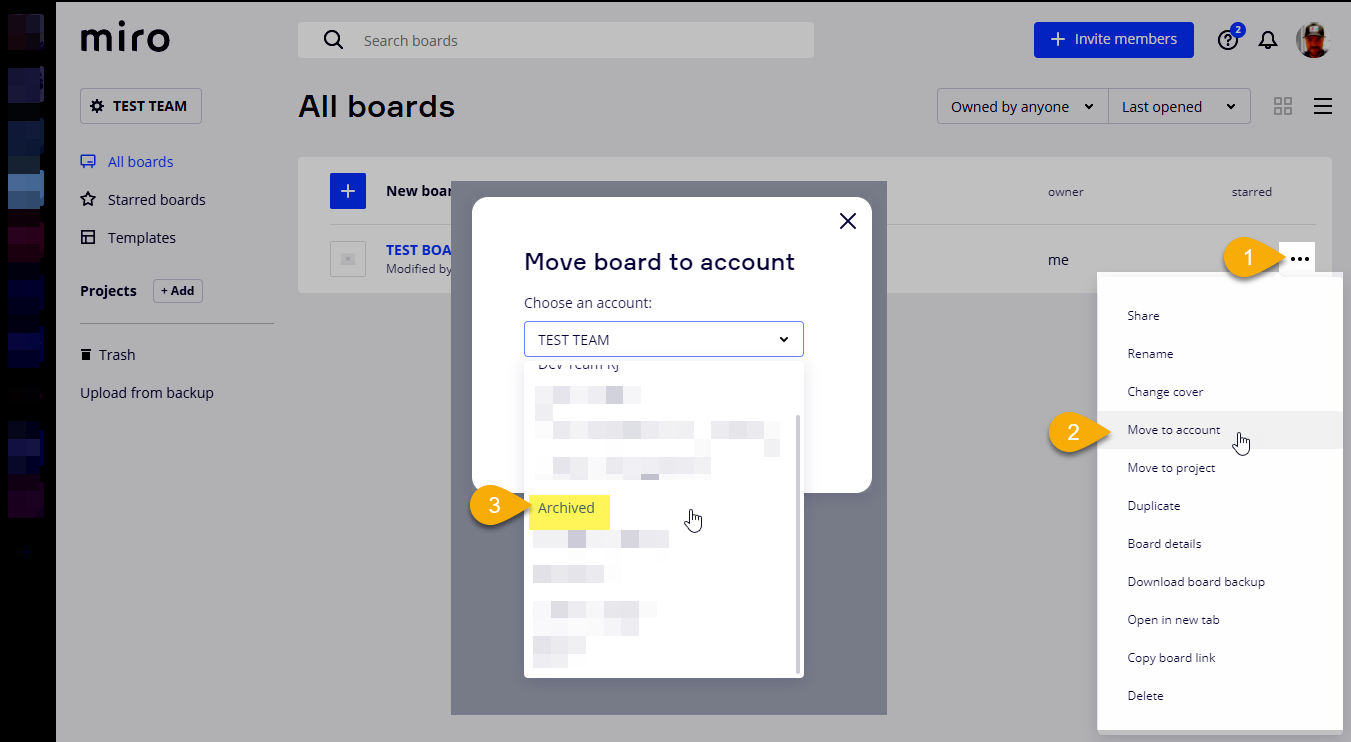
  2. Create an “Archived” team - Create a team called Archived and move the boards there. Inside of the Archived team, you could use Projects to organize boards by client.


This topic has been closed for replies.

2 replies

Robert Johnson
Forum|alt.badge.img+13
  • Volunteer Community Moderator
  • Answer
  • March 23, 2021

@Luud Berings - A few options:

  1. Board backup - If you don’t need immediate access to the boards, you could download a backup of the board, delete the teams and boards, and restore a board when it when needed. - this would be a very clean option.
  2. Create an “Archived” team - Create a team called Archived and move the boards there. Inside of the Archived team, you could use Projects to organize boards by client.


  • Author
  • New Here
  • March 24, 2021

Hi Robert,

Thank you so much for your answer. I used the 2nd option (create an Archive Team) and created projects within that team. Works great. Thanks again!

This is such a wonderful application!!

Luud

